What is a USB Microphone and How Does It Work in 2026
Bad audio can ruin a great video, podcast, or online meeting within seconds. That is why more people now choose USB microphones for clear and simple recording at home. But many beginners still ask, “What is a USB microphone?” and why is it so popular today?
A USB microphone is easy to set up because you can connect it directly to your computer without extra audio gear. Gamers, streamers, students, teachers, podcasters, and singers all use it for better sound quality and quick recording.
In this guide, you will learn how USB microphones work, their main features, benefits, drawbacks, setup tips, and how to choose the right one for your needs.
USB Microphone Definition
A USB microphone is a microphone that connects directly to a computer, laptop, tablet, or some smartphones through a USB cable. It records your voice and changes sound into digital audio that your device can understand. Many people use USB microphones because they are simple, fast, and beginner-friendly.
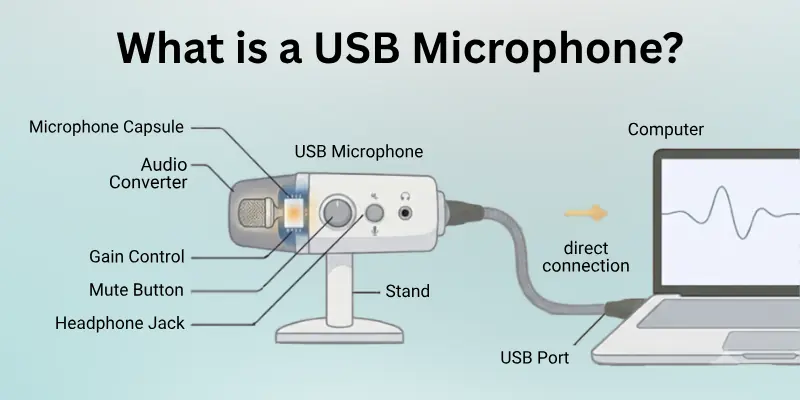
A USB microphone connects directly to a computer because it has a built-in audio converter and sound processor inside the microphone itself. This removes the need for extra devices like mixers or audio interfaces. You only need to plug it into a USB port, and it is usually ready to use within seconds.
Normal microphones often use XLR cables and need extra audio equipment to work properly. They are common in professional music studios and advanced recording setups. USB microphones, on the other hand, are designed for easy home and office use.
They offer a simple setup, lower cost, and quick recording for beginners, gamers, streamers, podcasters, and online workers.
Main Parts of a USB Microphone
A USB microphone has several important parts that help capture and record clear sound. Each part has a different job, but all of them work together to improve audio quality.
- Microphone Capsule: The microphone capsule is the main part that captures your voice or sound. It changes sound waves into audio signals. The quality of the capsule greatly affects how clear and natural your recordings sound.
- USB Port: The USB port allows the microphone to connect directly to a computer or other device. It sends both power and audio through one cable, which makes setup quick and simple.
- Built-In Audio Converter: A USB microphone includes a built-in audio converter called an analog-to-digital converter. This part changes your voice into digital audio that a computer can process and record.
- Headphone Jack: Many USB microphones have a headphone jack for real-time audio monitoring. This lets you hear your voice while recording without delay.
- Gain Control Knob: The gain control knob adjusts how sensitive the microphone is to sound. Increasing the gain makes the microphone capture quieter sounds, while lowering it helps reduce background noise.
- Mute Button: Some USB microphones include a mute button that quickly turns the microphone off during meetings, streaming, or recording sessions.
- Microphone Stand or Mount: The stand or mount keeps the microphone stable while you record. It also helps reduce unwanted vibrations and desk noise.
How Does a USB Microphone Work?
A USB microphone works by capturing your voice and turning it into digital audio that a computer can understand. It handles most of the audio processing inside the microphone itself, which makes recording simple for beginners.
Here is how the process works step by step:
- The microphone capsule captures sound waves from your voice.
- The microphone changes those sound waves into audio signals.
- The built-in analog-to-digital converter turns the audio signals into digital data.
- The USB cable sends the digital audio directly to your computer or laptop.
- Your recording software receives the sound and saves it as an audio file.
Why USB Microphones Are Easy to Use
USB microphones are popular because they are plug-and-play devices. In most cases, you only need to:
- Connect the microphone to a USB port
- Select the microphone in your sound settings
- Open your recording or meeting app
- Start recording immediately
You do not need mixers, audio interfaces, or complex sound equipment. This simple setup makes USB microphones a great choice for beginners, gamers, streamers, podcasters, students, and remote workers.
Types of USB Microphones
USB microphones come in different types for different recording needs. Some work better for vocals, while others are better for gaming, streaming, or recording in noisy places.
1. Condenser USB Microphone
A condenser USB microphone is very sensitive and captures detailed sound. It is one of the most popular choices for content creators and home recording.
Best For
- Podcasting
- Voiceovers
- Singing
- YouTube videos
- Streaming
Advantages
- Clear and detailed sound
- Good for indoor recording
- Captures soft voices well
Disadvantages
- Picks up background noise easily
- Works best in quiet rooms
2. Dynamic USB Microphone
A dynamic USB microphone is less sensitive and focuses more on the voice directly in front of it. It works well in noisy environments.
Best For
- Gaming
- Live streaming
- Online meetings
- Recording in noisy rooms
Advantages
- Reduces background noise
- Strong and durable
- Good for loud sound sources
Disadvantages
- Less detailed sound than condenser microphones
- May need a closer speaking distance

3. Ribbon USB Microphone
Ribbon USB microphones are less common but can produce a smooth and warm sound. Some creators use them for music and studio-style recording.
Best For
- Music recording
- Soft vocals
- Studio use
Advantages
- Natural and warm sound
- Smooth audio quality
Disadvantages
- More delicate than other microphones
- Usually more expensive
USB Microphone Polar Patterns
USB microphone polar patterns explain how a microphone captures sound from different directions. Some microphones focus only on the sound in front of them, while others record sound from every side. Choosing the correct polar pattern is important because it affects sound quality, background noise, and recording performance.
If you use the wrong polar pattern, your microphone may pick up keyboard sounds, room echo, fans, or other unwanted noise. That is why understanding polar patterns can help you get cleaner and more professional audio.
1. Cardioid Polar Pattern
The cardioid polar pattern captures sound mainly from the front of the microphone. It blocks most sounds coming from the sides and back. This is the most common polar pattern found in USB microphones.
Many gamers, streamers, podcasters, and YouTubers prefer cardioid microphones because they focus clearly on one speaker.
Best For
- Podcast recording
- Gaming
- Live streaming
- Voiceovers
- Online classes
- Video calls
Advantages
- Reduces background noise
- Focuses clearly on your voice
- Works well in small rooms
- Easy for beginners to use
Disadvantages
- Does not capture multiple people well
- Voice quality drops if you move too far away
2. Omnidirectional Polar Pattern
The omnidirectional polar pattern captures sound equally from all directions around the microphone. It does not focus on one single sound source.
This pattern works well when several people are speaking in the same room.
Best For
- Group meetings
- Conference calls
- Team discussions
- Roundtable podcasts
- Room recording
Advantages
- Records multiple voices clearly
- No need to sit directly in front of the microphone
- Good for open room conversations
Disadvantages
- Picks up background noise easily
- Captures room echo and nearby sounds
3. Bidirectional Polar Pattern
The bidirectional polar pattern captures sound from the front and back of the microphone while reducing noise from the sides. It is also called a figure-8 pattern because of its pickup shape.
This pattern is useful when two people sit across from each other during recording.
Best For
- Two-person interviews
- Face-to-face podcasts
- Conversation recordings
Advantages
- Captures two speakers clearly
- Reduces side noise
- Creates balanced interview audio
Disadvantages
- Picks up sound behind the microphone
- Not ideal for noisy environments
4. Stereo Polar Pattern
The stereo polar pattern records sound from multiple directions to create a wider and more natural listening experience. It helps make audio feel more realistic and immersive.
Some USB microphones use stereo mode for music recording and creative content.
Best For
- Music recording
- ASMR videos
- Live instrument recording
- Nature sounds
- YouTube content
Advantages
- Produces rich and detailed audio
- Creates realistic sound depth
- Great for immersive recordings
Disadvantages
- May capture extra room noise
- Not always ideal for voice-only recording
Which Polar Pattern Is Best for Beginners?
For most beginners, the cardioid polar pattern is the best choice. It focuses on your voice and reduces unwanted background noise. This makes it perfect for gaming, streaming, podcasting, online meetings, and YouTube videos.
If you plan to record group discussions or interviews, omnidirectional or bidirectional microphones may work better for your setup.
Advantages of a USB Microphone
Computer USB microphones have become very popular because they are simple, affordable, and easy to use. Many beginners and content creators choose them for recording, gaming, streaming, online meetings, and podcasting:
- Easy Setup: You can connect a USB microphone directly to your computer without using extra audio equipment. Most microphones start working within seconds.
- Beginner Friendly: USB microphones are perfect for people who are new to recording. You do not need technical skills to use them.
- Affordable Price: Many USB microphones offer good sound quality at a lower price compared to professional studio setups.
- Plug-and-Play Support: Most USB microphones work instantly after connecting them to a device. You usually do not need complicated software or drivers.
- Good Sound Quality: Modern USB microphones can record clear and detailed audio for podcasts, videos, streaming, and voiceovers.
- Portable Design: USB microphones are lightweight and easy to carry. You can use them at home, in the office, or while travelling.
- No Audio Interface Needed: USB microphones have a built-in audio converter, so you do not need to buy a separate audio interface.
- Works With Many Devices: Many USB microphones support computers, laptops, tablets, and even some smartphones with the correct adapter.
- Great for Content Creation: Gamers, YouTubers, podcasters, teachers, and streamers use USB microphones to improve their audio quality.
- Real-Time Audio Monitoring: Some USB microphones include a headphone jack that lets you hear your voice while recording without delay.
- Saves Space: USB microphones usually need fewer cables and devices, which helps keep your desk clean and organized.

Disadvantages of a USB Microphone
USB microphones are easy to use and great for beginners, but they also have some limitations. Understanding these disadvantages can help you decide whether a computer USB microphone is the right choice for your recording needs:
- Limited Upgrade Options: Most USB microphones work as all-in-one devices, so you cannot easily upgrade separate audio parts like you can with XLR setups.
- Less Flexible for Professional Use: Professional studios often prefer XLR microphones because they offer more control over sound settings and recording equipment.
- May Capture Background Noise: Some USB microphones, especially condenser models, can pick up keyboard sounds, fans, room echo, and other unwanted noise.
- Lower Audio Customization: USB microphones usually have fewer sound adjustment options compared to advanced recording systems.
- Limited Multi-Microphone Support: Using multiple USB microphones on one computer can sometimes create audio syncing or compatibility issues.
- Depends on Computer Processing: USB microphones rely heavily on your computer for recording and audio handling, which may affect performance on slower systems.
- Cable Length Limitations: USB cables have shorter distance limits compared to XLR cables, which can reduce setup flexibility.
- Build Quality Varies: Some budget USB microphones use cheaper materials that may not last long with heavy daily use.
- Latency Issues: Certain low-quality USB microphones may produce slight audio delays during recording or live monitoring.
- Not Always Ideal for Studio Recording: While USB microphones offer good sound quality, many professional music producers still prefer XLR microphones for high-end studio work.
USB Microphone vs XLR Microphone
Many beginners compare Computer USB microphones and XLR microphones before buying a microphone. Both types can record high-quality sound, but they work differently and are made for different users.
A USB microphone is simple and beginner friendly because it connects directly to a computer. An XLR microphone needs extra equipment like an audio interface or mixer, but it offers more control and flexibility for professional recording.
Here is a simple comparison between USB and XLR microphones.
| Feature | USB Microphone for Computer | XLR Microphone |
| Setup | Simple plug-and-play setup | Requires an audio interface or mixer |
| Ease of Use | Very easy for beginners | More complex for beginners |
| Sound Quality | Good for home recording and content creation | Better for professional studio recording |
| Price | Usually more affordable | Often more expensive because of extra equipment |
| Portability | Easy to carry and use anywhere | Less portable due to extra gear |
| Upgrade Options | Limited hardware upgrades | Easy to upgrade audio equipment |
| Audio Control | Basic sound controls | Advanced sound customization |
| Best For | Gaming, streaming, podcasting, and online meetings | Music production, studio vocals, professional recording |
| Connection Type | Connects through a USB cable | Connects through an XLR cable |
| Multi-Microphone Setup | Can be difficult on some systems | Better for multiple microphone setups |
Common USB Microphone Problems and Solutions
USB microphones are usually simple to use, but sometimes users face audio or connection problems. Most of these issues are easy to fix with a few basic troubleshooting steps.
Here are some common USB microphone problems and their solutions:
USB Microphone Not Detected
Sometimes the computer does not recognize the USB microphone after connecting it.
Solutions
- Disconnect and reconnect the USB cable
- Try a different USB port
- Restart your computer
- Check sound input settings
- Update audio drivers if needed
Low Sound Volume
Your microphone may sound too quiet during recording or calls.
Solutions
- Increase the microphone volume in the sound settings
- Move closer to the microphone
- Adjust the gain control knob
- Make sure the microphone is selected as the input device
Background Noise
USB microphones can sometimes capture keyboard sounds, fans, or room echo.
Solutions
- Record in a quiet room
- Use a cardioid polar pattern
- Lower microphone gain
- Use noise reduction software
- Keep the microphone away from noisy devices
Echo Problem
Echo can make your voice sound distant or repeated during calls and recordings.
Solutions
- Use headphones instead of speakers
- Lower speaker volume
- Disable extra microphones on your device
- Record in a room with less echo
Audio Delay or Latency
Some users notice a delay between speaking and hearing their voice.
Solutions
- Use the microphone headphone jack for direct monitoring
- Close unnecessary background programs
- Lower audio buffer settings in recording software
- Update audio drivers
Crackling or Distorted Sound
Audio may sound broken, fuzzy, or distorted during recording.
Solutions
- Check if the USB cable is damaged
- Lower microphone gain
- Try another USB port
- Keep the microphone away from wireless devices
- Restart recording software
Microphone Keeps Disconnecting
The microphone may randomly disconnect while recording or streaming.
Solutions
- Use a stable USB connection
- Avoid loose USB ports
- Disable USB power-saving settings
- Replace damaged cables if necessary
No Sound During Recording
Sometimes the microphone appears connected, but no sound is recorded.
Solutions
- Select the correct microphone in the recording software
- Check app microphone permissions
- Make sure the microphone is not muted
- Test the microphone on another device
Most USB microphone problems are small setup or software issues. With the right settings and proper microphone placement, you can improve audio quality and avoid many common recording problems.
Best USB Microphones for Beginners
Choosing the right USB microphone can make your recording sound clear and professional from day one. Beginners should focus on a simple setup, good sound quality, and a budget-friendly price.
Here are some of the best USB microphones for beginners based on ease of use and performance:
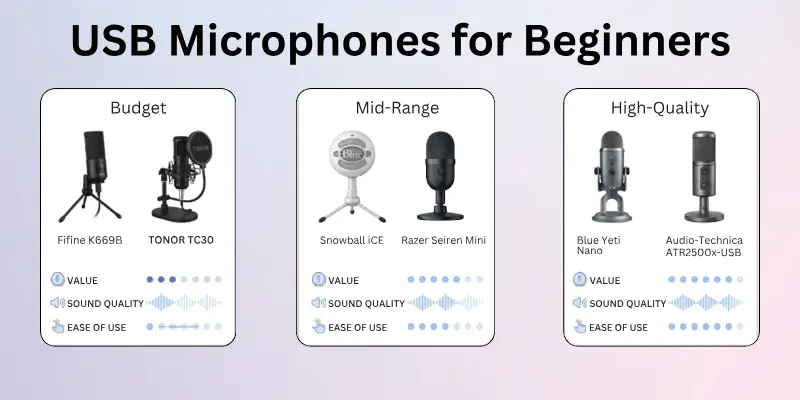
1. Budget USB Microphones
These microphones are perfect if you are just starting and want basic, good-quality sound.
- Fifine K669B: Easy plug-and-play setup with clear voice recording. Great for beginners, students, and online classes.
- TONOR TC30: Compact design with decent sound quality for gaming and video calls.
2. Mid-Range USB Microphones
These microphones offer better sound quality and more features for creators who want to improve their audio.
- Blue Snowball iCE: Simple design with clean voice output. Ideal for YouTube videos and podcasting.
- Razer Seiren Mini: Small size with strong voice focus. Good for streaming and gaming setups.
3. High-Quality Beginner-Friendly USB Microphones
These microphones are still easy to use but offer more professional sound quality.
- Blue Yeti Nano: Clear sound with better control options. Suitable for podcasts, streaming, and voiceovers.
- Audio-Technica ATR2500x-USB: Strong build quality with detailed audio recording for serious beginners.
How to Choose the Right One
Before buying, focus on a few key points:
- Sound clarity for clean voice recording
- Ease of setup for quick use without technical steps
- Room noise handling to avoid unwanted background sound
- Budget fit based on your needs and usage
A good beginner USB microphone should help you start recording easily without confusing settings or extra equipment.
Future of USB Microphones
USB microphones are improving fast as technology grows. They are becoming smarter, clearer, and easier to use for everyday creators and professionals:
- Better Sound Quality: New USB microphones will capture a more natural and detailed voice sound with less noise.
- AI Noise Reduction: Many future models will use AI to remove background noise like fans, keyboard clicks, and room echo.
- USB-C Connection: USB-C will become more common for faster and more stable audio transfer.
- Improved Plug-and-Play Experience: Setup will become even simpler with automatic device detection and smart settings.
- Compact and Portable Designs: Microphones will become smaller, lighter, and easier to carry for travel and remote work.
- Smart Voice Features: Future microphones may include voice tuning, automatic gain control, and sound enhancement tools.
- Better Compatibility: USB microphones will work smoothly with more devices, like phones, tablets, and laptops.
- Lower Price with Better Quality: Advanced features will become more affordable for beginners and content creators.
Conclusion
So guys, it’s time to wrap up. In this article, we’ve covered what is a USB microphone in detail.
My suggestion is simple: if you want a quick setup and solid sound quality, go for a USB microphone. It is perfect for beginners, students, and creators who want to start without technical hassle.
Don’t wait too long. Pick the right USB microphone today and start improving your audio quality right away.
Don’t skip the next part of the FAQs. You may find something more useful and interesting there. Take a moment to read it carefully because you might discover something new that can really help you improve your understanding.
FAQs About USB Microphones
Here are some common questions people ask before buying or using a USB microphone. These answers will help you understand how it works and whether it is right for you:
A USB microphone is used for simple and clear audio recording. It connects directly to a computer and helps you record voice without extra equipment.
- Podcasting
- Gaming and streaming
- Online meetings
- YouTube videos
- Voiceovers
A USB microphone usually gives better sound quality than a headset mic. It captures your voice more clearly and reduces distortion. Headset mics are fine for basic calls, but USB microphones are better for content creation.
Yes, you can use a USB microphone without installing special software. Most USB microphones are plug-and-play. You only need to select it in your device’s sound settings.
Yes, many USB microphones work on phones with the right adapter. Android phones may need a USB OTG cable. iPhones may need a Lightning to USB adapter.
Yes, USB microphones are a great choice for YouTube videos. They give clear voice quality and are easy to set up. Many beginner YouTubers use them for recording content at home.
USB microphones connect directly to a computer and are easy to use. XLR microphones need extra equipment like an audio interface. XLR gives more control, but USB is better for beginners.
Most USB microphones do not need drivers. They work automatically when you plug them in. Some advanced models may come with optional software for extra settings.
Yes, you can record music with a USB microphone, especially for beginners. It works well for vocals and simple recordings. However, professional studios often prefer XLR setups for higher control.
USB microphones can pick up background noise if the gain is too high or the room is noisy. Condenser microphones are also more sensitive. Using a quiet room and lowering the gain can help reduce noise.
Some of the best USB microphones for beginners include:
- Blue Yeti Nano: Great sound and easy controls
- FIFINE K669B: Budget-friendly and simple use
- Razer Seiren Mini: Small size with clear voice output
These options are easy to use and perfect for starting content creation.


- Be Respectful
- Stay Relevant
- Stay Positive
- True Feedback
- Encourage Discussion
- Avoid Spamming
- No Fake News
- Don't Copy-Paste
- No Personal Attacks
- Be Respectful
- Stay Relevant
- Stay Positive
- True Feedback
- Encourage Discussion
- Avoid Spamming
- No Fake News
- Don't Copy-Paste
- No Personal Attacks