
What is Phantom Power in Microphones: Get Clearer Audio Fast in 2026
Good audio can change how people hear your content. A clear voice makes videos, podcasts, and recordings more professional. But many microphones need extra power to work properly. That is where phantom power comes in.
Phantom power is a key part of many audio setups. It helps certain microphones perform at their best, especially in studio and recording environments. Without it, some microphones will not work at all.
In this guide, we will break down phantom power in simple terms. You will learn what it is, how it works, and why it matters for better sound quality.
What is Phantom Power in Microphones? (Phantom Power Definition)
Phantom power is a method that sends electrical power to a microphone through the same cable that carries the audio signal. It removes the need for a separate power source.
It is mainly used for condenser microphones that need external power to function. These microphones are more sensitive and capture detailed sound, but they cannot operate without power.
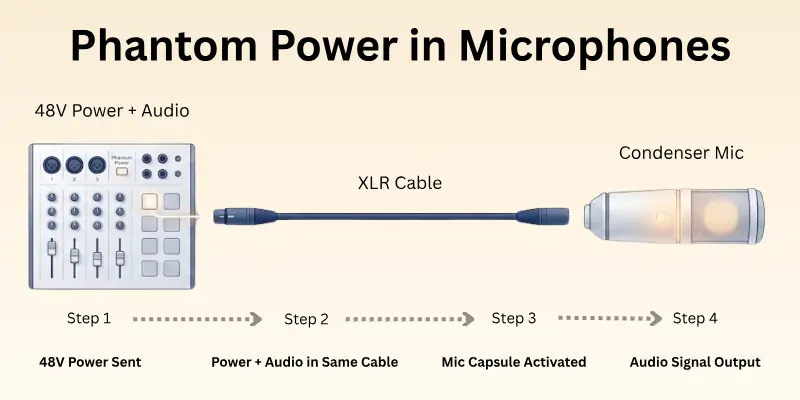
Phantom power usually travels through an XLR cable from an audio interface, mixer, or recording device. Most systems use a standard level of 48 volts.
The word “phantom” is used because the power is not visible. There is no separate power cable, but the microphone still receives energy through the same line used for sound.
How Phantom Power Works
Phantom power works in a simple and controlled way. It sends electricity through the same cable that carries the audio signal. This allows the microphone to work without any extra power source.
Here is how the process works step by step:
- The audio interface or mixer sends 48V power through the XLR cable
- The microphone receives both power and an audio signal at the same time
- The condenser microphone uses this power to activate its internal capsule
- The capsule captures sound and converts it into an electrical audio signal
- The signal is sent back to the device for recording or streaming
This entire process happens instantly. It keeps the sound clean, stable, and strong without needing separate power cables or batteries.
Phantom power only activates when the device is turned on. This makes it safe and easy to control during recording sessions.
Why Phantom Power is Needed
Phantom power is needed because some microphones cannot work on their own. They require a small amount of electricity to capture sound properly and deliver clear audio.
Here is why it is important:
- Phantom Power for condenser microphones: Condenser microphones need electrical power to activate their internal parts and detect sound accurately.
- Better sound detail: It helps capture soft and fine voice details that make recordings sound clear and professional.
- Stronger audio signal: It boosts the microphone signal so your recording device can process it properly.
- Stable performance: It keeps the microphone working smoothly during long recording sessions.
- Professional audio quality: It supports studio-level sound for podcasts, music, and voiceovers.
Without phantom power, many condenser microphones would produce weak or no sound at all. That is why it is a basic requirement in most recording setups.

What Is 48V Phantom Power?
Most phantom power systems use a standard voltage of 48 volts. This is why it is often called 48V phantom power in audio recording.
It is the most common power level used in professional audio equipment like audio interfaces and mixers. It provides enough power for condenser microphones to work properly without damaging them.
Here is why 48V phantom power is widely used:
- Stable power delivery: It gives a steady flow of electricity for clean audio recording.
- Wide compatibility: It works with most condenser microphones available in the market.
- Safe for equipment: When used correctly, it does not harm modern microphones or audio devices.
- Low noise performance: It helps reduce unwanted electrical noise during recording.
- Industry standard: Almost all professional audio setups use 48V as the default level.
Even though it is called 48 volts, the current is very low. This makes it safe for supported microphones and recording gear.
Which Microphones Need Phantom Power?
Not all microphones need phantom power. It only works with specific types of microphones that require external electricity to function.
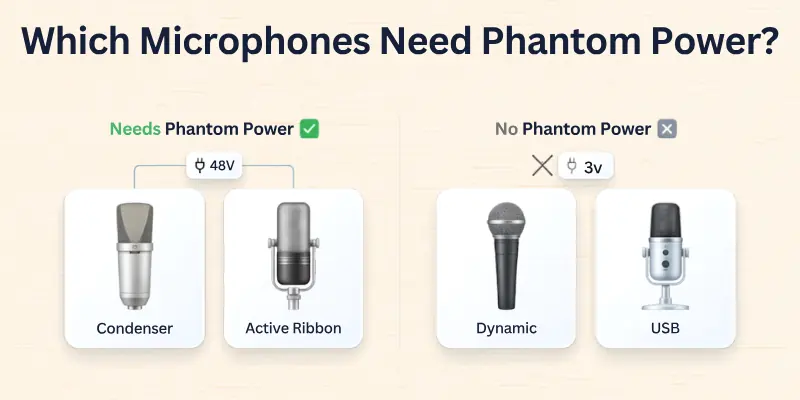
Here is a simple breakdown:
Microphones that need phantom power
- Condenser microphones: These are the most common microphones that need phantom power. They use it to power their internal capsule and capture detailed sound.
- Active ribbon microphones: Some modern ribbon microphones also need phantom power to boost their output signal.
Microphones that do NOT need phantom power
- Dynamic microphones: These microphones work without any external power. They rely on sound pressure only.
- USB microphones: These have built-in power systems and do not use phantom power at all.
Important tip
Always check your microphone manual before turning on phantom power. Using it with the wrong device is usually not harmful in modern setups, but it is still important to use it correctly for safe and stable recording.
How to Turn On Phantom Power
Phantom power is simple to use, but you must follow the correct steps to avoid noise or setup issues. It is usually controlled through an audio interface or mixer.
On an Audio Interface
- Connect your microphone using an XLR cable
- Plug the audio interface into your computer
- Open your recording software or system sound settings
- Find the “48V” or “Phantom Power” switch
- Turn it on after connecting the microphone
On a Mixer
- Plug your microphone into the XLR input
- Locate the phantom power button (often labeled 48V)
- Switch it on for the required channel or global input
- Check your sound levels before recording
Safety Tips
- Always connect the microphone before turning on phantom power
- Turn it off before unplugging the microphone
- Use proper XLR cables for stable performance
- Avoid switching it on and off during active recording
Following these steps helps you get clean audio and protects your equipment during use.
Phantom Power vs No Phantom Power
Phantom power is not always required in audio recording. Some microphones need it, while others work without it.
Understanding the difference helps you choose the right setup for your needs:
| Feature | Phantom Power Microphones | No Phantom Power Microphones |
| Power Source | Needs external power (48V) | No external power needed |
| Microphone Type | Mainly condenser and some ribbon mics | Dynamic and USB microphones |
| Sound Quality | Very detailed and sensitive audio | Simple and stable audio |
| Setup | Requires an audio interface or mixer | Plug-and-play setup |
| Best Use | Studio recording, podcasts, vocals | Live sound, basic recording, calls |
Phantom power setups are more common in studios because they offer higher sound detail. On the other hand, microphones that do not need phantom power are easier to use and better for quick recording or everyday use.
Common Problems with Phantom Power
Even though phantom power is simple to use, users sometimes face small issues during setup or recording.
Most of these problems are easy to fix with the right steps:
- Microphone not working: Check if phantom power is turned on and the XLR cable is properly connected.
- No sound output: Make sure the correct input device is selected in your recording software or system settings.
- Weak or low audio signal: Increase the gain level on your audio interface or mixer.
- Noise or humming sound: Use a high-quality XLR cable and avoid loose connections.
- Distorted audio: Lower the gain and make sure the microphone is not too close to loud sound sources.
- Intermittent sound loss: Check for damaged cables or unstable USB/audio interface connections.
- Wrong device settings: Ensure phantom power is enabled only on compatible microphones and inputs.

Mistakes to Avoid with Phantom Power
Phantom power is easy to use, but small mistakes can affect your audio quality or setup performance.
Avoiding these errors will help you get clean and stable sound:
- Turning on phantom power before connecting the microphone: Always plug in the microphone first, then switch on the power.
- Using the wrong microphone type: Do not apply phantom power to devices that do not support it.
- Ignoring cable quality: Low-quality or damaged XLR cables can cause noise and weak signals.
- Unstable gain settings: Very high gain can create distortion, while very low gain reduces clarity.
- Plugging or unplugging during active power: This can create a loud noise and may affect equipment performance.
- Skipping device checks: Always confirm your audio interface or mixer settings before recording.
- Overlooking room setup: Poor recording environments can increase noise even if phantom power is working correctly.
When Should You Use Phantom Power?
Phantom power is not needed in every recording situation. You should use it only when your microphone and setup require it for proper performance.
- Studio recording: Use phantom power when recording vocals or instruments in a studio setup with a condenser microphone.
- Podcasting: It helps capture clear and detailed voice audio for professional-quality podcasts.
- Voiceovers: Phantom power supports clean and accurate voice recording for videos, ads, and narration.
- Music production: It is useful for recording singing and acoustic instruments with high clarity.
- Streaming setups: Streamers use it to get better voice quality during live broadcasts.
- Online content creation: It improves audio for YouTube videos, tutorials, and digital content.
Always make sure your microphone actually needs phantom power before turning it on. Using it correctly helps you get the best sound quality without any risk.
Conclusion
In this article, we’ve covered what is phantom power for microphones in detail. My recommendation is simple: if you are using a condenser microphone, phantom power is a must for clear and stable audio. Just make sure you follow the correct setup steps to avoid any issues.
Now it’s your turn to use this knowledge and create better, cleaner, and more professional sound recordings.
Before you leave, check the FAQs on what is phantom power in microphones. You may find some useful and interesting answers there. Don’t miss it because you might learn something new that can improve your recording experience.
FAQs About Phantom Power for Microphones
Here are some common questions people ask about phantom power. These answers will help you understand it in a simple and clear way before you set up your microphone:
Phantom power is a method used to send electricity to a microphone through the same cable that carries sound. It is mainly needed for condenser microphones to help them record clear and detailed audio.
- It sends power through XLR cables
- No separate power cable is needed
- Mostly used in studio microphones
Phantom power does not usually damage microphones if used correctly. Most modern microphones are designed to handle it safely. Problems only happen when cables are damaged or connections are made the wrong way.
No, USB microphones do not need phantom power. They already get power directly from the computer through the USB connection, so they work without any external audio power source.
In most cases, nothing serious happens if you turn on phantom power by mistake. Most modern microphones can handle it safely. Still, you should turn it off if your microphone does not need it to avoid noise or connection issues.
Yes, most condenser microphones use 48V phantom power as the standard. It provides stable power that helps the microphone deliver clean and professional audio quality.
You can check your microphone manual or product specifications. Condenser microphones usually need phantom power. Dynamic and USB microphones do not require it at all.
Yes, you can use phantom power with a dynamic microphone in most modern setups. It will not damage the microphone. However, it is not needed because dynamic microphones work without external power.
You only need phantom power for podcasting if you are using a condenser microphone.
If you are using a dynamic or USB microphone, you do not need it. It depends completely on the type of microphone you are using.



- Be Respectful
- Stay Relevant
- Stay Positive
- True Feedback
- Encourage Discussion
- Avoid Spamming
- No Fake News
- Don't Copy-Paste
- No Personal Attacks
- Be Respectful
- Stay Relevant
- Stay Positive
- True Feedback
- Encourage Discussion
- Avoid Spamming
- No Fake News
- Don't Copy-Paste
- No Personal Attacks