
Top Advantages and Disadvantages of Touchscreen in 2026
Many people struggle with slow devices, complicated controls, and difficult navigation when using traditional systems. That is why touchscreen devices have become so popular today. But even they are not perfect.
In this article on the advantages and disadvantages of touchscreen, we will discuss both the benefits that make life easier and the issues that can still cause trouble for users. You will clearly understand where touchscreen helps you and where it may not.
So, stay with me as we go through this topic step by step in a simple and helpful way that solves your confusion.
Advantages of Touchscreen
Touch-based technology has improved how we work, learn, and communicate. It removes many traditional barriers and makes digital tools more accessible for everyone.
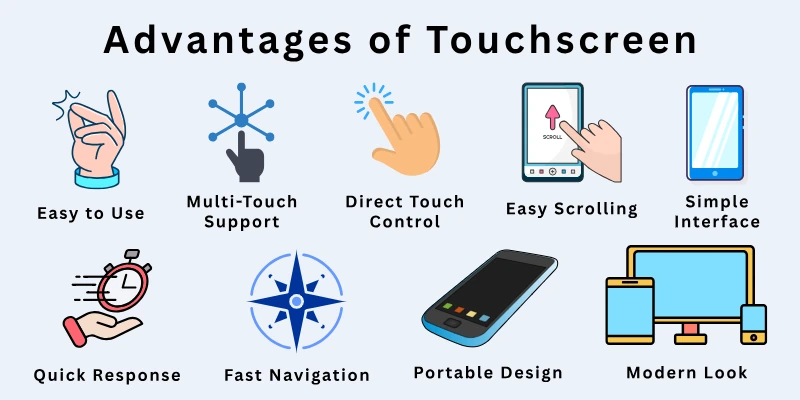
Here is the quick list of touchscreen advantages:
- Easy to Use
- Fast Navigation
- Direct Touch Control
- Space-Saving Design
- Portable Design
- Simple Interface
- Quick Response
- Multi-Touch Support
- Easy Scrolling
- Modern Look
Now, let’s explain these touchscreen pros in detail.
1. Easy to Use
Touchscreen devices make daily use simple because users can control everything with direct finger touch. There is no need for a keyboard or mouse, which removes extra steps. This makes the system easy for beginners and non-technical users.
People can quickly understand how to operate apps, menus, and settings because everything appears clearly on the screen. This reduces learning effort and helps users build confidence while using digital devices in daily life situations like browsing, calling, or using apps.
- Removes the need for extra hardware setup
- Helps users start using devices without training
- Supports independent use for children and seniors
- Improves understanding of basic digital actions
- Reduces confusion during first-time use
- Makes everyday digital tasks more natural
Did you know? Most users can perform their first successful touchscreen action within just a few minutes of using a device.
2. Fast Navigation
Touch-based systems allow users to move through apps, menus, and settings with very little effort. A simple swipe or tap replaces multiple steps required in traditional devices. This improves speed and reduces time spent on basic actions.
It also supports smooth multitasking because users can switch between apps instantly without delays. This makes touchscreen devices highly useful for work, study, entertainment, and daily communication tasks.
- Reduces time spent on manual controls
- Allows instant switching between apps
- Improves workflow efficiency in daily tasks
- Makes browsing and searching faster
- Supports a better multitasking experience
- Helps users manage multiple activities easily
Tip: Fast navigation becomes especially useful when users handle study, work, and entertainment together on one device.
3. Direct Touch Control
Users interact directly with what they see on the screen, which makes the experience more natural and easier to understand. Actions like tapping, dragging, and swiping happen instantly without using any external device.

This direct control improves clarity because users see immediate results of their actions. It also reduces complexity and makes digital tasks feel more interactive and engaging.
- Removes dependency on physical buttons
- Enables real-time interaction with content
- Improves accuracy in simple operations
- Helps users understand actions visually
- Makes device control more natural
- Enhances engagement with apps and content
Fun fact: Direct touch systems are inspired by how people naturally interact with real-world objects.
4. Space-Saving Design
Touchscreen devices combine display and input into one system, which removes the need for separate hardware like a keyboard or mouse. This creates a cleaner and more organized setup for users in homes, offices, and study areas. It also helps reduce clutter on desks.
This design is very useful for small spaces where users need to manage their work area efficiently. It also makes devices easier to handle because everything is built into a single screen system.
- Removes the need for separate input devices
- Creates a clean and organized workspace
- Saves physical desk space
- Reduces the number of accessories needed
- Supports compact device design
- Improves setup simplicity
Did you know? Many modern laptops and tablets use touchscreen systems to reduce hardware size and improve space efficiency.
5. Portable Design
Touchscreen devices are lightweight and easy to carry, which makes them suitable for mobile use. Users can take them anywhere for study, work, or entertainment without carrying extra equipment. This improves flexibility in daily life.
The slim structure also makes these devices easy to hold and operate for long periods. This supports users who travel frequently or need to work outside their home or office.
- Lightweight structure for easy carrying
- Suitable for travel and outdoor use
- Supports a mobile working lifestyle
- Easy one-hand operation in many cases
- Reduces physical burden during use
- Fits modern flexible routines
Tip: Portable touchscreen devices help users stay productive even when they are away from their main workspace.
6. Simple Interface
Touchscreen systems display everything in a clear visual format, which makes them easy to understand. Users interact with icons and menus directly without needing technical knowledge or training. This improves usability for beginners.
The layout is designed in a way that guides users naturally from one action to another. This reduces confusion and helps people complete tasks with confidence.
- Clear visual icons and menus
- No technical knowledge required
- Easy navigation for beginners
- Structured and organized layout
- Reduces learning difficulty
- Improves user confidence
Fun fact: Simple interface design plays a big role in making modern smartphones popular worldwide.
7. Quick Response
Touchscreens respond immediately when users touch the screen, which creates a smooth and fast experience. There is no delay between action and result, which improves overall device performance.
This quick response improves activities like gaming, browsing, and app usage. It also makes devices feel more reliable and efficient in everyday use.
- Instant feedback on every touch
- Smooth and fast system performance
- Better experience in gaming and apps
- No noticeable delay in actions
- Improves user satisfaction
- Supports efficient task handling
Did you know? Advanced touchscreen devices respond in milliseconds to deliver smooth interaction.
8. Multi-Touch Support
Modern touchscreens allow users to use more than one finger at the same time. This enables advanced gestures such as zooming, rotating, and dragging multiple elements. It improves control and flexibility in usage.
This feature is especially useful in creative work, gaming, and design tasks where precision and control are important. It also makes interaction more dynamic and powerful.
- Supports multiple finger inputs
- Enables advanced gesture control
- Improves design and editing tasks
- Helps in gaming performance
- Increases interaction flexibility
- Enhances user control
Tip: Multi-touch features are widely used in graphic design and photo editing applications.
9. Easy Scrolling
Scrolling on touchscreen devices feels smooth and natural because users only need to swipe their fingers. This makes browsing websites, apps, and documents faster and easier.
It also improves the reading experience because users can move continuously without interruption. This helps in quickly finding and viewing information.
- Smooth finger swipe navigation
- Faster browsing experience
- Easy movement through content
- Improves reading flow
- Reduces effort in searching
- Supports continuous scrolling
Fun fact: Touch scrolling has increased how long users stay engaged on mobile screens.
10. Modern Look
Touchscreen devices have a clean and stylish design that gives them a modern appearance. The flat screen design makes them attractive and visually appealing to users.
This design also fits well with today’s digital lifestyle, where people prefer simple and elegant technology. It improves both the look and feel of devices.
- Clean and flat screen design
- Stylish and modern appearance
- Matches current technology trends
- Improves the visual appeal of devices
- Increases user preference
- Enhances overall device experience
Did you know? Touchscreen technology completely changed how modern electronic devices are designed.
Disadvantages of Touchscreen
Touchscreen devices are very useful in daily life, but they also come with some clear drawbacks. While they make tasks easier and faster, they can also create problems in certain situations.
Understanding these disadvantages helps you make better choices when using or buying touchscreen devices.
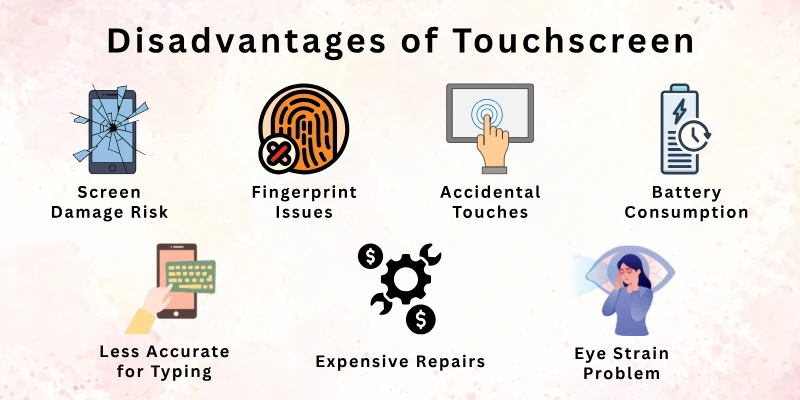
Here is a quick list of the disadvantages of touch screens:
- Screen Damage Risk
- Expensive Repairs
- Fingerprint and Smudge Issues
- Battery Consumption
- Accidental Touches
- Difficult in Wet Conditions
- Less Accurate for Typing
- Eye Strain Problem
- Not Ideal for Precision Work
- Screen Glare in Bright Light
Let’s discuss these touchscreen disadvantages in detail.
1. Screen Damage Risk
Touchscreen devices use sensitive glass screens that can break or scratch easily if you drop them. When this happens, you may notice touch problems or poor display quality. Even a small crack can affect how you use the device in daily life.
We often rely fully on the screen for all actions, so any damage directly impacts performance. That is why you need to handle your device with extra care in daily use.
- High chance of damage from drops
- Scratches affect screen clarity
- Touch response may be reduced after damage
- You may need a full-screen replacement
- Careful handling is always required
- Protective cover becomes important
Did you know? One accidental drop can sometimes cost more than half the device’s price in repairs.
2. Expensive Repairs
If your touchscreen breaks, repair costs can be quite high compared to older devices. In many cases, you cannot fix only one part, so you may need to replace the full screen. This increases your overall expense.
You may also need to visit official service centers, which can take time and extra money. Because of this, long-term maintenance becomes costly for many users.
- Full-screen replacement is often required
- Higher repair charges than basic devices
- Limited low-cost repair options
- Service center visits may be needed
- Increases total ownership cost
- Not budget-friendly for everyone
Tip: If you use a strong screen protector and case, you can reduce repair risks.
3. Fingerprint and Smudge Issues
When you use a touchscreen, your fingers leave marks, oil, and smudges on the screen. Over time, this makes the display look dirty and less clear. You may find yourself cleaning it again and again.
This issue becomes more visible when you watch videos or use the device in bright light. It can slightly affect your viewing experience if the screen is not clean.
- The screen gets dirty very quickly
- Finger marks reduce clarity
- Needs frequent cleaning
- Affects viewing experience
- Smudges visible in bright light
- Can be distracted during use
Fun fact: You clean your phone screen more often than any other personal item in a day.
4. Battery Consumption
Touchscreen devices use more battery because the display stays active all the time. When you use apps, games, or videos, the screen consumes even more power. This leads to faster battery drain.

You may need to charge your device more often during the day. Brightness level and continuous use also increase power usage.
- Faster battery drain during use
- The screen uses high power
- Frequent charging required
- High brightness increases usage
- Not ideal for long trips
- Heavy app use reduces battery life
Did you know? The display alone can use more than half of your phone’s battery.
5. Accidental Touches
Sometimes, you may accidentally tap the wrong option on the screen while holding your device. This can open apps or trigger unwanted actions. It can interrupt your work or viewing experience.
We often face this issue when typing or using large screens. It may reduce accuracy in daily tasks.
- Unwanted taps during use
- Wrong apps may open
- Interrupts ongoing tasks
- Typing mistakes increase
- Common in large screens
- Can cause frustration
Tip: You can reduce accidental touches by using screen lock or sensitivity settings.
6. Difficult in Wet Conditions
Touchscreens do not always respond well when your fingers are wet or the screen has moisture. In such cases, the touch accuracy reduces or stops working completely.
You may notice this problem during rain or when using the device outdoors. It can make basic tasks difficult until the screen is dry again.
- Poor response with wet fingers
- Touch accuracy reduces
- May stop responding temporarily
- Affected by moisture or rain
- Difficult outdoor usage
- Needs a dry surface to work well
Did you know? Some modern phones now include water-resistant touch features to solve this issue.
7. Less Accurate for Typing
When you type on a touchscreen, you may press the wrong letters because there is no physical feedback. This can lead to more mistakes, especially when typing fast.
If you write long messages or documents, it may feel slower compared to a keyboard. Many people still prefer physical keyboards for accuracy.
- Higher chance of typing errors
- No physical key feedback
- Slower long typing tasks
- Less accurate for fast typing
- Not ideal for heavy writing work
- Can reduce productivity
Fun fact: Even today, many professionals prefer keyboards for writing because they feel more accurate.
8. Eye Strain Problem
If you use touchscreen devices for long hours, your eyes may feel tired or strained. Bright screens and close viewing distance can increase discomfort over time.
You might notice reduced focus or tired eyes after long usage. This becomes more common if you do not take breaks.
- Causes eye fatigue over time
- Long screen exposure discomfort
- Reduces focus after long use
- Bright screens increase strain
- Common in heavy users
- Needs regular breaks
Tip: You should follow the 20-20-20 rule to reduce eye strain.
9. Not Ideal for Precision Work
Touchscreens are not always perfect for tasks that need high accuracy, like detailed design or editing work. Finger control is less precise than a mouse or stylus.
If you do professional creative work, you may find it harder to control fine details. That is why many designers use extra tools for better accuracy.
- Limited precision with fingers
- Not ideal for detailed editing
- Slower for technical tasks
- Needs a stylus for better control
- Less accuracy in fine work
- Not suitable for all professionals
Did you know? Most graphic designers still prefer stylus pens for precision work.
10. Screen Glare in Bright Light
When you use a touchscreen in sunlight or bright areas, you may struggle to see the display clearly. Light reflection creates glare on the screen.
This can make reading or working outdoors difficult. You may need to adjust brightness or change position often.
- Hard to see in sunlight
- Screen glare reduces clarity
- Affects outdoor usage
- Requires brightness adjustment
- Causes viewing discomfort
- Limits outdoor productivity
Fun fact: Anti-glare screen coatings are designed to solve this issue in modern devices.
Are Touchscreens Better Than Traditional Devices?
Touchscreen devices have changed how people use technology in daily life. Many users now prefer them because they offer faster control and a simpler way to interact with digital tools. Still, traditional devices like keyboards and mice are also useful in many situations.
Both options have their own strengths, and the better choice depends on how and where you use the device. Some tasks feel easier on touchscreens, while others work better with traditional setups.
Key Points
- Touchscreens give faster and more direct interaction
- Traditional devices offer better accuracy for typing and detailed work
- Touchscreens are easier for beginners and casual users
- Keyboards and mice are more comfortable for long working hours
- Touch devices save space and improve portability
- Traditional setups are better for professional tasks like coding or design
- Touchscreens support modern apps and gestures
- Traditional devices provide more control in complex tasks
- Touchscreens are more suitable for mobile use and travel
- Both systems work best depending on user needs and environment
Who Should Use Touchscreen Devices?
Touchscreen devices fit many types of users because they are simple and easy to operate. This is why they are widely used in phones, tablets, and modern laptops.
Different people use touchscreen devices for different needs. Some use them for study, some for work, and others for entertainment. The choice depends on comfort, usage style, and daily requirements.
Key Users of Touchscreen Devices:
- Students who need easy learning tools for study and research
- Children who can learn basic digital skills quickly through touch control
- Office workers who want fast access to apps and simple navigation
- Travellers who need lightweight and portable devices
- Business users who manage tasks and presentations on the go
- Casual users who browse, watch videos, and use social media daily
- Elderly users who prefer simple tap-based interaction instead of complex controls
- Designers and creators who use touch gestures for drawing and editing
- Healthcare staff who use quick digital systems in hospitals and clinics
- Retail workers who use touchscreen systems for billing and customer service
Tip: Touchscreen devices work best when you need speed, simplicity, and portability in everyday tasks.
Conclusion
In this article, we’ve covered the advantages and disadvantages of touchscreen in detail. After exploring both sides, I personally recommend using touchscreen devices for everyday tasks because they offer speed, simplicity, and a better user experience.
However, you should also consider their limits, like screen damage and battery use, before making a choice. Overall, it depends on your needs and how you use the device.
If you found this guide helpful, make sure to explore more related articles and keep learning with us for a better understanding.
Frequently Asked Questions (FAQ Section)
Here are some frequently asked questions related to touchscreen advantages and disadvantages that help you understand the topic simply and clearly:
Touchscreen devices make daily life very simple because you can control everything directly with your finger. You do not need a mouse or keyboard, which makes the process faster and easier for most users. It also helps beginners learn technology without stress.
Touchscreen devices are useful, but they also come with some problems. The screen is sensitive and can break easily if dropped, and repair costs are often high. You may also notice fingerprint marks and smudges on the screen during daily use. Battery drain is another common issue because the display stays active for long hours.
Touchscreen devices are popular because they are simple, fast, and modern. People can use them without technical skills, which makes them suitable for all age groups.
It depends on how you use them. Touchscreens are better for quick tasks like browsing, gaming, and watching videos. They give fast access and easy control.However, keyboards are better for long typing work because they give more accuracy and comfort. So, the touch screen advantages and disadvantages depend on your personal needs and daily usage.
Yes, touchscreen devices usually use more battery because the screen is always active when you use it. Bright display settings and heavy app usage also increase power consumption.
- The screen consumes more energy
- Brightness affects battery life
- Continuous use drains power faster
Yes, touchscreen devices are very helpful for students because they make learning more interactive and easier. Students can use apps, read books, and watch educational videos without difficulty.They also support online learning platforms and quick research, which improves study efficiency. That is why students are often included in discussions about the advantages and disadvantages of touch screen devices.
Yes, touchscreen devices are more sensitive compared to traditional devices. A small drop can cause cracks or damage the display, which may affect usage.
To reduce risk, users often use protective cases and screen guards. This is a key point in the advantages and disadvantages of touchscreen discussion because durability matters a lot.
If you use touchscreen devices for a long time, your eyes may feel tired or strained. Bright screens and long usage hours can increase discomfort.
You can reduce this by taking breaks, lowering brightness, and avoiding long continuous screen time. Eye health is an important part of the pros and cons of touch screen technology.
Touchscreen typing works well for short messages, but it may not be comfortable for long writing tasks. You may also make mistakes because there is no physical feedback.
- Good for quick texting
- Less accurate for long typing
- Slower than physical keyboards
This shows another practical side of the touch screen pros and cons in daily life.
Touchscreen technology is improving very fast with better speed, flexibility, and durability. Future devices may include foldable screens and smarter touch response systems.
We can also expect better battery efficiency and stronger screen protection. These improvements will change how we see the advantages and disadvantages of touchscreens in the coming years.



- Be Respectful
- Stay Relevant
- Stay Positive
- True Feedback
- Encourage Discussion
- Avoid Spamming
- No Fake News
- Don't Copy-Paste
- No Personal Attacks
- Be Respectful
- Stay Relevant
- Stay Positive
- True Feedback
- Encourage Discussion
- Avoid Spamming
- No Fake News
- Don't Copy-Paste
- No Personal Attacks









