
Top Advantages and Disadvantages of Mouse in 2026
Do you ever feel your hand getting tired or slow while using a computer mouse for a long time? A mouse looks like a very simple device, but it plays a very important role in how you control your computer every day.
It helps you click, move, and open things on the screen in just a few seconds, which makes your work faster and easier. Many people use it for study, office work, gaming, and daily browsing without even thinking about how important it really is.
But like every tool, it also has some problems that can affect your comfort and performance. That is why it is important to understand both the advantages and disadvantages of computer mouse before choosing one.
Let’s explore the advantages and disadvantages of mouse in detail.
Advantages of Mouse
A mouse is one of the most important tools for using a computer. It helps you control the screen in a simple and smooth way. People use it for study, office work, gaming, and daily tasks.

Here is the list of the computer mouse pros:
- Easy Use
- Fast Navigation
- High Accuracy
- Creative Control
- Gaming Support
- Right-Click
- GUI Friendly
- Ergonomic Design
- Portable
- Budget Options
Let’s cover the computer mouse advantages in detail.
1. Easy Use
A mouse is very easy to use and helps you control a computer without any difficulty. You only need to move it on a flat surface, and the pointer follows your hand. A simple click opens files, apps, and folders instantly. This makes computer use smooth and stress-free.
Most people can learn it in just a few minutes. It does not need any technical knowledge or training. The movement feels natural because your hand directly controls the screen. That is why it works well for beginners and daily users.
Useful points:
- Connects quickly with USB or wireless option
- Works on almost every computer system
- Supports simple click and drag actions
- No installation needed in most cases
- Helps beginners start using computers easily
- Works with both laptops and desktops
- Suitable for all age groups
Tip to remember: A clean surface always improves smooth mouse movement.
2. Fast Navigation
A mouse helps you move across the computer screen very quickly. You can open apps, click files, and browse websites in seconds. It removes slow steps and makes everything feel faster. This improves your overall computer experience.
It also makes multitasking easier because you can switch between windows without delay. You can manage several tasks at the same time with better control. This saves time and helps you stay organised at work or while studying.
Things to know:
- Opens folders and files in one click
- Helps move between tabs quickly
- Makes scrolling long pages easy
- Reduces time spent on navigation tasks
- Supports smooth multitasking
- Improves daily workflow speed
- Works well for browsing and office tasks
Did you know? A mouse helps reduce extra keyboard actions during daily computer use.
3. High Accuracy
A mouse gives very precise control over your screen. You can click small icons, select text, and move items exactly where you want. This reduces mistakes and improves accuracy in your work.

It is very useful in editing, designing, and office tasks. You can handle detailed work more carefully because every movement is controlled. This makes your tasks cleaner and more professional.
Real uses:
- Helps click small buttons easily
- Supports accurate text selection
- Useful in editing and design work
- Reduces wrong clicks during tasks
- Helps in online form filling
- Makes file arrangement more precise
- Improves detailed work quality
Fun fact: A mouse can control very large screen movement with just a small hand motion.
4. Creative Control
A mouse helps you do creative work with better control and comfort. You can use it in design software, drawing tools, and photo editing apps. It allows smooth hand movement, which helps you create better shapes and designs. This makes digital work easier for beginners and professionals.
It also helps you manage small details in creative projects. You can adjust colours, shapes, and objects with more precision. This improves the quality of your digital work. Many designers prefer a mouse for daily creative tasks.
Helpful uses:
- Works well with drawing and editing tools
- Helps adjust shapes and lines easily
- Supports photo editing tasks
- Makes design work more controlled
- Helps in creating digital artwork
- Improves accuracy in creative projects
- Easy to use with design software
Creative insight: Small movements of a mouse can create detailed digital art.
5. Gaming Support
A mouse plays an important role in computer gaming. It gives fast response and smooth control during gameplay. Players can aim, move, and react quickly using simple hand movements. This improves performance in action and strategy games.
It also gives better control compared to a touchpad. Gamers can enjoy faster speed and more accuracy. Many games are designed to work best with a mouse. This makes it a popular choice for PC gamers.
Gaming benefits of mouse:
- Helps in fast aiming and shooting
- Improves reaction time in games
- Works well with most PC games
- Gives better control than a touchpad
- Supports smooth in-game movement
- Useful for competitive gaming
- Makes gameplay more responsive
Did you know? Professional gamers often use high-speed mice for better performance.
6. Right-Click Function
The right-click button gives extra options in a simple way. You can copy, paste, rename, or delete files without typing anything. It opens a quick menu that saves time during computer use. This makes tasks faster and easier.
It helps you access useful commands in just one click. You do not need to open multiple menus or settings. This improves your daily workflow. It is useful for both beginners and advanced users.
Quick functions:
- Opens shortcut menu instantly
- Helps copy and paste files easily
- Supports quick file renaming
- Reduces the need for keyboard shortcuts
- Makes file management faster
- Helps in editing tasks
- Improves daily productivity
Quick tip: Right-click menus change based on the app you are using.
7. GUI Friendly
A mouse works perfectly with modern computer systems that use icons and visuals. You can click, drag, and drop items easily on the screen. This makes the computer feel more visual and simple to use. It reduces the need for typing commands.
It helps users naturally interact with software. You can open folders, move files, and select options with ease. This makes computers more user-friendly for everyone. It is an important part of modern computing.
Easy actions:
- Helps click icons and folders easily
- Supports drag-and-drop features
- Makes software navigation simple
- Reduces use of complex commands
- Works well with all modern apps
- Helps beginners use computers easily
- Makes the interface more interactive
Fun fact: Without a mouse, modern graphical systems would feel much harder to use.
8. Ergonomic Design
Many modern mice are designed to fit your hand comfortably. This helps reduce pressure on your wrist and fingers during long use. A good design makes computer work less tiring. It supports better hand posture.
It is very helpful for people who use computers for many hours. Gamers, office workers, and students all benefit from it. It reduces discomfort and improves long-term usage. A well-shaped mouse improves daily comfort.
Comfort mouse benefits:
- Fits naturally in your hand shape
- Reduces wrist strain during long use
- Supports better hand posture
- Useful for long working hours
- Helps prevent finger fatigue
- Designed for daily comfort
- Improves long-term usability
Health note: Ergonomic mice can help reduce hand stress during office work.
9. Portable Device
A mouse is small and lightweight, so you can carry it easily. It fits inside a laptop bag without taking up much space. You can use it anywhere, like school, the office, or while travelling. This makes it very practical for mobile users.
It works with both wired and wireless options. You can connect it quickly and start using it. This makes it flexible for different situations. It is a simple tool that you can take anywhere.
Portable uses:
- Easy to carry in laptop bags
- Works well with laptops on the go
- Lightweight and compact design
- Quick setup anywhere
- Suitable for travel and office use
- Works with wireless connection options
- No heavy setup needed
Travel tip: Wireless mice are more convenient for travel use.
10. Budget-Friendly Options
A mouse is available in many price ranges. Even low-cost models work well for basic computer tasks. This makes it affordable for students and home users. You do not need a big budget to buy one.
More expensive models offer extra features, but basic ones are enough for daily use. This gives users many choices based on their needs. It is one of the most budget-friendly computer accessories.
Budget facts:
- Available in low and high price ranges
- Cheap models work for daily tasks
- Good option for students and beginners
- Expensive models offer extra features
- Easy to replace if needed
- Works well even at a low cost
- Widely available in markets
Did you know? Even the simplest mouse can last for years with proper care.
Disadvantages of Mouse
A mouse is very useful for computer work, but it also has some limits. It does not work perfectly in every situation. Sometimes it can cause small problems during daily use.
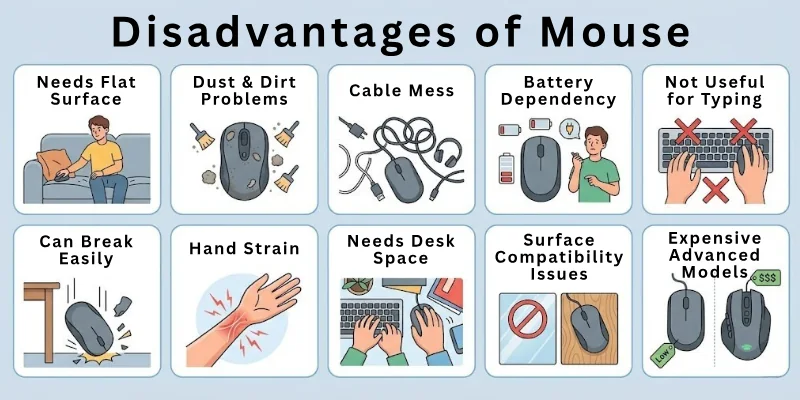
Understanding these disadvantages helps you choose the right mouse and use it in a better way. It also helps you avoid common issues during work, study, or gaming.
Here is the list of mouse cons:
- Needs a Flat Surface
- Dust and Dirt Problems
- Cable Mess (Wired Mouse)
- Battery Dependency (Wireless Mouse)
- Not Useful for Typing
- Can Break Easily
- Hand Strain During Long Use
- Needs Desk Space
- Surface Compatibility Issues
- Expensive Advanced Models
Let’s look at the main computer mouse disadvantages.
1. Needs a Flat Surface
A mouse needs a flat and smooth surface to work properly. If the surface is uneven, soft, or shiny, the pointer may not move correctly. This can make it hard to control the screen.
It works best on a table or a mouse pad. Without the right surface, you may face slow or jumpy movement. This can affect your work speed and accuracy.
Common issues:
- Does not work well on beds or cushions
- Needs a proper table or mouse pad
- Movement becomes slow on rough surfaces
- Glass surfaces may cause tracking problems
- Not useful in all outdoor situations
- Can stop responding in uneven areas
- Requires a stable surface for best use
Quick note: A simple mouse pad can fix most surface problems.
2. Dust and Dirt Problems
A mouse can collect dust and dirt over time. This can affect its sensor or buttons. When dirt builds up, the mouse may not move smoothly or click properly.

Regular cleaning is important to keep it working well. If ignored, performance can slowly get worse. This is common in both wired and wireless mice.
Common issues:
- Dust can block the sensor underneath
- Buttons may feel sticky over time
- Dirt can reduce smooth movement
- Needs regular cleaning for good performance
- Can stop responding properly if dirty
- Affects clicking speed and accuracy
- More common in long-term use
Maintenance tip: Clean your mouse once a week for better performance.
3. Cable Problems (Wired Mouse)
Wired mice come with a cable that connects to the computer. This cable can sometimes get tangled or messy. It can also limit how far you can move the mouse.
A messy cable can make your desk look unorganized. It may also get in the way during work or gaming. This reduces comfort during use.
Limitations of mouse:
- Cables can get tangled easily
- Limits the movement range on the desk
- Makes the workspace look messy
- Can break if pulled too hard
- Hard to manage in small spaces
- Less flexible than wireless mice
- Can disturb a smooth working setup
Simple tip: Use a cable holder to keep your desk clean.
4. Battery Dependency (Wireless Mouse)
Wireless mice need batteries or charging to work. If the battery runs out, the mouse stops working immediately. This can interrupt your work or study.
You also need to recharge or replace batteries regularly. This adds extra effort and cost over time. It can be inconvenient during urgent tasks.
Common issues:
- Stops working when the battery is empty
- Needs regular charging or replacement
- Can interrupt important tasks
- Extra cost for batteries over time
- Not always reliable for long use
- Needs charging planning
- Can run out at the wrong time
Did you know? Some wireless mice save power automatically when not in use.
5. Not Useful for Typing
A mouse cannot replace a keyboard. It only helps with clicking, moving, and selecting. You still need a keyboard for writing or entering text.
This makes it limited for typing-heavy tasks. You cannot use it alone for emails, documents, or messaging. It always needs support from a keyboard.
Common issues:
- Cannot type words or sentences
- Not useful for writing documents alone
- Needs a keyboard for full computer use
- Limited to pointing and clicking only
- Not helpful for text-heavy work
- Cannot replace input devices
- Works only as a supporting tool
Quick fact: A mouse and keyboard always work best together.
6. Can Break Easily
A mouse is a small device, so it can break if dropped or handled roughly. Cheap models are more fragile and may stop working after some time.
Buttons or scroll wheels can also wear out with heavy use. This reduces the lifespan of the device.
Common issues:
- Can break if dropped accidentally
- Cheap models wear out faster
- Buttons may stop working over time
- The scroll wheel can become loose
- Not very strong under pressure
- Needs careful handling
- Shorter life if low quality
Safety tip: Always store your mouse in a safe place after use.
7. Hand Strain During Long Use
Using a mouse for many hours can cause pain in your hand or wrist. This usually happens if your posture is not correct or the mouse is not comfortable.
Long use without breaks can also lead to tired fingers. This makes it uncomfortable for office workers and gamers.
Common issues:
- It can cause wrist pain over time
- Fingers may feel tired after long use
- Poor grip can increase discomfort
- Not ideal for nonstop usage
- Can affect daily productivity
- Needs proper hand position
- May cause strain in long sessions
Health tip: Take short breaks while using a mouse for long hours.
8. Needs Desk Space
A mouse needs enough space to move freely. If your desk is small or crowded, it becomes hard to use properly. Limited space can restrict movement and reduce comfort. This can affect speed and control during work.
Common issues:
- Needs free space to move
- Not suitable for very small desks
- Can hit objects on crowded tables
- Reduces comfort in tight spaces
- Limits smooth movement range
- Hard to use in compact setups
- Can slow down work efficiency
Quick note: A clean desk setup improves mouse performance.
9. Surface Compatibility Issues
Not all surfaces work well with a mouse. Some materials, like glass or shiny tables, can confuse the sensor. This makes movement unstable. You may see jumping or slow pointer movement. In such cases, a mouse pad becomes necessary.
Common issues:
- Does not work well on glass surfaces
- Shiny tables can affect tracking
- The pointer may move unevenly
- Needs a mouse pad for best use
- Performance changes with surface type
- Can cause tracking errors
- Not reliable on all materials
Fun fact: Optical sensors need texture to track movement properly.
10. Expensive Advanced Models
Basic mice are affordable, but advanced models can be expensive. Gaming and ergonomic mice often cost more due to extra features.
This makes high-end options less suitable for budget users. You may need to spend more for better performance.
Common issues:
- Gaming mice can be costly
- Advanced features increase the price
- Not affordable for all users
- High-end models need a bigger budget
- Extra features may not be necessary for everyone
- Replacement cost is higher
- Price varies by brand and quality
Did you know? High-end mice often include extra buttons and better sensors.
Fun Facts About the Computer Mouse
The computer mouse may look simple, but it has an interesting history and some cool features. Here are some fun facts you might not know:
- The first computer mouse was made in 1964 and was built from wood.
- The mouse was first called an “X-Y Position Indicator”, not a mouse.
- It was named a “mouse” because it looked like a real one, with a tail (the wire).
- The first mouse had only one button and no scroll wheel.
- Apple was the first company to sell a mouse with a computer in 1983.
- Scroll wheels were added later to help people move up and down on a page.
- Some mice now use a laser light instead of a red light for better accuracy.
- Gaming mice have extra buttons that help players act faster in games.
- The speed of a mouse is measured in DPI (dots per inch). More DPI = faster movement.
- Wireless mice connect using Bluetooth or USB receivers, so no cables are needed.
Future of Computer Mouse Technology
The computer mouse has changed a lot over time, and it is still improving. In the future, mice will become smarter, faster, and more comfortable to use. New technology will focus on better speed, better control, and more comfort for users.
We may also see mice that need less effort to use and work more smoothly on all surfaces. Some new designs will also help reduce hand pain and improve long working hours. Overall, the future mouse will make computer use easier and more advanced for everyone.
Future improvements:
- More wireless and Bluetooth-only designs for a clean setup
- Better battery life with fast charging support
- Smart sensors for more accurate movement tracking
- AI-based features for personalized user control
- Ergonomic designs to reduce hand and wrist pain
- Works smoothly on all surfaces without a mouse pad
- Lightweight and compact designs for easy travel
- Gesture control features instead of only clicking
- Higher speed response for gaming and professional work
- Eco-friendly materials for safer and sustainable use
Future insight: In the coming years, mice may also include touch and gesture controls, making them even more interactive and smart.
Conclusion
In this article, we’ve covered the advantages and disadvantages of mouse in detail. A mouse may look small, but it plays a big role in making computer use smooth and fast. It helps you click, move, and control everything on your screen with ease.
I personally feel that a mouse is a must-have tool for every computer user, especially students and office workers. A well-designed mouse can make your daily work more comfortable and save a lot of time.
If you enjoyed this article, don’t forget to read more helpful guides and improve your computer knowledge step by step.
Quick Questions and Answers
Here are some common questions about the advantages and disadvantages of computer mouse:
A computer mouse is a small device that helps you control what you see on the screen. You move it with your hand and click to open files, apps, or websites. It makes computer use simple and fast for everyone.
People use it because it removes the need for complex keyboard commands. It gives easy control over daily computer tasks.
A mouse helps students do school work faster and easier. They can browse, write documents, and complete projects with better control.
But it can also cause problems if used for long study hours. Students may feel hand tiredness or need a proper desk setup for comfort.
A mouse is not fully required, but it makes work much easier. Laptops already have touchpads, but a mouse gives better speed and accuracy.
Many users prefer a mouse for:
- Faster clicking and navigation
- Better comfort during long work
- Easier control in games and editing
So, it is helpful but not mandatory.
Sometimes a mouse does not work smoothly in daily use. It may stop responding or move slowly on the wrong surface.
Other common issues include:
- Dust affecting the sensor
- Battery drain in wireless models
- Cable clutter in wired versions
These problems can affect performance if not managed.
A mouse helps you finish tasks faster by reducing extra steps. You can click, drag, and open files in seconds.
It improves productivity by:
- Saving time in navigation
- Making multitasking easier
- Reducing typing for simple actions
This helps users work more efficiently every day.
A wired mouse connects with a cable, while a wireless mouse uses Bluetooth or a USB receiver. Both work in similar ways but have different benefits.
Wired mouse:
- No battery needed
- Stable connection
Wireless mouse:
- Easy to carry
- No cable mess
Your choice depends on your comfort and usage.
Yes, long use of a mouse can affect your hand or wrist. It usually happens when you do not take breaks or use a poor design.
To stay safe:
- Use a comfortable mouse shape
- Take short breaks often
- Keep your wrist in a relaxed position
Good habits help reduce strain.
A mouse is useful in many daily computer tasks. It helps in school work, office work, gaming, and browsing. Main uses include:
- Opening and closing files
- Editing documents and images
- Playing computer games
- Browsing websites easily
It is a simple tool with wide use.
You should choose a mouse based on your needs. Different users need different types of mice. Before buying, check:
- Comfort and grip
- Wired or wireless option
- Purpose (gaming, office, study)
- Budget range
A good choice improves your daily experience.
The future of mouse technology is becoming smarter and more advanced. New designs focus on comfort, speed, and better control.
Future improvements may include:
- Smart sensors for better accuracy
- Longer battery life
- Ergonomic shapes for health comfort
- Gesture and touch-based controls
Technology will make mice easier and more powerful.



- Be Respectful
- Stay Relevant
- Stay Positive
- True Feedback
- Encourage Discussion
- Avoid Spamming
- No Fake News
- Don't Copy-Paste
- No Personal Attacks
- Be Respectful
- Stay Relevant
- Stay Positive
- True Feedback
- Encourage Discussion
- Avoid Spamming
- No Fake News
- Don't Copy-Paste
- No Personal Attacks