
Top Advantages and Disadvantages of Webcam in 2026
Struggling with video calls that freeze, poor lighting, or awkward angles is a common frustration for many online users. Learning the advantages and disadvantages of webcam use can help solve these problems.
Webcams provide clear communication, support remote work, and make online learning interactive. At the same time, they can expose users to privacy risks, require extra setup, and sometimes produce technical glitches.
By understanding these benefits and drawbacks, users can adjust their environment, choose the right equipment, and adopt safer practices, turning webcam challenges into smoother and more productive digital interactions.
Advantages of Webcam
There are many advantages of a webcam that make online communication easy, fast, and more effective. People use webcams every day for work, study, meetings, and personal talks. It helps you connect face-to-face from anywhere in the world.
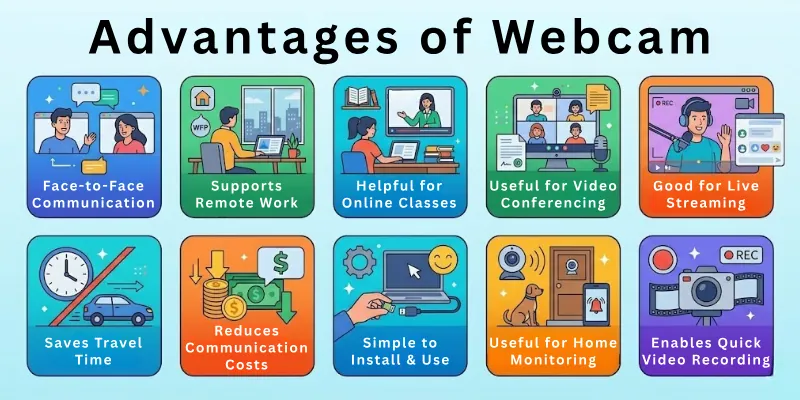
Below, I have listed the main webcam benefits simply:
- Easy Face-to-Face Communication
- Supports Remote Work
- Helpful for Online Classes
- Useful for Video Conferencing
- Good for Live Streaming
- Saves Travel Time
- Reduces Communication Costs
- Simple to Install and Use
- Useful for Home Monitoring
- Enables Quick Video Recording
Now, let’s cover each webcam advantages in detail one by one.
1. Easy Face-to-Face Communication
A webcam helps people talk face-to-face from anywhere in the world. You can see expressions, gestures, and reactions during a conversation. This makes communication feel more natural and personal. Many people use webcams daily to stay connected with family, friends, and coworkers.
Video communication also improves understanding during conversations. It reduces confusion that often happens in voice-only calls or text messages. Businesses, teachers, and students use webcams to create better interaction online. It helps people feel more connected even when they are far away.
- Helps build trust during online talks
- Makes virtual meetings feel more real
- Improves non-verbal communication (like facial expressions)
- Supports clear emotional understanding
- Useful for long-distance relationships
Did You Know? People understand emotions better when they see faces during communication.
2. Supports Remote Work
Webcams have become very important for remote jobs. Workers can join meetings, discuss projects, and communicate with teams from home. This allows companies to continue working without needing employees in the office every day. Many businesses now depend on webcams for daily operations.

A webcam also helps managers and employees collaborate better online. Team members can share ideas, give presentations, and attend virtual training sessions easily. It creates a more professional environment during online meetings. Remote work becomes smoother and more productive with video communication.
- Helps employees attend global meetings easily
- Supports hybrid work systems
- Makes online training more effective
- Improves teamwork across locations
- Reduces office dependency
Pro Tip: Keep your background clean to look more professional in meetings.
3. Helpful for Online Classes
Students and teachers use webcams for online learning every day. A webcam allows teachers to explain lessons visually while students can ask questions in real time. This creates a classroom-like experience even at home. It helps students stay focused during lessons.
Webcams also improve communication between teachers and students. Teachers can monitor participation and explain difficult topics more clearly. Many schools and colleges now include webcams in digital learning systems. Online education becomes more interactive and effective with video support.
- Helps teachers see student reactions
- Makes virtual quizzes and tests easier
- Improves attention during lessons
- Supports group study sessions online
- Helps shy students participate more
Fact: Students learn faster when they can see and hear lessons together.
4. Useful for Video Conferencing
Webcams make video conferencing simple and effective. Businesses, schools, and organizations use them for meetings with multiple people at the same time. Participants can discuss ideas, share updates, and solve problems together. This improves communication in professional environments.
Video conferencing also saves time because people do not need to travel for meetings. Teams from different cities or countries can connect instantly. A webcam helps create smoother discussions and better interaction during conferences. It has become an essential tool for modern communication.
- Supports global team meetings
- Helps in client presentations
- Allows screen sharing with video
- Makes decision-making faster
- Improves communication clarity
Truth Factor: Many companies now run most meetings through video calls instead of offices.
5. Good for Live Streaming
Webcams are widely used for live streaming on platforms like YouTube, Twitch, and Facebook. Streamers use webcams to interact with viewers in real time. This creates stronger audience engagement and makes content more interesting. Many gamers and creators depend on webcams daily.
A webcam also helps build trust with viewers because people can see the creator while watching the content. Live streaming has become popular for gaming, education, interviews, and entertainment. Even beginners can start streaming easily with a basic webcam setup.
- Builds a stronger audience connection
- Helps grow online followers
- Makes content more engaging
- Supports real-time comments interaction
- Useful for brand promotions
Did You Know? Streams with face cameras often get higher viewer engagement.
6. Saves Travel Time
A webcam allows people to attend meetings, classes, and interviews from home. This removes the need for daily travel in many situations. People can communicate instantly without wasting hours on transportation. It helps users manage their time more efficiently.
Businesses also benefit because employees can join meetings from different locations quickly. Students can attend online classes without commuting to school or college every day. Webcams make communication faster and more convenient for everyone.
- Reduces traffic stress
- Helps manage the daily schedule better
- Allows instant meeting access
- Supports work-from-home lifestyle
- Improves time efficiency
Pro Tip: Always test your webcam before joining important meetings.
7. Reduces Communication Costs
Webcams help reduce communication expenses for businesses and individuals. Instead of travelling for meetings, people can connect online through video calls. Companies save money on transportation, hotel stays, and office meeting arrangements. This makes communication more affordable.
Families and friends also use webcams to stay connected without expensive travel costs. Many free video calling apps support webcam communication. This allows users to talk face-to-face without spending extra money. It is a cost-effective communication solution.
- Reduces business travel expenses
- Supports free communication platforms
- Helps startups save money
- Lowers training and meeting costs
- Makes global communication affordable
Fact: Video meetings can cut business costs by a large amount each year.
8. Simple to Install and Use
Most webcams are very easy to set up and operate. Many laptops already include built-in webcams that work instantly. External webcams usually connect through a USB port and require very little setup. Even beginners can start using them quickly.
Modern webcams also work with popular apps like Zoom, Google Meet, and Microsoft Teams. Users do not need advanced technical knowledge to use them. Simple controls and automatic settings make webcams beginner-friendly and convenient.
- No technical skills required
- Works on most operating systems
- Quick driver installation
- Easy app integration
- User-friendly controls
Truth Factor: Most webcams are ready to use within seconds after plugging in.
9. Useful for Home Monitoring
Some people use webcams as simple home monitoring devices. A webcam can help parents check on children or monitor rooms while away from home. It provides live video access through connected software or apps. This adds extra convenience and security.
Although webcams are not full security cameras, they can still help in basic monitoring situations. Small businesses and homeowners sometimes use them to watch indoor spaces. This makes webcams useful beyond communication purposes.
- Supports baby monitoring
- Helps check home activity remotely
- Useful for pet monitoring
- Can connect with security apps
- Works as a backup camera system
Did You Know? Some webcams can send alerts when motion is detected.
10. Enables Quick Video Recording
Webcams allow users to record videos quickly without needing expensive camera equipment. People can create tutorials, presentations, and personal videos directly from their computers. This makes content creation faster and easier for beginners.
Many teachers, students, and professionals use webcams for quick recordings. Built-in recording software also makes the process simple. Users can create video content anytime without complicated setup or editing tools.
- Helps create tutorial videos easily
- Useful for practice recordings
- Supports online teaching content
- No extra camera needed
- Fast sharing to platforms
Pro Tip: Good lighting improves webcam video quality more than expensive equipment.
Disadvantages of Webcam
While webcams offer many benefits, they also come with some drawbacks. Understanding these disadvantages can help you use them more safely and effectively.
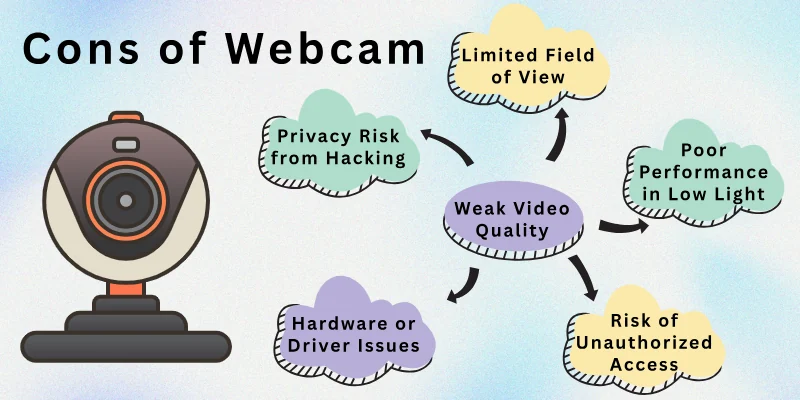
Below, I have simply listed the main webcam disadvantages:
- Privacy Risk from Hacking
- Weak Video Quality in Low-End Models
- Depends on Internet Connection
- Poor Performance in Low Light
- Security Concerns in Public Networks
- Background Distractions During Calls
- Limited Field of View
- Hardware or Driver Issues
- Can Cause Eye Strain After Long Use
- Risk of Unauthorized Access if Not Secured
Now, let’s cover each disadvantage in detail one by one.
1. Privacy Risk from Hacking
Webcams can create privacy risks if someone hacks into your system. In some cases, hackers may gain access and misuse the camera without your permission. This is why webcam security is very important in today’s digital world. Many users are not aware of this risk until they face a problem.
This issue mainly happens when systems are not protected properly. Weak passwords, outdated software, or unsafe apps can increase the risk. That is why users must stay careful while using webcams for daily communication or work.
- Risk of unauthorized camera access
- Hackers may spy through infected software
- Weak passwords increase security danger
- Unsafe apps can expose webcam control
- Important for personal data protection
Did You Know? Covering your webcam when not in use is a common safety habit.
2. Weak Video Quality in Low-End Models
Not all webcams give high-quality video. Low-cost models often produce blurry or grainy images. This can affect online meetings, classes, and recordings. Poor quality makes communication less effective, especially in professional use.

Video clarity depends on camera resolution and hardware quality. Budget webcams may not perform well in modern HD requirements. Good lighting can help, but it cannot fully fix low-quality hardware issues.
- Produces unclear or blurry video
- Poor color and image sharpness
- Not suitable for professional use
- Affects video presentations
- Limited HD support in cheap models
Truth Factor: Higher resolution webcams give much clearer communication results.
3. Depends on Internet Connection
Webcams rely heavily on a stable internet connection. If the internet is slow, video calls may lag or freeze. This can interrupt meetings and reduce communication quality. Many users face this issue during peak internet usage times.
A weak connection can also cause audio and video delays. This makes conversations less smooth and sometimes confusing. For good webcam performance, a strong internet connection is always needed.
- Video lag during slow internet
- Audio and video delay issues
- Call drops in weak networks
- Poor streaming experience
- Interrupts online meetings
Pro Tip: Use a stable Wi-Fi connection for smooth webcam performance.
4. Poor Performance in Low Light
Webcams do not perform well in dark or low-light conditions. The video may look grainy, unclear, or too dark. This can make online communication less effective. Many users face this issue in rooms without proper lighting.
Good lighting is important for clear video quality. Without it, even expensive webcams may not show good results. This is a common limitation in most basic webcam setups.
- Dark or unclear video output
- Grainy image quality
- Poor facial visibility
- Affects professionalism in meetings
- Needs external lighting support
Fact: Good lighting improves webcam quality more than camera upgrades.
5. Security Concerns in Public Networks
Using webcams on public or shared networks can be risky. These networks are less secure and may expose your data. Hackers can try to intercept video communication in unsafe connections. This is a serious concern for both personal and business users.
Public Wi-Fi is often not encrypted properly. This increases the chances of data leaks or unauthorized access. Users should always be careful when using webcams outside private networks.
- Risk of data interception
- Unsafe public Wi-Fi connections
- Possible privacy leaks
- Weak network protection
- Unsafe for sensitive meetings
Did You Know? VPNs can help improve security on public networks.
6. Background Distractions During Calls
Webcams show everything behind you, not just your face. A messy or noisy background can distract others during calls. This can reduce focus and make communication less professional. Many users forget this during online meetings.
A clean background is important for better impressions. Without proper setup, your environment can affect how others see you. This is a common issue in remote work and online classes.
- Distracting background objects
- Reduces professional appearance
- Affects focus during meetings
- May cause embarrassment
- Hard to control the home environment
Pro Tip: Use a plain wall or virtual background for better presentation.
7. Limited Field of View
Some webcams have a narrow field of view. This means they cannot capture a wide area or multiple people clearly. It becomes a problem during group meetings or presentations. Only part of the scene is visible on camera.
This limitation affects team discussions or classroom setups. External wide-angle webcams solve this issue, but are more expensive. Built-in webcams usually have this restriction.
- Cannot capture large groups
- Limited camera angle
- Poor for group discussions
- Restricts movement visibility
- Not ideal for presentations
Truth Factor: Wide-angle webcams give better coverage for group use.
8. Hardware or Driver Issues
Webcams sometimes face technical problems like driver errors or hardware failure. These issues can stop the camera from working properly. Users may need updates or reinstallation to fix them. This can interrupt important meetings or classes.
Older systems are more likely to face compatibility issues. Even good webcams can stop working if the software is not updated. This makes maintenance important for smooth use.
- Driver installation problems
- Camera not detected issues
- Software compatibility errors
- Requires technical fixing
- Interrupts online sessions
Fact: Regular updates help prevent most webcam issues.
9. Can Cause Eye Strain After Long Use
Long webcam use can cause eye strain and fatigue. Staring at a screen for hours affects eyesight and comfort. This is common in online classes, remote jobs, and long meetings. Many users ignore breaks during video calls.
Poor screen habits make this problem worse. Without proper breaks, users may feel tired or uncomfortable. This is a health-related disadvantage of webcams.
- Eye tiredness from long screen time
- Headaches after long meetings
- Reduced focus during calls
- Screen fatigue issues
- Need for regular breaks
Pro Tip: Follow the 20-20-20 rule to reduce eye strain.
10. Risk of Unauthorized Access if Not Secured
If webcams are not secured properly, unauthorized users may access them. This can happen due to weak passwords or unsafe software. It creates serious privacy concerns for users. Many people are unaware of this risk.
Security settings must always be enabled to prevent misuse. Simple precautions like updates and antivirus software can reduce this risk. Webcam safety is important for all users.
- Risk of remote camera access
- Weak security settings cause problems
- Possible privacy invasion
- Unsafe apps increase risk
- Needs proper system protection
Did You Know? Many laptops include webcam indicator lights for safety alerts.
Who Should Buy a Webcam?
A webcam is useful for many types of people in daily life. It helps you connect, learn, work, and create content from anywhere. If you often use video calls or online platforms, a webcam can make your experience much better.
Below are the main groups of people who should consider buying a webcam.
- Students who attend online classes
- Remote workers who join virtual meetings
- Teachers who teach online lessons
- Content creators on YouTube or social media
- Gamers who stream live gameplay
- Business professionals who attend video conferences
- Freelancers who work with international clients
- People who attend online interviews
- Families who stay in touch through video calls
- Anyone who wants better online communication
Comparison Table of Webcam Advantages and Disadvantages
Here is a simple comparison table to help you quickly understand both sides of using a webcam. It shows how webcams can help you and where they can cause problems.
| Web Camera Advantages |
|---|
|
| Disadvantages of Web Camera |
|---|
|
Conclusion
In this guide, we have covered the advantages and disadvantages of webcam. While webcams offer many benefits like clear communication and better collaboration, they also come with risks such as privacy concerns and technical issues.
By using them carefully, keeping software updated, and covering your camera when not in use, you can enjoy the advantages while minimizing the drawbacks.
Thank you for reading, and I hope this guide was helpful for you.
Don’t miss the next set of FAQs. You might discover something useful and exciting, so make sure to check it out. Skipping it could mean missing important tips.
Top Questions Users Ask About Webcam
Here are some common frequently asked questions aksed related to the webcam pros and cons:
A webcam helps people talk face-to-face online, even when they are far away. It is widely used for work, study, and personal communication. It also makes video calls clearer and more interactive.
- Easy online communication
- Useful for remote work and study
- Supports live meetings and classes
- Improves understanding in conversations
Webcams are simple tools, but they make digital communication much more effective in daily life.
Webcams are useful, but they also have some problems. One big issue is privacy risk if the system is not secure. They also depend on internet speed for smooth performance.
Some common disadvantages include:
- Security and privacy concerns
- Poor video quality in cheap models
- Internet connection dependency
- Eye strain after long use
These issues can affect user experience, especially in professional work.
People use webcams in online classes because they make learning more interactive. Teachers can explain lessons clearly, and students can ask questions easily. It creates a classroom-like experience at home.
Webcams also help students stay focused during lessons. Many schools and universities now depend on them for digital education. They make learning simple, flexible, and more engaging.
Webcams are generally safe if you use proper security settings. Problems usually happen when devices are not updated or protected. Using strong passwords and antivirus software helps reduce risks.
- Always update your system
- Use trusted applications only
- Cover the webcam when not in use
- Avoid unsafe public networks
With these steps, you can safely use webcams for daily communication.
A webcam makes remote work easier by allowing face-to-face meetings online. Employees can join virtual meetings, share ideas, and work as a team from different places. It saves time and travel costs.
In simple terms, webcams help companies stay connected without physical offices. They improve communication and make teamwork smooth in digital work environments.
Webcams can sometimes cause technical and user issues. Poor lighting or low-quality devices can reduce video clarity. Internet issues can also interrupt communication.
Another common problem is discomfort during long meetings. Users may feel eye strain or fatigue after extended screen time. Proper setup and breaks can reduce these problems.
Advantages show what a webcam helps you do, like communication, learning, and remote work. Disadvantages show the problems, such as privacy risks and technical issues.
In short:
- Advantages = benefits and useful features
- Disadvantages = limitations and risks
Understanding web camera advantages and disadvantages helps users decide if a webcam is right for them.
Webcams are used by many different people in daily life. Students, teachers, office workers, and content creators use them often. Gamers also use webcams for live streaming.
They are also common in online interviews and business meetings. Anyone who uses video communication regularly can benefit from a webcam.
Yes, a webcam can work without the internet for recording videos. You can save videos directly to your computer. However, for live video calls or meetings, the internet is required.
So:
- Recording = No internet needed
- Live communication = Internet required
This makes webcams useful for both offline and online tasks.
You can improve webcam quality with simple steps. Good lighting is the most important factor. Clean your camera lens and adjust your background for better results.
Also:
- Use a stable internet connection
- Sit at a proper distance from the camera
- Update webcam drivers
- Use HD settings if available
These small changes can make your video look much clearer and more professional.


- Be Respectful
- Stay Relevant
- Stay Positive
- True Feedback
- Encourage Discussion
- Avoid Spamming
- No Fake News
- Don't Copy-Paste
- No Personal Attacks
- Be Respectful
- Stay Relevant
- Stay Positive
- True Feedback
- Encourage Discussion
- Avoid Spamming
- No Fake News
- Don't Copy-Paste
- No Personal Attacks









