
How to Calculate Age Using Age Calculator Formula for Beginners
Every day, millions of people calculate their age for school admissions, job applications, passports, insurance, and many other purposes. While it may seem as simple as subtracting one year from another, the process is more detailed than that. Months, days, leap years, and different month lengths all affect the final result.
If you want an accurate answer, you need to understand how to calculate age using age calculator formula instead of relying on simple year subtraction.
Now, come with me as we understand the mathematical steps behind accurate age calculation.
Mathematical Model Behind Age Calculation
Age calculation may look easy at first. Many people think they only need to subtract the birth year from the current year. I have noticed that this method often gives the wrong answer because it ignores months and days.
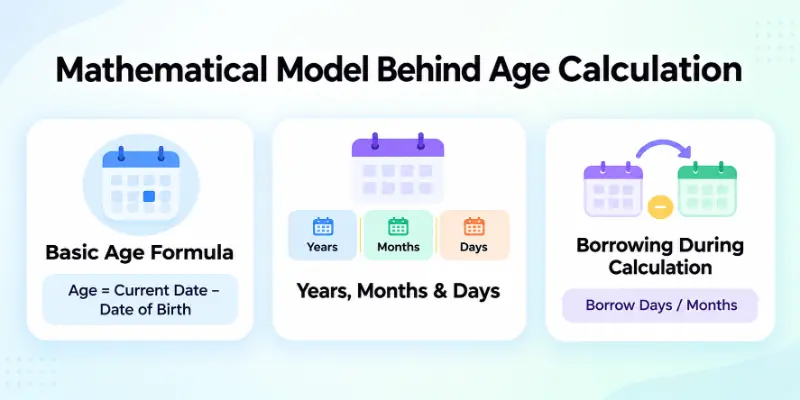
A correct age calculation checks the complete date, not just the year. Let’s understand how the formula works.
Basic Age Formula
The basic age formula is:
- Age = Current Date − Date of Birth
This formula compares two dates:
- Current Date: Today’s date or the date you want to calculate age on.
- Date of Birth: The person’s birth date.
The result is usually written in years, months, and days.
For example:
- Date of Birth: 15 August 2000
- Current Date: 20 September 2026
Age = 26 years, 1 month, 5 days
This formula gives the correct result only when it compares the full date. If you subtract only the years, you may get the wrong age.
For example:
- Current Year: 2026
- Birth Year: 2000
2026 − 2000 = 26
This answer looks correct, but it is not always right.
Now look at another example.
- Date of Birth: 15 December 2000
- Current Date: 20 September 2026
The simple subtraction still gives 26.
However, the birthday has not arrived yet. The correct age is 25 years, 9 months, and 5 days. This is why professional age calculations never depend only on the birth year.
Breaking the Formula Into Years, Months, and Days
A proper age calculation checks the date in three parts.
Step 1: Calculate the Years
Subtract the birth year from the current year.
Example:
- Current Year: 2026
- Birth Year: 2000
2026 − 2000 = 26 years
This is only the starting point.
Step 2: Calculate the Months
Next, compare the current month with the birth month.
Example:
- Birth Month: August
- Current Month: September
September comes after August, so the month difference is: 9 − 8 = 1 month
Step 3: Calculate the Days
Now compare the days.
Example:
- Birth Day: 15
- Current Day: 20
20 − 15 = 5 days
The final age becomes: 26 years, 1 month, and 5 days
By checking years, months, and days separately, you get the exact age instead of an estimate.

How Borrowing Works During Age Calculation
Sometimes the current day is smaller than the birth day. In that case, you cannot subtract the numbers directly. You need to borrow days from the previous month.
For example:
- Date of Birth: 25 May 2000
- Current Date: 10 June 2026
Start with the days.
- Current day = 10
- Birth day = 25
- Since 10 is smaller than 25, subtracting is not possible.
Take one month from June. The previous month is May, which has 31 days.
Now add those 31 days to the current day.
10 + 31 = 41 days
Now subtract:
41 − 25 = 16 days
Because you borrowed one month, the current month changes from June to May.
Now calculate the months.
5 − 5 = 0 months
Finally, calculate the years.
2026 − 2000 = 26 years
The final age is:
26 years, 0 months, and 16 days
The same idea applies to months.
Suppose the current month is smaller than the birth month.
Example:
- Date of Birth: 18 October 2000
- Current Date: 12 July 2026
July comes before October, so you cannot subtract the months directly.
Borrow one year from the current year.
One year equals 12 months.
The year changes from 2026 to 2025.
Now add 12 months to July.
7 + 12 = 19 months
Subtract the birth month.
19 − 10 = 9 months
Now calculate the years.
2025 − 2000 = 25 years
After adjusting the days, the final age becomes 25 years, 9 months, and the remaining days.

I have seen many people skip these borrowing steps when they calculate age by hand. That small mistake can change the final answer. This is why accurate age calculations always compare years, months, and days in order and borrow values whenever needed.
How Leap Years Affect Age Calculation
Leap years make age calculation a little more detailed because they add one extra day to the calendar. A correct age calculation must consider this extra day. If it does not, the final age may be off by one day, especially when the date range includes one or more leap years.
- A leap year has 366 days instead of 365. It includes an extra day, February 29, which appears once every four years.
- The extra day changes the total number of days between two dates. This is important when calculating an exact age in years, months, and days.
- People born on February 29 need special attention. In non-leap years, their birthday is usually observed on February 28 or March 1, depending on local laws or organization rules.
- The age calculation formula checks whether a leap year falls between the birth date and the current date. If it does, the calculation includes the extra day automatically.
- Manual calculations often miss leap years. I have seen many people calculate age by counting only 365 days per year. This usually gives the wrong number of total days.
- Official records always consider leap years. Schools, government offices, hospitals, banks, and other organizations use accurate age calculations that include every leap year.
- If you want the exact age, never ignore leap years. One extra day may seem small, but it can change the final result when calculating age down to the exact day.
How Different Month Lengths Affect the Formula
Not every month has the same number of days. This is why the age calculation formula cannot treat every month as equal.
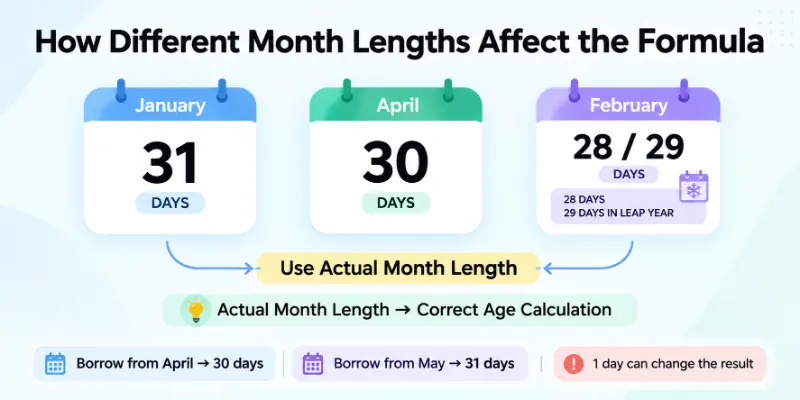
To find the correct age, it must use the actual number of days in each month:
- Some months have 31 days. These include January, March, May, July, August, October, and December.
- Some months have 30 days. These are April, June, September, and November.
- February is different from every other month. It has 28 days in a normal year and 29 days in a leap year.
- The formula uses the correct number of days when borrowing. For example, if you borrow from April, you add 30 days. If you borrow from May, you add 31 days.
- Using the wrong number of days changes the final age. Even a one-day mistake can make the result incorrect.
- Manual calculations become harder because every month is different. You need to know the exact number of days in the previous month before you borrow.
- Accurate age calculations always follow the calendar. They check the actual length of each month instead of assuming every month has 30 or 31 days. This helps produce the correct age in years, months, and days.
Where is the Age Calculation Formula Used?
The age calculation formula is used in many parts of everyday life. It helps people and organizations find a person’s exact age for legal, educational, medical, and financial purposes.
An accurate age calculation helps avoid mistakes and ensures that the right decisions are made:
- School and college admissions: Schools use age to check whether a student meets the minimum or maximum age requirement for admission.
- Government documents: Passport offices, national ID authorities, and other government departments verify a person’s age before issuing official documents.
- Job applications: Many employers check a candidate’s age to confirm they meet the age requirements for a specific job.
- Healthcare and hospitals: Doctors and hospitals use age to choose the right treatments, medicine doses, and vaccination schedules.
- Insurance services: Insurance companies use age to calculate premiums, policy terms, and eligibility.
- Banking and financial services: Banks may verify age before opening certain accounts, approving loans, or providing financial products.
- Retirement planning: Employers and government organizations use age to determine retirement dates and pension eligibility.
- Sports competitions: Many sports events divide participants into age groups to ensure fair competition.
- Competitive exams: Some entrance exams and government tests have minimum and maximum age limits that applicants must meet.
- Legal matters: Courts and legal authorities use a person’s exact age to decide eligibility, rights, and responsibilities under the law.
Final Note
So guys, it’s time to wrap up. In this article, we’ve covered how to calculate age with age calculator formula in detail. We learned how the mathematical formula works, how to calculate age manually, how leap years and different month lengths affect the result, and where this formula is used in real life.
From my experience, understanding the formula is much more useful than simply using an online calculator because it helps you verify whether the result is correct.
I hope this guide has made age calculation simple and easy to understand. If you found this article helpful, feel free to share it with others who want to learn the correct way to calculate age.
Helpful FAQs
Below are the most common questions people ask about how to calculate age manually using an age formula:
The easiest way to calculate age manually is to compare the current date with the date of birth. First, subtract the years, then compare the months and days. If the current month or day is smaller, borrow from the previous month or year to get the correct age.
The age calculator formula compares two dates instead of only two years.
It follows these basic steps:
- Compare the birth date with the current date.
- Calculate the years.
- Calculate the months.
- Calculate the remaining days.
- Adjust the result by borrowing when needed.
This method gives the exact age in years, months, and days.
If your manual calculation and an online age calculator show different results, one of your calculation steps may be incorrect. Many people forget to check whether the birthday has already passed or ignore leap years. A correct age calculation formula always considers the complete date before showing the final age.
To calculate age from date of birth, you need both the birth date and the current date. Compare the years first, then the months, and finally the days. If the current day or month is smaller than the birth day or month, borrow from the previous month or year before completing the calculation.
Leap years add one extra day to the calendar, which can affect the total number of days between two dates.
This is why an accurate age calculation should always consider leap years, especially when calculating the exact age in years, months, and days.
The age calculation formula is used in many real-life situations, such as:
- School and college admissions
- Passport and national ID applications
- Job applications
- Hospital records
- Insurance policies
- Retirement planning
- Government services
Accurate age calculation helps avoid errors in official records.
Yes, you can calculate age without using an online calculator. Once you understand how to calculate age using an age calculator formula, you can find the exact age with a pen, paper, and a calendar. It may take a little longer, but the result will be accurate if you follow each step carefully.
Many people think that subtracting the birth year from the current year gives the correct age. However, this method ignores the birth month and birth day, which can change the final result. That is why the age calculator formula checks the complete date before calculating age.
Before you start calculating age, make sure you have:
- The complete date of birth
- The current date
- The correct month lengths
- Leap year information, if needed
Having these details makes the calculation much easier and more accurate.
Learning how to calculate age using the age calculator formula helps you understand how age is calculated instead of simply trusting a result.
It also allows you to verify age for official documents, school admissions, and job applications whenever accuracy is important. Once you know the formula, you can calculate age confidently, even without an online age calculator.


- Be Respectful
- Stay Relevant
- Stay Positive
- True Feedback
- Encourage Discussion
- Avoid Spamming
- No Fake News
- Don't Copy-Paste
- No Personal Attacks
- Be Respectful
- Stay Relevant
- Stay Positive
- True Feedback
- Encourage Discussion
- Avoid Spamming
- No Fake News
- Don't Copy-Paste
- No Personal Attacks









