Trackball vs Mouse: Which Pointing Device Is Better?
Millions of people use pointing devices every day, but many still do not know the real difference between a trackball and a mouse.
In this detailed guide on trackball vs mouse, we will compare their features, comfort, gaming performance, precision, and daily use benefits. You will also learn the pros and cons of both devices and find out which one suits your needs better.
Whether you work, study, or play games, choosing the right device can improve your experience.
Ready to discover which option fits you best? Let’s dive in!
What is a Trackball?
A trackball is a pointing device that helps you move the cursor on a computer screen. It works differently from a mouse because you do not move the whole device. Instead, you roll a small ball with your finger or thumb to control the cursor.
We use a trackball when we want more control in a small space. It stays in one place, so you do not need to move your hand around the desk. This makes it useful for people who want comfort and better precision during work.
Uses of a Trackball
- Graphic design and photo editing
- Office work like documents and spreadsheets
- Limited desk space setups
- Industrial or control room systems
- People who prefer less wrist movement

What is a Mouse?
A mouse is a common pointing device that helps you control the cursor on a computer screen. You move it on a flat surface to point, click, and select items. It is one of the easiest tools to use for computer navigation.
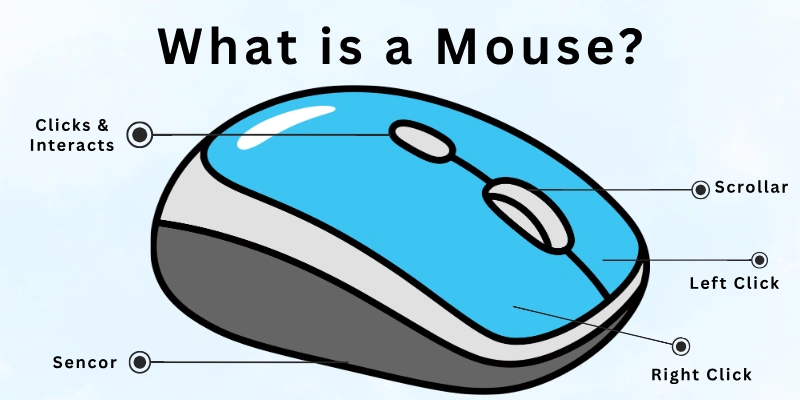
We use a mouse in almost every daily computer task. It gives smooth control and fast movement on the screen. Most people learn it quickly because it feels simple and natural in hand.
Uses of a Mouse
- Browsing websites and using apps
- Office work like typing and file management
- Playing computer games
- Graphic design and editing work
- Online learning and presentations
Comparison Table of Trackball versus Mouse
Here is a quick comparison of the difference between a mouse and a trackball. This table will help you understand both devices in a simple and clear way.
| Feature | Trackball | Mouse |
| Movement Style | Stays in one place | Moves on the desk surface |
| Control Method | You roll a ball with finger or thumb | You move the whole device |
| Learning Ease | Takes time to learn | Very easy for beginners |
| Desk Space | Needs very little space | Needs more space |
| Comfort | Reduces hand movement | May need more wrist movement |
| Precision | High control for detailed work | Fast and smooth movement |
| Best Use | Design work and small spaces | Daily use and gaming |
| Cleaning | Needs regular cleaning of ball | Easy to clean |
| Portability | Less portable | Easy to carry and use anywhere |
Detailed Feature Comparison of Mouse vs Trackball
Now we will look at the most important features that help you understand how a mouse and a trackball are different. These points will make it easy for you to compare both devices in real use.
Each feature shows how they perform in daily tasks:
- Comfort and Ergonomics
- Speed and Performance
- Accuracy and Precision
- Desk Space Requirement
- Learning Curve
- Gaming Experience
- Maintenance and Cleaning
- Durability and Lifespan
- Productivity in Daily Work
- Accessibility for Different Users (Right/Left Hand Use & Mobility Needs)
Let’s break down each feature in a simple way.
1. Comfort and Ergonomics
Here is how both devices feel when you use them for long hours of computer work.
A trackball keeps your hand mostly in one position. You only move your thumb or finger to control the ball. This reduces hand movement and can help reduce strain for some users.
A mouse needs you to move your whole hand across the desk. This feels natural for many people, but long-term use may cause wrist fatigue if your posture is not correct. It works well for users who prefer free movement.
2. Speed and Performance
Here is how both devices perform when you need fast cursor movement during daily tasks.
A trackball moves the cursor by rolling the ball. It can feel slower at first, but once you get used to it, you can make quick and controlled movements without moving your arm.
A mouse gives fast and direct movement because you slide it across a surface. It is often quicker for beginners and works smoothly for browsing, office tasks, and gaming.
3. Accuracy and Precision
Here is the difference in how precisely you can control the cursor on screen.
A trackball offers high precision because small finger movements can control the cursor very accurately. This is helpful in design work or detailed editing tasks.
A mouse also provides good accuracy, especially with modern sensors. It is easy to control, but very fine adjustments may need more hand movement compared to a trackball.
4. Desk Space Requirement
Here is how both devices use your workspace differently.
A trackball stays in one place, so it needs very little desk space. You can use it comfortably even in small or crowded work areas.
A mouse needs a flat surface to move around. It works best when you have enough desk space, which makes it less suitable for very tight setups.
5. Learning Curve
Here is how quickly you can learn to use each device.
A trackball takes some time to learn because the control method feels different. Users need practice to get smooth and accurate movement.
A mouse is very easy for beginners. Most people learn it quickly because moving and clicking feel natural from the start.
6. Gaming Experience
Here is how both devices perform when used for gaming.
A trackball can work well for strategy or simulation games. However, it may feel unusual for fast action games that need quick reflexes.
A mouse is widely used for gaming because it offers fast response and easy control. It is preferred for FPS and action games where speed matters.
7. Maintenance and Cleaning
Here is how much care each device needs over time.
A trackball needs regular cleaning because dust can collect around the ball. If not cleaned, it may affect smooth movement.
A mouse is easier to maintain. You only need to clean the surface and sensor area occasionally to keep it working well.
8. Durability and Lifespan
Here is how long each device can last with regular use.
A trackball can last a long time because it does not move around on the desk. Fewer moving parts outside means less wear on the device body.
A mouse is also durable, but it may wear out faster due to constant movement on surfaces. However, good-quality mice can still last for years.
9. Productivity in Daily Work
Here is how both devices affect your daily computer tasks.
A trackball can improve productivity for users who do detailed or focused work. It reduces hand movement and helps maintain steady control.
A mouse supports fast multitasking and is great for general office work. It allows quick switching between tasks and feels efficient for most users.

10. Accessibility for Different Users
Here is how both devices support different types of users and needs.
A trackball is useful for people with limited desk space or reduced arm movement. Some models also work well for both left- and right-handed users.
A mouse is designed for wide accessibility and works for almost everyone. It is simple to use and widely supported across all devices and systems.
Pros & Cons of a Trackball and Mouse
So guys, let’s understand the good and bad sides of both devices. This will help you choose the right option based on your comfort, work style, and daily use. We will look at each device separately in a simple way.
Pros of Using a Trackball
Let’s first look at the advantages of a trackball. It is designed for users who want more control and less hand movement. It also works well in small spaces and long work sessions.
- Better wrist comfort: A trackball reduces hand movement because you only move the ball with your fingers or thumb. This can help reduce wrist strain during long use.
- Saves desk space: It stays in one place, so you do not need a large working area. This is helpful for small desks or tight setups.
- High precision control: It allows very accurate cursor movement, which is useful for design work and detailed editing.
- Good for long use: Many users feel less fatigue because the arm does not move much.
- Stable usage: It does not slide or move around while working, so control stays steady.
Cons of Using a Trackball
Now let’s look at the disadvantages of a trackball. It is not the best choice for everyone, especially beginners or fast-paced users.
- Learning takes time: New users may find it difficult because the control method feels different from a mouse.
- Needs regular cleaning: Dust and dirt can collect around the ball and affect smooth movement.
- Not ideal for fast gaming: It may feel slow in action-based games that need quick reactions.
- Limited availability: Not all stores offer many trackball options compared to mice.
- Less familiar feel: Most people are used to mice, so switching can feel unusual at first.
Advantages of Using a Mouse
Now, let’s see the benefits of a mouse. It is the most common pointing device, and almost every computer user is familiar with it. It works smoothly for daily tasks.
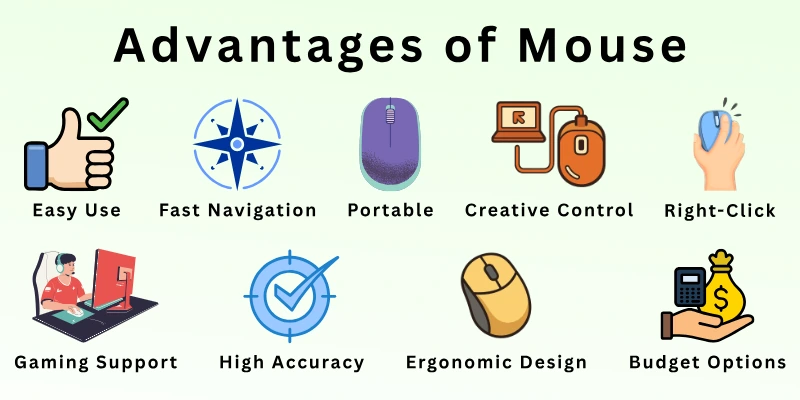
- Very easy to use: A mouse feels natural, and beginners can learn it in minutes.
- Fast movement: It allows quick navigation, which is great for browsing and multitasking.
- Perfect for gaming: It gives fast response time, especially in action and FPS games.
- Widely available: You can easily find a mouse in different styles and price ranges.
- Simple design: It does not require special training or adjustment.
Disadvantages of Using a Mouse
Now let’s look at the downsides of a mouse. Even though it is popular, it still has some limits.
- Needs desk space: You must have enough flat space to move it properly.
- Can cause wrist strain: Long hours of use may lead to discomfort if posture is not correct.
- Less precise for fine work: Very detailed tasks may feel harder compared to a trackball.
- Can wear out faster: Constant movement can reduce the lifespan of low-quality models.
- Depends on surface: It does not work well on uneven or unsuitable surfaces.
Who Should Use a Trackball?
A trackball works best for people who want better control with less hand movement. It also helps users who work in tight spaces or need more precision in their tasks.
Best Users for a Trackball:
- Graphic designers: A trackball gives smooth and precise control, which helps in detailed design and editing work.
- People with wrist pain: It reduces hand movement, which can help lower strain during long computer use.
- Users with small desks: It stays in one place, so it fits well in limited workspace setups.
- Precision-focused users: It works well for tasks that need careful and slow cursor control, like editing or CAD work.
Who Should Use a Mouse?
A mouse is a great choice for users who want quick movement and easy control. It works well for general tasks, gaming, and everyday computer use.
Best Users for a Traditional Mouse:
- Students and office workers: It is perfect for writing, browsing, and daily office tasks.
- Gamers: It offers fast response and smooth movement, which is important for gaming performance.
- Casual computer users: It is easy to use for simple tasks like internet browsing and media use.
- Beginners: It is very simple to learn, making it ideal for new computer users.
How to Choose Between a Trackball and a Mouse
Here are the most important things you should check before buying a pointing device. These points will help you avoid confusion and pick the right option for your needs:
- Consider comfort needs: Think about how your hand feels during long computer use. Choose the device that reduces strain and feels natural to you.
- Think about desk space: If you have a small desk, a trackball may fit better. A mouse needs more movement space to work properly.
- Check your work type: For design or precise work, a trackball can help. For gaming and daily tasks, a mouse is often better.
- Compare budget and features: Look at price, quality, and features before buying. Both devices come in different price ranges.
- Test both devices if possible: Try using both options before deciding. This helps you understand what feels more comfortable in real use.
Mistakes People Make When Choosing a Mouse or Trackball
Here are the most common errors users should avoid when buying a pointing device. Being aware of these can help you make a smarter choice:
- Ignoring comfort: Many people only focus on design or price and forget about hand comfort. This can lead to pain during long use.
- Choosing only by price: A cheap device may not give good performance or durability. Always balance price with quality.
- Not checking compatibility: Some devices may not work smoothly with all systems or setups. Always check before buying.
- Buying without testing grip style: Everyone holds devices differently. If the grip does not feel right, it can affect performance and comfort.
- Ignoring cleaning needs: Some devices, especially trackballs, need regular cleaning. Many users forget this and face issues later.
Conclusion
In this article, we’ve covered the trackball vs mouse in detail. We explored their features, comparisons, benefits, limitations, and practical use cases. Personally, I think a mouse works best for most people because it is easy to learn and fits daily tasks.
Still, a trackball is a great option for users who want better comfort and less arm movement. Your choice depends on your work style and comfort level.
Don’t skip the next part of the FAQs. I hope you will find something more interesting, so don’t miss it. If you miss it, you may lose something new.
Simple FAQs About Choosing a Trackball or Mouse
Now, let’s clear some common doubts people have about the difference between trackball and mouse. These quick answers will help you understand the topic better and make a smart decision without confusion:
A trackball stays in one place, and you move the ball to control the cursor. A mouse moves across the desk to move the cursor. Both help you control your computer, but they work in different ways.
A trackball is better for users who want less hand movement and more control. It can feel more comfortable during long working hours. A mouse is better for most people because it is simple and fast. It works well for everyday tasks like browsing and office work.
A trackball is often better for wrist pain because it reduces hand movement. You mainly use your fingers instead of your whole arm. This can help reduce strain over time.
A mouse may cause discomfort if used for long hours without proper posture. Many users prefer ergonomic trackball designs for relief.
A trackball is not the best choice for fast-action games. It can feel slow when quick reactions are needed. Some players still use it for strategy games. A mouse is better for gaming because it offers fast and smooth movement. It is widely used in FPS and competitive games.
Yes, a trackball saves a lot of desk space. It stays fixed in one position and does not need movement. A mouse needs a flat surface and more room to move around. It is less suitable for very small workspaces.
Yes, a trackball needs more cleaning because dust can collect around the ball. If not cleaned, it may affect smooth movement. A mouse is easier to maintain. You only need to clean the surface and sensor area occasionally.
Yes,
- Beginners can use a trackball, but it takes time to learn
- The control feels different from a normal mouse
- Practice helps improve speed and accuracy over time
A mouse is still easier for beginners. It feels more natural and needs no learning curve.
A trackball is often more durable because it does not move around on the desk. It has less external wear and tear. A mouse can also last long if it is of good quality. However, heavy daily movement may affect its lifespan over time.


- Be Respectful
- Stay Relevant
- Stay Positive
- True Feedback
- Encourage Discussion
- Avoid Spamming
- No Fake News
- Don't Copy-Paste
- No Personal Attacks
- Be Respectful
- Stay Relevant
- Stay Positive
- True Feedback
- Encourage Discussion
- Avoid Spamming
- No Fake News
- Don't Copy-Paste
- No Personal Attacks