
LCD vs OLED: Full Display Comparison Guide in 2026
Are you confused about whether to choose an OLED screen or an LCD one? You are not alone. Many people don’t know the real difference between these two types of screens.
Both OLED and LCD are used in TVs, phones, laptops, and monitors. But they are built differently and show colours in different ways. One uses tiny lights in each pixel, and the other uses a light behind the screen.
In this guide, we will explain everything in a very simple way. We will look at how each screen works, what makes them different, and which one is better for your needs.
Let’s learn about OLED vs LCD so you can make the best choice.
What Is an OLED Display?
An OLED display is a screen technology that creates light from small organic materials inside the screen. OLED stands for Organic Light Emitting Diode. Each pixel makes its own light, so the screen does not need a separate backlight. This helps the display show deep black colours and sharp picture quality.
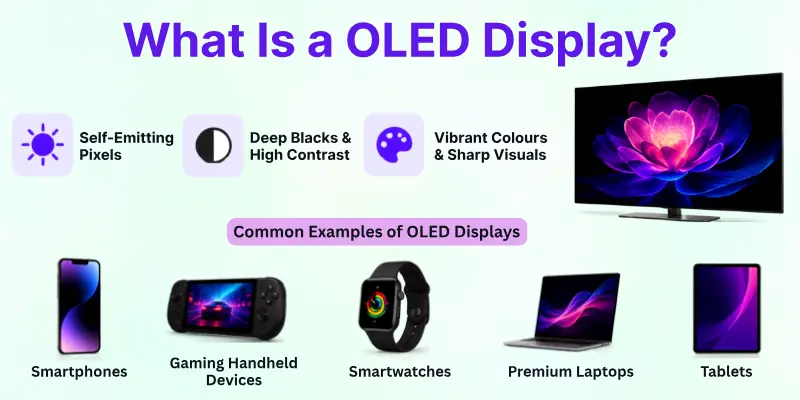
You can find OLED displays in many modern devices because they give bright colours and smooth visuals. Many people like OLED screens for watching movies, gaming, and using smartphones. These displays also look thinner and more stylish than many traditional screens.
Common Examples of OLED Displays:
- Smartphones
- Smart TVs
- Gaming handheld devices
- Smartwatches
- Premium laptops
- Tablets
What Is an LCD Display?
An LCD display is a screen technology that uses liquid crystals to show images and videos on the screen. LCD stands for Liquid Crystal Display. These crystals do not create their own light, so the screen uses a backlight to make the picture visible. This technology helps LCD screens deliver clear and bright visuals for daily use.
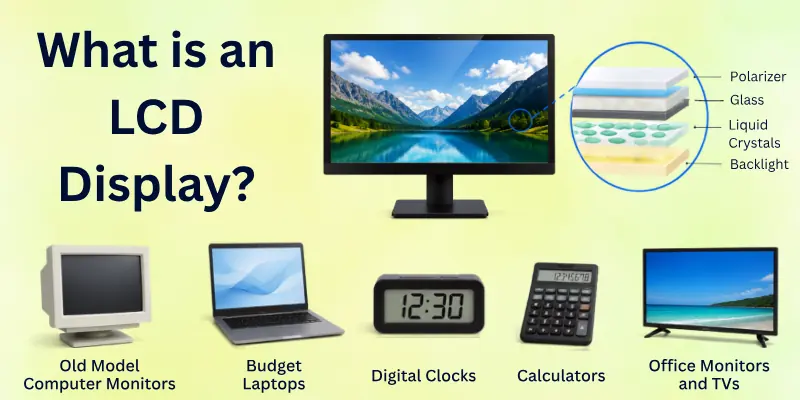
Many people use LCD displays because they are affordable and reliable. You can see them in homes, schools, offices, and public places. LCD screens also work well in bright rooms, which makes them a common choice for TVs, monitors, and laptops.
Common Examples of LCD Displays:
- Desktop monitors
- Budget smartphones
- LED TVs
- Office laptops
- Digital clocks
- Calculator screens
OLED vs LCD Comparison Table
Here is a quick difference between OLED and LCD displays. This table helps you understand how both screen technologies perform in daily use.
| Feature | OLED Display | LCD Display |
| Full Form | Organic Light Emitting Diode | Liquid Crystal Display |
| Backlight | Does not need a backlight | Uses a backlight |
| Black Levels | Shows true black colours | Blacks may look gray |
| Picture Quality | Sharper and more vibrant | Good but less deep |
| Brightness | Great in dark rooms | Better in bright rooms |
| Viewing Angles | Wider viewing angles | Limited viewing angles |
| Response Time | Faster response time | Slower than OLED |
| Screen Thickness | Very thin design | Slightly thicker |
| Power Usage | Uses less power in dark mode | Uses steady power |
| Burn-In Risk | Burn-in can happen | No burn-in problem |
| Lifespan | May reduce over time | Usually lasts longer |
| Price | More expensive | More affordable |
| Best For | Gaming, movies, and premium use | Daily work and budget use |
Differences Between OLED and LCD Features
Before we look at the full comparison, it helps to understand the key features that make OLED and LCD different. Each feature shows how both display types perform in real use.
These points will help you compare them easily and choose the right screen for your needs.
- Display Quality and Clarity
- Colour Accuracy and Performance
- Brightness Levels
- Black Levels and Contrast
- Viewing Angles
- Response Time and Motion Handling
- Power Consumption
- Screen Lifespan and Durability
- Thickness and Design
- Price and Affordability
Now let’s explore each point in detail.
1. Display Quality and Clarity
Here is how OLED and LCD differ when it comes to overall picture sharpness and clarity on screen:
OLED shows very sharp and clean images because each pixel lights up on its own. This gives a more detailed and smooth look, especially in videos and games. Dark and bright areas look more balanced, which improves overall clarity.

LCD also gives clear visuals, but it uses a backlight behind the screen. This can slightly reduce sharpness in dark scenes. Still, LCD works well for daily tasks like browsing, studying, and office work.
2. Colour Accuracy and Performance
Here is the difference in how OLED and LCD handle colours on the screen:
OLED produces rich and deep colours that look very close to real life. It performs very well in dark scenes and gives a more vivid viewing experience. This makes movies and games look more attractive.
LCD shows natural and balanced colours, but they may look less intense compared to OLED. In bright rooms, LCD still performs well and keeps colours stable. It is good for general use where extreme colour depth is not needed.
3. Brightness Levels
Here is how both OLED and LCD differ in screen brightness and visibility:
OLED screens offer strong brightness, but they are often optimized for balanced viewing in different lighting conditions. They perform very well in dark environments where contrast matters more than extreme brightness.
LCD screens usually produce higher constant brightness levels. This makes them easier to see in direct sunlight or very bright rooms. That is why many outdoor displays still use LCD technology.
4. Black Levels and Contrast
Here is the key difference in how OLED and LCD show dark areas on the screen:
OLED can turn off individual pixels completely, which creates true black colours. This gives very high contrast and makes images look deeper and more realistic. Dark scenes in movies look very powerful on OLED.
LCD cannot turn off pixels fully because of the backlight. This means black areas may look slightly gray. Even so, LCD still provides decent contrast for everyday viewing.
5. Viewing Angles
Here is how OLED and LCD differ when you look at the screen from the side:
OLED maintains strong picture quality even when viewed from wide angles. Colours and brightness stay consistent, which improves the group viewing experience. You can move around without losing image quality.
LCD screens often lose some brightness and colour accuracy from side angles. The image may look faded or washed out when not viewed directly. This can affect shared viewing in some situations.
6. Response Time and Motion Handling
Here is the difference in how fast OLED and LCD respond to moving images:
OLED has a very fast response time because each pixel changes instantly. This reduces motion blur and makes fast action scenes look smooth. Gamers often prefer OLED for this reason.
LCD is slower in response compared to OLED. This can sometimes cause a slight blur during fast movements. However, newer LCD screens have improved a lot for gaming and video playback.
7. Power Consumption
Here is how OLED and LCD differ in energy usage during screen operation:
OLED uses less power when showing dark content because black pixels turn off completely. This helps save battery on smartphones and laptops in dark mode. Power usage depends on what is shown on the screen.
LCD uses constant backlight power no matter what is displayed. This makes it less flexible in saving energy. It may consume more power during long use.
8. Screen Lifespan and Durability
Here is the difference in how long OLED and LCD screens last in regular use:
OLED screens can face burn-in if the same image stays on the screen for a long time. Over time, this may reduce display quality in some cases. However, modern OLED screens have improved protection.
LCD screens usually last longer without burn-in issues. They are more stable for long-term and continuous use. This makes them reliable for office and public displays.
9. Thickness and Design
Here is how OLED and LCD differ in screen design and physical structure:
OLED screens are thinner because they do not need a backlight layer. This allows manufacturers to create lightweight and modern-looking devices. Many premium gadgets use OLED for this reason.
LCD screens need extra layers for backlighting, which makes them slightly thicker. This adds more weight and reduces flexibility in design. Still, they remain strong and widely used.
10. Price and Affordability
Here is the difference in cost between OLED and LCD technology:
OLED displays are more expensive because of advanced technology and better image quality. They are usually found in premium devices. The higher price matches the better performance.

LCD displays are more budget-friendly and widely available. They are used in many affordable devices and everyday products. This makes them a practical choice for most users.
Advantages and Disadvantages of OLED and LCD
Now, let’s clearly understand the strengths and weaknesses of both OLED and LCD displays. This will help you decide which screen type fits your needs better in daily use.
Advantages of OLED Displays
Here are the main benefits of OLED displays and why many people prefer them for premium devices:
- Better picture quality: OLED shows sharp and clear images because each pixel produces its own light. This creates a more detailed and natural viewing experience.
- True black colours: OLED can turn off individual pixels completely. This helps create real black colours and improves contrast in movies and games.
- Thinner and lighter design: OLED screens do not need a backlight layer. This makes devices slimmer, lighter, and more modern in design.
- Faster response time: OLED changes pixels very quickly. This reduces motion blur and improves smoothness in fast videos and gaming.
- Better viewing angles: Colours and brightness stay strong even when you look from the side. This improves the group watching experience.
Disadvantages of OLED Displays
Here are some common drawbacks of OLED technology that users should know before buying:
- Higher price: OLED screens cost more because of advanced technology and better display quality.
- Risk of burn-in: If a static image stays too long, it may leave a permanent mark on the screen.
- Lower brightness in some cases: OLED may not always match LCD brightness in very bright sunlight or outdoor use.
- Shorter lifespan in heavy use: Over time, OLED pixels may lose brightness faster compared to LCD screens.
Advantages of LCD Displays
Here are the key benefits of LCD screens that make them popular in budget and everyday devices:
- More affordable price: LCD screens are cheaper to produce, making devices more budget-friendly for users.
- Good brightness levels: LCD performs well in bright environments and outdoor use due to strong backlighting.
- Longer durability: LCD screens do not suffer from burn-in issues, making them stable for long-term use.
- Reliable performance: LCD technology is stable and widely tested, so it works well for daily tasks.
- Wide availability: LCD screens are used in many devices like monitors, laptops, and TVs, making them easy to find.
Disadvantages of LCD Displays
Here are some limitations of LCD screens compared to newer display technology:
- Weaker black levels: LCD cannot produce true black because it uses a backlight, so blacks may look gray.
- Lower contrast ratio: Images may not look as deep or rich compared to OLED displays.
- Thicker design: LCD needs extra layers for backlighting, which makes devices less slim.
- Limited viewing angles: Colours and brightness may fade when viewed from the side.
- Slower response time: Fast-moving images may show slight blur compared to OLED screens.
Who Should Use an OLED Display?
Here is a simple guide to help you understand who gets the most benefit from an OLED display in daily use.
- You enjoy movies and videos: OLED is great if you love watching movies, series, or YouTube. It shows deep colours and strong contrast, which makes scenes look more real and exciting.
- You are a gamer: OLED works very well for gaming because it has a fast response time and smooth motion. Games look clearer, especially in action scenes.
- You care about display quality: If you want the best picture quality with rich colours and true black levels, OLED gives a premium viewing experience.
- You use a premium smartphone or laptop: OLED is common in high-end devices. It gives a modern look with a thin design and high visual quality.
- You often use your device in low light: OLED performs very well in dark rooms. It reduces eye strain and gives a comfortable viewing experience at night.
Who Should Use an LCD Display?
Here is a simple guide to help you understand who should choose an LCD display for daily use:
- You want a budget-friendly option: LCD is a good choice if you want a lower price. It gives solid performance without costing too much.
- You use a device for office or study work: LCD works well for typing, browsing, and online classes. It gives clear text and stable performance for daily tasks.
- You need a long-lasting screen for use: LCD is a safe choice for long hours of use. It does not have burn-in issues, so it stays stable over time.
- You use your device in bright places: LCD performs well in sunlight and bright rooms. It keeps the screen visible even in strong light.
- You want simple and reliable performance: LCD is a practical option for everyday use. It works well without needing advanced display features.
Tips for Choosing the Right Display
Here are some simple tips to help you pick the right display between OLED and LCD for your needs.
- Check your budget first: Always start with your budget. OLED costs more, while LCD gives a more affordable option with good performance.
- Think about your daily use: If you watch movies or play games, OLED gives a better visual experience. If you mainly do office or study work, an LCD is enough.
- Look at brightness needs: If you use your device outdoors or in bright sunlight, an LCD can be a better choice. It stays visible in strong light.
- Focus on picture quality: If you want deep colours and high contrast, OLED is the better option. It gives a more premium viewing experience.
- Check long-term use: If you plan to use the device for many years, the LCD is more stable. It has no burn-in risk.
- Consider battery usage: OLED can save more power in dark mode, which is helpful for phones and laptops.
- Match it with your lifestyle: Choose OLED if you want entertainment and high quality. Choose LCD if you want simple, reliable, and cost-friendly use.
Common Mistakes to Avoid When Comparing OLED and LCD
Here are some common mistakes people make when they compare OLED and LCD displays. Avoiding these can help you choose the right screen with more confidence:
- Only focusing on price: Many people choose the cheapest option without thinking about their needs. OLED is costly, but it gives better picture quality. LCD is cheaper, but it may not feel as premium.
- Ignoring your usage needs: Some users buy OLED even when they only do basic tasks. Others pick LCD but expect high-end movie quality. Always match the display with how you use your device.
- Thinking one display is always better: OLED is not perfect, and LCD is not outdated. Both have strong points. The better choice depends on your situation.
- Not checking brightness requirements: People often forget where they will use the device. LCD works better in bright sunlight, while OLED performs better in dark rooms.
- Overlooking burn-in risk in OLED: Some users do not know that OLED can face burn-in with static images. This can affect long-term use if not handled carefully.
- Ignoring long-term durability: LCDs often last longer without display issues. OLED gives better visuals but may need more careful use over time.
- Choosing based on hype only: Many people follow trends without research. Always check real features instead of just going with popular opinions.
Conclusion
And that’s the end of our LCD vs OLED journey. In this article, we’ve covered OLED vs LCD displays in detail. We looked at their features, picture quality, brightness, gaming performance, advantages, disadvantages, and best uses.
If you want premium visuals and better contrast, I think OLED is the stronger option. But if you need a budget-friendly and reliable screen for daily work, LCD is still a smart choice. Your final decision should depend on your budget and usage needs.
Now keep reading the FAQs because you may discover extra tips and answers that can help you choose the perfect display more easily.
Common Frequently Asked Questions
Here are some common questions people ask about the difference between LCD and OLED displays:
Yes, OLED is often better for gaming because it has faster response time and smoother motion handling. Games look sharper and more fluid, especially during fast action scenes. Many gamers also like OLED because of its deep black colours and stronger contrast.
LCD usually lasts longer because it does not face burn-in problems like OLED. It performs well for long daily use and stays stable over time.
OLED still offers excellent quality, but heavy use may slowly affect some pixels after many years. Modern OLED screens are much better now, but LCD remains stronger for long-term durability.
OLED can feel more comfortable in dark rooms because it produces deeper blacks and balanced contrast. Many users enjoy softer viewing during night use.
However, screen brightness settings also matter. No display is completely perfect for eye comfort if you use it for many hours without breaks.
Here are the main reasons why OLED screens cost more than LCD displays:
- OLED uses advanced screen technology
- It delivers better picture quality
- The design is thinner and more premium
- Manufacturing costs are higher
Because of these features, OLED devices usually come with higher prices.
Yes, LCD often performs better in very bright rooms and outdoor areas. Its strong backlight helps keep the screen more visible in sunlight. OLED also offers good brightness, but many LCD displays stay brighter for longer periods. This is why some users still prefer LCD for daytime use.
OLED burn-in usually happens when the same image stays on the screen for a very long time. Examples include fixed logos, maps, or game menus. Most modern OLED devices now include protection features to reduce this problem. Normal users may never notice burn-in if they use the screen properly.
OLED is usually better for movies because it shows richer colours and true black levels. Dark scenes look more realistic and cinematic. If you enjoy streaming, Netflix, or home theatre viewing, OLED can give a more premium entertainment experience compared to LCD.
Yes, LCD is still a strong choice for many users in 2026. It remains affordable, reliable, and widely available in TVs, monitors, and laptops. Many people still choose LCD for study, office work, and daily use because it offers solid performance at a lower price.
Battery usage depends on how you use the screen, but OLED can save more power in dark mode. Black pixels turn off completely, which reduces energy use.
Here are situations where OLED may use less battery:
- Watching dark-themed content
- Using dark mode apps
- Viewing black backgrounds
LCD uses constant backlight power, so it does not save energy in the same way.
If you want premium visuals, better contrast, and a modern viewing experience, OLED is a great option. If you need a simple and budget-friendly screen for regular tasks, LCD is the smarter choice.
You should compare your budget, daily work, and viewing needs before making the final decision.

- Be Respectful
- Stay Relevant
- Stay Positive
- True Feedback
- Encourage Discussion
- Avoid Spamming
- No Fake News
- Don't Copy-Paste
- No Personal Attacks
- Be Respectful
- Stay Relevant
- Stay Positive
- True Feedback
- Encourage Discussion
- Avoid Spamming
- No Fake News
- Don't Copy-Paste
- No Personal Attacks