
Capacitive vs Resistive Touchscreens – Key Differences in 2026
Capacitive and resistive touchscreens are the two most commonly used touchscreen technologies.
Capacitive screens detect touch through the electrical charge of your finger, while resistive ones respond to physical pressure. Both have unique strengths, and knowing the difference can save you from choosing the wrong screen.
In this guide, we’ll break down capacitive vs resistive touchscreens in the clearest way so you can make the right choice.
What is a Capacitive Touchscreen?
A capacitive touchscreen is a type of screen that works by using your finger’s natural electric charge. When you touch the screen, it detects the change and understands your command. It responds quickly and gives a smooth experience. You usually see this type of screen in smartphones, tablets, and modern devices.
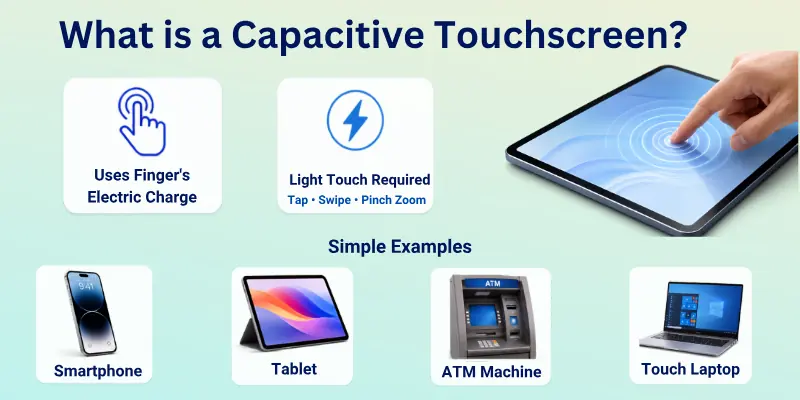
This screen does not need pressure to work. Even a light touch is enough. It supports fast actions like swipe, tap, and pinch zoom. That is why it feels more modern and easier to use in daily life.
Simple Examples of Capacitive Touchscreens
- Smartphones like Android and iPhones
- Tablets used for study or entertainment
- Modern ATM machines
- Touch laptops and smart kiosks
What is a Resistive Touchscreen?
A resistive touchscreen is a screen that works when you apply pressure to it. It has two thin layers inside. When you press the screen, the layers touch each other and send a signal. This is how the screen understands your input. It works even with a light pen, finger, or any object.
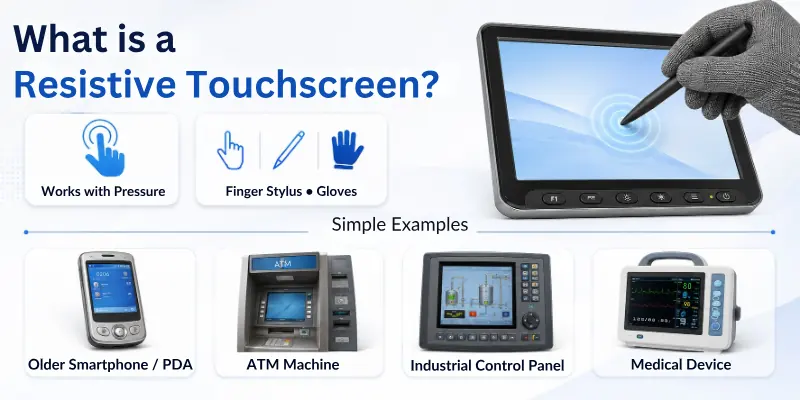
This type of touchscreen does not depend on electricity from your finger. It only needs pressure to work. It is simple and often used in older devices and some machines. It is also useful in places where users wear gloves or need precise input.
Simple Examples of Resistive Touchscreens
- Older smartphones and PDAs
- ATM machines in some regions
- Industrial control systems
- Medical devices and testing machines
Resistive vs Capacitive Touchscreens: Simple Comparison Table
Here is a clear comparison to help you quickly understand how the two touchscreen types are different. You can use this table to make a fast decision without confusion:
| Feature | Capacitive Touchscreen | Resistive Touchscreen |
| Touch Method | Works with finger touch only | Works with pressure from a finger or any object |
| Sensitivity | Very high and fast response | Less sensitive and slower response |
| Multi-Touch Support | Yes, supports gestures like zoom and swipe | No, usually single touch only |
| Display Clarity | Clear and bright display | Slightly less clear display |
| Durability | Strong and modern build | Can wear out faster with heavy use |
| Cost | More expensive | More budget-friendly |
| Best Use | Smartphones, tablets, modern devices | ATMs, industrial machines, and older systems |
| Input Flexibility | Only conductive touch works | Works with gloves, stylus, or any object |
Detailed Features Comparison: Capacitive vs Resistive Touchscreens
Before we compare both touchscreen types, let’s quickly understand the main features that affect their performance. These points will help you see how each screen works in real life and what makes them different.
Now let’s look at the key features:
- Touch Sensitivity
- Touch Technology
- Response Speed
- Multi-Touch Support
- Display Clarity
- Input Methods
- Durability
- Power Usage
- Cost
- Usage Environment
- Accuracy
- Maintenance Needs
So, now, guys, let’s cover each of them in detail.
1. Touch Sensitivity
Here is how both screens behave when it comes to how easily they detect touch.
A capacitive touchscreen reacts very quickly to even a light finger touch. You do not need to press hard, and it still responds smoothly. This makes daily use fast and comfortable, especially for scrolling and tapping apps. It feels natural, like using a modern smartphone.

A resistive touchscreen needs physical pressure to detect input. You must press the screen for it to respond correctly. This can slow down interaction a little, especially during fast tasks. However, it still works reliably in basic operations.
2. Touch Technology
Here is the difference in how both screens detect user input.
A capacitive touchscreen uses the electrical charge from your finger to detect touch. It senses changes on the surface and quickly converts them into actions. This technology is more advanced and widely used in modern devices. It gives a smoother and more responsive experience.
A resistive touchscreen works through pressure between two thin layers inside the screen. When you press, the layers touch and create a signal. This method is simpler and older, but still effective. It is commonly used in machines where basic input is enough.
3. Response Speed
Here is how both screens differ in how fast they respond to your actions.
A capacitive touchscreen responds almost instantly when you touch it. It reduces delay and makes the device feel very fast. This is useful for gaming, typing, and smooth navigation. It improves the overall user experience.
A resistive touchscreen responds slightly slower because it needs pressure to register input. The touch must be firm enough to activate the screen. This can create a small delay in fast tasks. Still, it works well for simple and controlled usage.
4. Multi-Touch Support
Here is the difference in how many touch points each screen can handle at once.
A capacitive touchscreen supports multi-touch gestures like zoom, rotate, and swipe with two or more fingers. This makes it more interactive and modern. It improves control in apps, maps, and games. Most smartphones depend on this feature.
A resistive touchscreen usually supports only one touch point at a time. It cannot properly handle advanced gestures like pinch-to-zoom. This limits interaction in modern apps. However, it still works fine for simple button-based input.
5. Display Clarity
Here is how both screens differ in visual quality and brightness.
A capacitive touchscreen offers clear, bright, and sharp display quality. It has fewer layers blocking the screen, so visuals look more vibrant. This improves the video-watching and reading experience. It is preferred in modern devices for better visuals.
A resistive touchscreen has multiple layers, which can reduce brightness and sharpness slightly. The display may look less clear compared to modern screens. This is noticeable in bright lighting conditions. Still, it is acceptable for basic tasks.
6. Input Methods
Here is the difference in how you can interact with both screens.
A capacitive touchscreen works mainly with a finger or a special capacitive stylus. It does not respond to normal objects like pens or gloves in most cases. This keeps input simple and smooth. It is designed for natural human touch.
A resistive touchscreen works with almost anything, including a finger, a stylus, a pen, or even a gloved hand. It only needs pressure to function. This makes it flexible in different environments. It is useful in industrial and outdoor settings.
7. Durability
Here is how both screens handle long-term use and physical stress.
A capacitive touchscreen is generally more durable because it has a solid glass surface. It can handle daily use without losing performance. It is resistant to light scratches. This makes it suitable for smartphones and tablets.
A resistive touchscreen is more sensitive to wear and tear over time. The flexible layers inside can degrade with heavy use. It may also get scratched more easily. However, it still works well in controlled environments.
8. Power Usage
Here is how both technologies differ in energy consumption.
A capacitive touchscreen uses very low power during normal use. It only activates sensing when touch is detected. This helps improve battery life in mobile devices. It is energy efficient overall.
A resistive touchscreen also uses low power but may require slightly more effort from the system to detect pressure. The difference is not very large in basic devices. It still works well in systems with limited power sources. However, it is less optimized than capacitive.
9. Cost
Here is the difference in pricing between the two touchscreen types:
A capacitive touchscreen is more expensive because it uses advanced technology. The materials and manufacturing process cost more. This increases the overall device price. It is common in modern premium devices.
A resistive touchscreen is cheaper to produce. Its design is simpler and uses older technology. This makes it ideal for low-cost devices. It is often chosen when the budget is important.
10. Usage Environment
Here is how both screens perform in different working conditions.
A capacitive touchscreen works best in clean and indoor environments. It may not work well with gloves or wet fingers in some cases. It is designed for normal everyday use. It is common in personal devices.
A resistive touchscreen works well in tough environments. It can be used with gloves, a stylus, or in dusty places. This makes it useful in factories and outdoor machines. It performs reliably in special conditions.
11. Accuracy
Here is how both screens differ in precision and control:
A capacitive touchscreen offers good accuracy with fast and smooth touch detection. It is ideal for general use but may struggle with very fine detail input. It is optimized for speed and convenience. Most users find it very easy to use.
A resistive touchscreen offers high accuracy for single-point input. It is better for tasks that need precise selection, like drawing or control panels. It may feel less smooth but more controlled. It is useful in technical applications.
12. Maintenance Needs
Here is the difference in how much care both screens require:
A capacitive touchscreen needs very little maintenance. Its glass surface is easy to clean and maintain. It stays smooth with regular use. It is designed for long-term consumer use.
A resistive touchscreen may need more care over time. Its layers can wear out with heavy use. It may also need calibration in some systems. It is more maintenance-sensitive compared to capacitive screens.
Pros and Cons of Capacitive and Resistive Touchscreens
Now, let’s clearly understand the good and bad sides of both touchscreen types. This will help you choose the right one based on your needs:
Advantages of Capacitive Touchscreens
Here are the key benefits that make capacitive screens modern and widely used:
- Fast response speed: It reacts instantly when you touch it, so everything feels smooth and quick in daily use.
- Multi-touch support: It allows gestures like zoom, swipe, and rotate, which make apps and games easier to control.
- Better display clarity: The screen looks bright and sharp because it has fewer layers blocking the view.
- Easy touch control: It works with a light finger touch, so you do not need to press hard at all.
- Modern user experience: It feels natural and smooth, especially for smartphones and tablets.
- Strong glass surface: It is more durable for regular everyday use and resists light scratches.
Disadvantages of Capacitive Touchscreens
Now, let’s look at the limitations you should know before choosing capacitive screens:
- Does not work with all objects: It only responds to a finger or a special stylus, so normal pens or gloves may not work.
- Higher cost: It is more expensive to produce, which increases the price of devices.
- Not ideal for rough use: It is less suitable for heavy industrial or very harsh environments.
- Performance issues with wet hands: Touch may not respond properly if your fingers are wet or oily.
- Costly repairs: If damaged, fixing or replacing the screen can be expensive.
Advantages of Resistive Touchscreens
Here are the main strengths that make resistive screens useful in specific areas:
- Works with any object: You can use a finger, stylus, pen, or even gloves to operate it easily.
- Good for precise control: It works well for single-touch tasks like buttons or control panels.
- Lower cost: It is cheaper to manufacture, making devices more affordable.
- Reliable in tough environments: It performs well in dust, heat, and industrial settings.
- Simple technology: It is easy to use and maintain in basic systems.
- Works under pressure input: It responds even if you press lightly or firmly, giving flexible control.

Disadvantages of Resistive Touchscreens
Now, let’s understand the weak points of resistive screens:
- Slower response time: It needs pressure, so it does not feel as fast or smooth.
- No multi-touch support: You cannot use gestures like zoom or pinch.
- Lower display quality: The extra layers reduce brightness and make the screen less sharp.
- Less smooth experience: It does not feel as modern or as easy as capacitive screens.
- Wear and tear over time: The layers can get damaged with heavy or long-term use.
- Not ideal for advanced use: It is not suitable for gaming or modern smartphone features.
Who Should Use Capacitive Touchscreens?
You should choose a capacitive touchscreen if you want a fast and smooth daily experience. It works best for people who use modern devices like smartphones, tablets, and touch laptops. It responds quickly, so it feels easy and natural during regular use.
We also recommend it for users who enjoy advanced features like multi-touch gestures. If you like zooming in pictures, scrolling fast, or playing games, this screen type will feel very comfortable. It gives better control and a more modern feel.
Best Users for Capacitive Touchscreens:
- Students using tablets or smart devices for study and learning
- Office users who need smooth navigation and fast typing
- Gamers who need quick response and multi-touch control
- General smartphone users for daily apps, browsing, and social media
- Content viewers who watch videos, scroll apps, and use touch gestures often
Who Should Use Resistive Touchscreens?
You should use a resistive touchscreen if you need a simple and low-cost solution. It works well for basic tasks where speed and advanced gestures are not important. It gives reliable performance in simple systems like machines and control panels.
We also suggest it for users who work in tough or special environments. If you use gloves, a stylus, or operate devices in dust, heat, or outdoor conditions, this screen works better. It responds to pressure, so it stays useful in many practical situations.
Best Users for Resistive Touchscreens:
- Industrial workers using control machines and factory systems
- ATM and kiosk operators who need simple touch input
- Medical staff using basic diagnostic or control devices
- Outdoor workers who may use gloves or tools while operating screens
- Budget device users who need low-cost and reliable touchscreen solutions
Tips for Choosing the Right Touchscreen for Your Needs
Choosing the right touchscreen depends on how and where you will use it. You should first understand your daily use before making a decision. This helps you avoid confusion and pick the best option easily.
You should choose based on your usage style. If you want smooth, fast, and modern use, a capacitive screen is better. If you need simple control, durability, and use in tough conditions, a resistive screen is a better choice.
Simple Tips to Help You Decide:
- Think about your daily use: If you use apps, games, or social media, go for capacitive. If you use machines or basic systems, resistive is enough.
- Check your environment: For indoor and clean use, capacitive works well. For dusty or industrial areas, resistive is more reliable.
- Decide your budget: If you want a low-cost device, resistive is cheaper. If you want better performance, capacitive is worth the price.
- Consider touch experience: If you want smooth gestures and fast response, capacitive is best. If you only need simple tapping, resistive works fine.
- Think about accessories: If you use gloves or a stylus often, a resistive one is more flexible. Capacitive works best with finger touch.
Common Mistakes People Make When Choosing Touchscreens
Many people pick a touchscreen without understanding how it actually works. This can lead to poor performance or a device that does not fit their needs. Let’s look at the most common mistakes so you can avoid them easily.
You should always match the screen type with your real usage. A good choice depends on where and how you plan to use the device, not just on price or looks.
Mistakes to Avoid When Choosing a Touchscreen:
- Choosing only based on price: Many users pick the cheapest option, but this can lead to slow performance or a poor experience if the screen type does not match their needs.
- Ignoring usage environment: Some people buy capacitive screens for rough or industrial use, but they may not work well in gloves, dust, or outdoor conditions.
- Overlooking touch needs: Users often forget whether they need multi-touch features like zoom or swipe, which resistive screens usually do not support.
- Not checking input method: Some devices require stylus or glove use, but capacitive screens may not support these properly.
- Thinking all touchscreens are the same: This is a common mistake. Capacitive and resistive screens work in very different ways and give different experiences.
- Ignoring long-term use: Some users do not think about durability, which can lead to faster wear in the wrong environment.
Conclusion
With that, our detailed comparison of capacitive vs resistive touchscreens comes to a close.
Based on my experience, capacitive touchscreens work best for most modern users due to their accuracy and multi-touch support. However, if you’re dealing with harsh environments or need glove-friendly input, resistive is the way to go.
Now it’s your turn, compare your needs and make the smart pick. And if you found this useful, feel free to pass it along!
Common FAQs
Let’s quickly answer some of the top questions people ask about capacitive vs resistive touchscreens:
The main difference is how they detect touch. A capacitive screen works with finger touch using electrical signals. A resistive screen works with pressure from any object.
Capacitive is faster and more modern. Resistive is simpler and more flexible for basic use.
It depends on your needs. Capacitive is better for smartphones, tablets, and a smooth user experience. Resistive is better for machines, ATMs, and industrial use.
If you want speed and modern features, go for capacitive. If you need durability and low cost, resistive is enough.
Capacitive touchscreens are used in modern devices. You will find them in smartphones, tablets, and touchscreen laptops. They are also used in smart kiosks and digital devices. These screens are common in daily life technology.
Resistive touchscreens are mostly used in special systems. They are found in ATMs, factories, and medical machines. They are also used in old devices and outdoor equipment. These screens are chosen for simple and strong performance.
Most resistive touchscreens do not support multi-touch. They usually detect only one touch point at a time. This limits advanced gestures like zoom or pinch.
However, they are still useful for simple button-based tasks. They work well where advanced features are not needed.
Capacitive touchscreens usually do not work with normal gloves. They need direct finger contact to detect electrical signals.
- Some special gloves may work with capacitive screens
- But most standard gloves will not respond
- This is why they are not ideal for heavy industrial use
Capacitive touchscreens are generally more durable. They use strong glass surfaces that handle daily use well. This makes them long-lasting for personal devices.
Resistive screens can wear out faster because of pressure layers. They may need more care over time.
Capacitive screens use advanced technology and better materials. This increases production cost and device price. That is why smartphones with capacitive screens are usually more expensive.
Resistive screens use older and simpler technology. This makes them cheaper and more budget-friendly.
Capacitive touchscreens give better display quality. They have fewer layers, so the screen looks brighter and sharper. Resistive screens have extra layers that reduce clarity slightly. This makes visuals less bright compared to capacitive screens.
Choosing depends on your usage and environment. You should check how you plan to use the device daily.
Simple guide:
- For smartphones and fast use → Capacitive
- For machines and outdoor systems → Resistive
- For gaming and multitouch → Capacitive
- For simple control systems → Resistive
Always match the screen type with your real needs, not just price


- Be Respectful
- Stay Relevant
- Stay Positive
- True Feedback
- Encourage Discussion
- Avoid Spamming
- No Fake News
- Don't Copy-Paste
- No Personal Attacks
- Be Respectful
- Stay Relevant
- Stay Positive
- True Feedback
- Encourage Discussion
- Avoid Spamming
- No Fake News
- Don't Copy-Paste
- No Personal Attacks