
LCD vs LED Guide: Which Screen is Better for You?
Are you confused between LCD vs LED and not sure which screen is better for your needs? Many people feel the same because both look similar, but work very differently.
LED vs LCD screens differ in brightness, power use, and picture quality, which makes the choice tricky.
In this article, we will break down LCD versus LED in simple words, compare their features, and explain which one suits you best. You will also learn about their pros, cons, and real-life use cases.
Let’s clear the confusion step by step and make your choice easy. Shall we start now?
What is an LCD Display?
An LCD stands for Liquid Crystal Display. It uses liquid crystals to show images on the screen. These crystals do not produce light on their own. A backlight helps them show clear pictures on the screen.
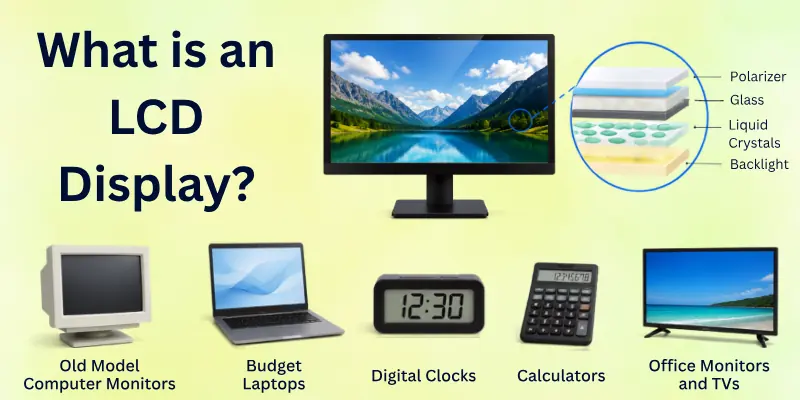
LCD screens are common in many devices like TVs, monitors, and laptops. They are known for clear display and low power use. People use them for daily work, study, and basic entertainment.
Simple Examples of LCD Devices
- Old model computer monitors
- Budget laptops
- Digital clocks and calculators
- Some office monitors and TVs
What is an LED Display?
An LED display stands for Light Emitting Diode display. It uses tiny LED lights to create images on the screen. These lights control brightness and colour very clearly. This helps the screen show sharper and brighter visuals.
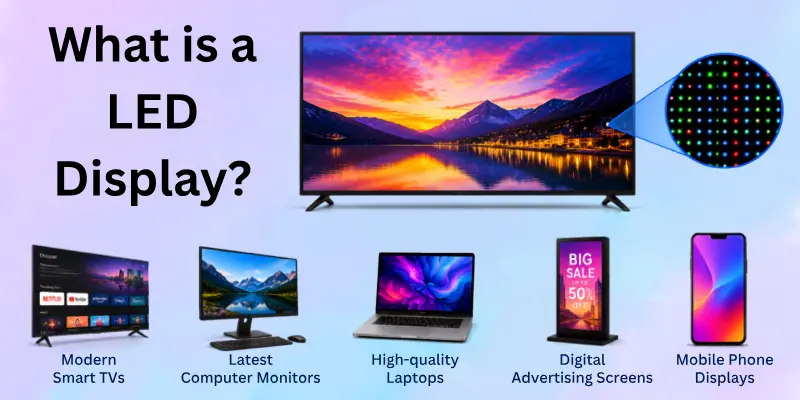
LED screens are an improved version of LCD screens. They give better brightness, better contrast, and use less power. People often choose LED displays for modern TVs, laptops, and monitors because they look clearer and more vibrant.
Simple Examples of LED Devices
- Modern smart TVs
- Latest computer monitors
- High-quality laptops
- Digital advertising screens
- Mobile phone displays

LCD vs LED Comparison Table
This table helps you understand LED versus LCD in a quick and easy way. You can compare both screen types side by side and see the main differences clearly:
| Feature | LCD Display | LED Display |
| Backlight | Uses fluorescent backlight | Uses LED lights |
| Brightness | Normal brightness | Brighter display |
| Picture Quality | Good for basic use | Sharper and more vivid |
| Energy Use | Uses more power | Uses less power |
| Thickness | Slightly thicker | Slim and modern design |
| Contrast | Lower contrast | Higher contrast |
| Price | Usually cheaper | Slightly more expensive |
| Usage | Basic devices and office work | Modern TVs, laptops, and monitors |
Differences Between LCD and LED Features
Before we compare LCD and LED in detail, it is important to understand the main features that make them different. These features help you see how each screen works in real life.
They also make it easier to choose the right display for your needs:
- Display Technology
- Backlight System
- Brightness Output
- Picture Quality
- Color Performance
- Power Consumption
- Screen Thickness
- Contrast Level
- Lifespan (Durability)
- Viewing Angles
- Heat Emission
- Response Time
- Cost / Price
- Environmental Impact
Now, let’s look at the key features one by one.
1. Display Technology
Here is how LCD and LED use different display systems:
LCD uses liquid crystals that depend on an external light source to form images. These crystals control light to show pictures on the screen. This is an older but still useful display method for basic devices.
LED also uses liquid crystals in most screens, but it uses LED lights for backlighting. This improves image clarity and makes the display more modern and efficient. It also helps screens look sharper and brighter.
2. Backlight System
Let’s look at how lighting works differently in LCD and LED screens:
LCD uses fluorescent lamps as the backlight. These lamps spread light across the screen to make images visible. This system is heavier and less energy-efficient.
LED uses small LED lights for backlighting. These lights give better control over brightness and improve picture quality. They also help make the screen thinner.
3. Brightness Output
Here is how brightness performance differs in LCD and LED displays:
LCD provides normal brightness that works well indoors. It may look less clear in strong light or sunlight. This limits its visibility in bright environments.
LED offers much higher brightness levels. It stays clear even in very bright conditions. This makes it better for modern viewing needs.
4. Picture Quality
Let’s understand how image quality changes between LCD and LED:
The LCD gives decent picture quality for everyday use. The images look clear but not very sharp or vibrant. It works fine for simple tasks.
LED delivers sharper and more detailed visuals. The images look more realistic and attractive. This improves the viewing experience for videos and games.
5. Colour Performance
Here is how colour display differs in LCD and LED screens:
The LCD shows basic and stable colours for normal use. The colours may look slightly dull in some cases. It is suitable for simple viewing needs.
LED produces richer and more vivid colours. The display looks more natural and eye-catching. This makes content more enjoyable to watch.
6. Power Consumption
Now let’s see how energy use differs in LCD and LED technology:
LCD uses more power because of its older lighting system. This increases energy usage over time. It is not very efficient for long-term use.
LEDs consume less power due to efficient lighting. It helps reduce electricity costs. This makes it a better long-term option.
7. Screen Thickness
Here is how design and thickness differ in LCD and LED screens:
LCD screens are usually thicker due to bulky backlights. This makes the design less slim. Older devices mostly use this structure.
LED screens are slimmer and more modern in design. The compact LED lights reduce overall thickness. This makes devices look more stylish.
8. Contrast Level
Let’s explore how contrast quality differs in LCD and LED:
LCD has lower contrast levels. Dark areas may look less deep and less clear. This reduces image depth.
LED provides higher contrast with deeper blacks. Bright and dark areas stand out clearly. This improves overall visual quality.
9. Lifespan (Durability)
Here is how long-lasting performance differs in LCD and LED:
An LCD can last many years with normal use. However, brightness may reduce slowly over time. This affects display quality.
LED usually lasts longer with stable performance. It maintains quality for a longer period. This makes it more reliable.
10. Viewing Angles
Let’s see how screen visibility changes from different angles in LCD and LED:
The LCD loses clarity when viewed from side angles. Colours may look faded or dull. This reduces shared viewing comfort.
LED offers wider viewing angles with better clarity. The picture remains stable from different positions. This improves group viewing.
11. Heat Emission
Here is how heat production differs in LCD and LED screens:
LCD generates moderate heat during use. This is due to older backlight technology. It can affect long-term usage comfort slightly.
LEDs produce less heat during operation. The system stays cooler and more efficient. This improves device performance.
12. Response Time
Let’s understand how fast screen response differs in LCD and LED:
LCD has a slower response time in fast-moving scenes. This can cause slight motion blur. It is noticeable in gaming or videos.
LED responds faster and shows smoother motion. The visuals stay clear during fast action. This improves user experience.

13. Cost / Price
Here is how pricing differs in LCD and LED screens:
LCD is usually cheaper and budget-friendly. It works well for basic needs. This makes it widely used.
LED costs more because of better technology. It offers better performance and quality. Many users prefer it for long-term value.
14. Environmental Impact:
Let’s see how eco-friendliness differs in LCD and LED technology:
LCD uses more energy and older materials. This makes it less eco-friendly. It is not very efficient for the environment.
LEDs use less power and last longer. It helps reduce energy waste. This makes it a more eco-friendly option.
Pros and Cons of LCD vs LED
Now, let’s clearly understand the advantages and disadvantages of both LCD and LED screens. This will help you see what works best for your daily use and what problems each one may have.
Advantages of LCD Screen
Here are the main benefits of LCD screens and why many people still use them:
- Low-cost option: LCD screens are cheaper, so they fit well in a small budget. They are often used in basic laptops, monitors, and TVs.
- Good for simple use: They work well for office work, study, and basic browsing. The display is clear enough for normal tasks.
- Stable performance: LCD screens give steady performance for long hours of use. They do not heat up quickly in normal conditions.
- Widely available: You can easily find LCD screens in many older and budget-friendly devices.
Disadvantages of LCD Screen
Here are the main drawbacks of LCD screens you should know:
- Lower brightness: LCD screens are not very bright, so they may look dull in strong light or sunlight.
- Limited picture quality: The colours and sharpness are not very strong compared to modern screens.
- Higher power use: LCD screens use more energy because of older backlight technology.
- Thicker design: These screens are usually bulkier and not very slim in design.
Advantages of LED Screen
Now, let’s look at why LED screens are more popular in modern devices:
- Better picture quality: LED screens show sharper and more detailed images. Everything looks clearer and more vibrant.
- High brightness: They perform very well even in bright rooms or sunlight.
- Energy efficient: LED screens use less power, which helps reduce electricity usage.
- Slim design: They are thinner and more modern in appearance.
- Better colour display: Colours look richer and more natural on LED screens.
- Longer lifespan: LED screens usually last longer and stay stable over time.
Disadvantages of LED Screen
Here are some limitations of LED screens you should consider:
- Higher price: LED screens are more expensive than LCD screens.
- Repair cost: If damaged, repairs can cost more compared to LCDs.
- Light sensitivity in cheap models: Low-quality LED screens may show uneven brightness.
- Overkill for basic users: For simple tasks, LED features may not be fully needed.
Who Should Choose LCD Screens?
Here is a simple guide to help you understand who should go for LCD screens:
LCD screens are a good choice for people who want a low-cost display for basic use. If you do simple tasks like typing, browsing, or watching normal videos, an LCD screen can work well for you. It gives stable performance without needing advanced features.
LCD is also a smart option for students, office users, and anyone on a tight budget. It works well in places where high brightness or ultra-sharp visuals are not needed. If you want a simple screen for daily work, an LCD is still a practical choice.
Best suited for:
- Students who use laptops for study and assignments
- Office workers doing basic typing and emails
- Users who need a budget-friendly monitor or TV
- People who use screens for light entertainment only
- Users who do not need high-end display quality
Who Should Choose LED Screens?
Here is a simple guide to understand who should choose LED screens for better results:
LED screens are a great choice for people who want better picture quality and modern display features. If you enjoy watching movies, playing games, or working with clear visuals, an LED screen will give you a better experience. It shows brighter and sharper images in daily use.
LED is also a smart option for users who care about energy saving and long-term performance. It works well in bright rooms and gives a comfortable viewing experience for long hours. If you want a stylish, slim, and high-quality screen, LED is the better choice.
Best suited for:
- Gamers who need smooth and clear visuals
- Movie lovers who want bright and sharp picture quality
- Users who work on modern laptops and monitors
- People who want energy-efficient devices
- Anyone who prefers a slim and stylish screen design
- Users who need better display performance for daily use
Tips for Choosing the Right Screen for Your Needs
Choosing the right screen becomes easy when you know what to look for. Here are some simple tips that help you pick the best option between LCD and LED based on your daily use.
Before buying any screen, think about how you will use it. If you only do basic work like browsing or typing, a simple display can be enough. But if you watch videos, play games, or need clear visuals, a better screen will give you a smoother experience.
Helpful Tips to Choose the Right Screen:
- Know your purpose: Decide if you need it for study, work, gaming, or entertainment
- Check your budget: Choose LCD for a low budget and LED for better quality
- Look at screen brightness: Pick a brighter screen if you sit in well-lit rooms
- Focus on usage time: For long use, choose a screen that is comfortable for the eyes
- Check display quality: Choose better clarity if you watch movies or edit visuals
- Think about energy use: Go for energy-saving screens if you use them daily for long hours
- Consider design: Slim screens look better in modern setups
Common Mistakes People Make When Choosing LED or LCD Screens
Many people make simple mistakes when buying a screen. These mistakes can affect their comfort, money, and long-term use. Here are the most common ones you should avoid.
Sometimes users only focus on price and ignore what they really need. This leads to a wrong choice that does not match their daily use. A little planning can help you avoid these problems easily.
Common Mistakes to Avoid:
- Choosing only based on price: Many people buy the cheapest option without checking features or usage needs
- Ignoring daily usage: Some users do not think about whether they need it for study, work, or entertainment
- Confusing LCD and LED features: People often think both are the same, which leads to wrong expectations
- Not checking screen quality: Skipping brightness, clarity, and viewing angles can reduce user experience
- Overlooking power consumption: Many users ignore energy use, which can increase long-term electricity costs
- Buying outdated models: Some people pick old designs that do not match modern needs
- Not thinking about eye comfort: Long screen time can become uncomfortable if the display quality is poor
Conclusion
In this article, we’ve covered LCD vs LED in detail, step by step, so you can clearly understand their differences, features, and use cases. We also explained the advantages, disadvantages, and the right choice for different users.
Personally, I suggest LED screens for most people because they offer better quality, brightness, and long-term value. Still, LCD is a good choice if you want something simple and affordable.
Don’t ignore the FAQs section ahead because it explains important questions in an easy way. You may discover something new that helps you make better decisions. Go through it carefully so you don’t miss helpful details.
FAQs About LCD vs LED Screens
Here are some frequently asked questions that will help you understand the difference between LED and LCD better and clear your final doubts:
The main difference between LCD and LED screens is their backlight system. LCD uses fluorescent backlights, while LED uses light-emitting diodes. This difference affects brightness, clarity, and power use.
LED screens give better picture quality and save more energy. LCD screens are older but still work well for basic use.
Yes, LED is better for most daily uses like watching videos, gaming, and browsing. It gives brighter and sharper visuals. LED screens also use less power and last longer. However, LCD is still good for simple office work and basic tasks.
LCD is a good option for budget users. LED is better for long-term value and performance.
- LCD screens are usually cheaper
- LED screens cost more but offer better features
- Price depends on size, brand, and quality
Yes, LED screens consume less electricity compared to LCD screens. They use modern lighting technology that saves energy. LCD screens use older backlight systems that need more power. This makes LED more energy-efficient and cost-saving.
LED screens give better picture quality with sharper and more vibrant images. They show deeper colors and higher contrast.
LCD screens offer decent quality but may look less bright and less detailed. That is why LED is preferred for movies and gaming.
Yes, LCD is still good for basic use like office work, study, and simple browsing. It is also cheaper, which makes it useful for budget users. However, LED is more modern and better for high-quality viewing. So choice depends on your needs.
LED screens usually last longer than LCD screens. They use better technology and stay stable for more years. LCD screens also last long, but may lose brightness over time. This makes LED a more durable option.
LED screens are often better for eye comfort because they offer adjustable brightness and a clearer display. This reduces strain during long use.
LCD screens may feel less bright and less sharp in some conditions. Proper screen settings matter in both types.
Yes, you can use an LCD for gaming or videos, but it is not the best choice. It may show slower response and less sharp visuals.
LED screens are better for smooth gameplay and a high-quality video experience. They reduce motion blur and improve clarity.
LED is better for modern TVs and monitors because it offers better brightness and picture quality. It also looks more stylish and slim. LCD is still used in some budget TVs and older monitors. But for better performance, LED is the preferred choice.

Screen for Online Classes: How to Choose Right Display for Comfortable & Productive Learning

- Be Respectful
- Stay Relevant
- Stay Positive
- True Feedback
- Encourage Discussion
- Avoid Spamming
- No Fake News
- Don't Copy-Paste
- No Personal Attacks
- Be Respectful
- Stay Relevant
- Stay Positive
- True Feedback
- Encourage Discussion
- Avoid Spamming
- No Fake News
- Don't Copy-Paste
- No Personal Attacks