Screen for Online Classes: How to Choose Right Display for Comfortable & Productive Learning
Students attend live lectures, professionals join meetings, and creators learn new skills directly through screens every day.
But most people ignore one important factor that affects everything: the screen itself. The display you use for online classes decides how clearly you see content, how long you can focus, and how comfortable your eyes feel during long sessions.
A poor screens for online classes can cause eye strain, distraction, and fatigue. A good one makes learning smooth, natural, and stress-free.
In this guide, you will learn how to choose the right screen based on real use, not just technical specs.
What is a Screen for Online Classes?
A screen for online classes refers to any digital display used for virtual learning activities. This includes laptops, monitors, tablets, and connected TV displays.
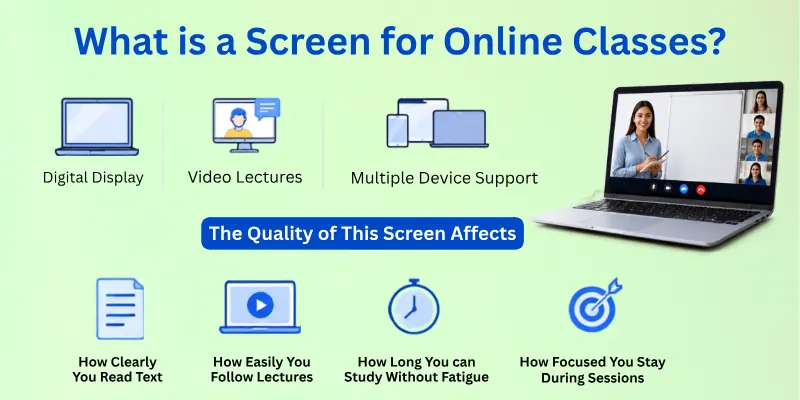
Its main role is to show video lectures, reading material, presentations, and communication tools like Zoom, Google Meet, or Microsoft Teams.
The quality of this screen affects:
- How clearly you read text
- How easily you follow lectures
- How long can you study without fatigue
- How focused you stay during sessions
In simple words, your screen is the main learning window between you and your online class.
Why the Right Screen Matters in Online Learning
Many people focus only on internet speed or software, but the screen is the most used part of online learning. If the display is not comfortable, your eyes work harder than your brain. This leads to fatigue and reduced attention.
A good screen for online classes improves:
- Visual clarity of text and slides
- Long-hour comfort without strain
- Focus during lectures and meetings
- Multitasking efficiency for notes and assignments
A poor screen leads to:
- Constant eye adjustment
- Headaches and dryness
- Low concentration
- Reduced learning speed
Think of it like reading a book. If the text is clear, reading feels smooth. If it is blurry or too small, your mind gets tired quickly.
Types of Screens for Online Classes
Different devices offer different learning experiences. Choosing the right one depends on how you study daily.
1. Laptop Screens for Online Classes
Laptops are the most commonly used devices for online learning because they are portable and easy to set up anywhere.
They work well for attending live lectures, joining meetings, and basic assignments. Students can carry them easily between home, coaching, or travel.
However, smaller screens can become uncomfortable during long sessions. Multitasking becomes difficult when multiple windows are open.
Best use case:
- Students attending mobile or flexible classes
- Basic daily learning and assignments
Limitations:
- Small display size
- Less comfortable for long study hours
- Limited multitasking space
2. Desktop Monitors for Online Learning
Desktop monitors are one of the best choices for serious and long-term online learning. A larger display gives you more space to manage lectures, notes, PDFs, and research together. This reduces the need to switch between tabs repeatedly.
They also help improve posture because you sit at a proper viewing distance instead of bending forward.
Best use case:
- Students attending long daily classes
- Professionals working from home
- Users who multitask heavily
Benefits:
- Large and clear viewing area
- Better productivity and focus
- Reduced eye movement and strain
- Ideal for long study sessions
3. Tablets for Light Online Learning
Tablets are portable and easy to use, making them useful for reading notes, short lectures, or casual learning. They are especially helpful for younger students or users who prefer touch interaction.
However, they are not suitable for long academic sessions or heavy multitasking because of the smaller screen size.
Best use case:
- Reading notes and PDFs
- Short online classes
- Secondary learning device
Limitations:
- Small display
- Limited multitasking capability
- Not ideal for long hours
4. Smart TVs for Online Classes
Smart TVs can be connected to laptops or streaming devices for a large-screen experience. They are useful for group learning, watching recorded lectures, or presentations.
However, they are not practical for active study work because the distance from the screen reduces engagement and interaction.
Best use case:
- Group learning sessions
- Watching recorded lectures
Limitations:
- Not suitable for daily study use
- Poor interaction for note-taking
- Requires proper distance setup

Ideal Screen Size for Online Classes
Screen size plays a major role in how comfortable and productive your online learning experience feels. A properly sized display helps you read clearly, manage multiple windows, and reduce eye strain during long study hours.
Choosing the right size depends on how you study, how much you multitask, and how long you stay on screen.
- Small screens (11–14 inches): Best for portability and basic learning, but limited for multitasking
- Medium screens (15–24 inches): Balanced option for most students with good clarity and comfort
- Large screens (27 inches and above): Ideal for heavy multitasking, advanced study, and long sessions
- Recommended range: 21–27 inches for the best comfort and productivity balance
- Better posture support with larger screens due to proper viewing distance
Best Screen Resolution for Online Learning
Screen resolution directly affects how sharp and clear your study material appears. A higher resolution reduces eye strain and makes text, diagrams, and video lectures easier to read.
For online classes, clarity matters more than anything else because you spend hours focusing on digital content.
- HD (1366×768): Basic clarity, suitable for very light usage but not ideal for long study
- Full HD (1920×1080): Standard and most recommended resolution for online learning
- 2K resolution: Offers extra sharpness, useful for advanced users and designers
- 4K resolution: Ultra-clear display, but not necessary for regular students
- Best choice: Full HD gives the perfect balance of clarity, performance, and affordability
Important Features for Comfortable Learning
A good screen is not only about size and resolution. Comfort features play an equally important role in protecting your eyes and improving long-term study performance.
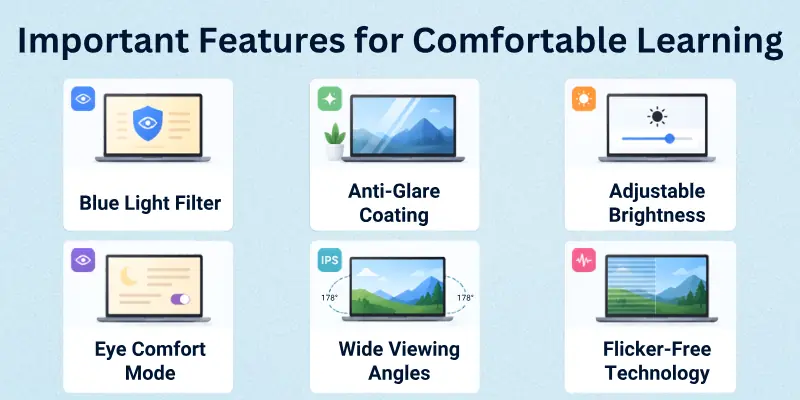
These features help reduce fatigue, improve visibility, and make your learning environment more comfortable.
- Blue light filter: Reduces eye strain during long study hours and improves sleep quality
- Anti-glare coating: Minimizes reflections from lights and improves screen visibility
- Adjustable brightness: Helps match screen brightness with room lighting conditions
- Eye comfort mode: Automatically adjusts display settings for long-duration usage
- Wide viewing angles (IPS panels): Keep visuals clear even when you shift position
- Flicker-free technology: Reduces screen flickering and prevents eye fatigue

IPS vs LED vs OLED Displays
Different display technologies affect how your screen looks, feels, and performs during long online classes. The right panel type can improve eye comfort, colour clarity, and overall learning experience.
Understanding these differences helps you choose a screen that matches your study needs:
- IPS (In-Plane Switching): Best for students, offers accurate colours and wide viewing angles for long study sessions
- LED (Light Emitting Diode): Most common and affordable option with good brightness and basic performance
- OLED (Organic LED): Premium display with deep blacks and high contrast, mainly used for high-end devices
- IPS is more stable for learning because it reduces colour shift during long use
- OLED delivers superior visuals, but it may be expensive for normal study needs
- LED is a budget-friendly choice, but not as colour-accurate as IPS
Best overall choice for online classes: IPS display
Which Screen Should You Choose?
Choosing the right screen depends on your study style, daily usage, and budget. Instead of focusing only on specifications, it is better to match the screen with your real learning needs.
- If you are a student, → A laptop with a Full HD display works for basic study
- If you attend long online classes, → A 21–27-inch IPS monitor is ideal
- If you need portability, → A laptop or tablet is more practical
- If you multitask heavily, → Dual monitor setup improves productivity
- If you have a low budget, → Start with a Full HD laptop screen
- If you want comfort + performance → Laptop + external monitor combo is best
Simple rule: choose based on comfort, not just price or size
Best Setup for Online Classes
A proper setup can completely change your online learning experience. Even a good screen performs better when your environment is organized and comfortable. The goal is to reduce strain and improve focus during long study sessions.
- Keep your screen at eye level to avoid neck strain
- Maintain proper distance (arm’s length from screen)
- Use a comfortable chair with back support
- Ensure soft and balanced room lighting
- Avoid studying in complete darkness with a bright screen contrast
- Keep your desk clean and distraction-free
- Use an external keyboard and mouse for better posture (if using a monitor)
A well-organized setup improves focus, comfort, and long-term study efficiency
Common Mistakes to Avoid
Many users make simple mistakes while choosing a screen for online classes. These mistakes often lead to discomfort, eye strain, and poor productivity during study sessions.
- Choosing low-resolution screens to save money
- Buying very large monitors for small desk spaces
- Ignoring eye-care features like a blue light filter and an anti-glare
- Not checking compatibility with the laptop or devices
- Focusing only on price instead of long-term comfort
- Using a poor lighting setup while studying
- Sitting too close or too far from the screen
Avoiding these mistakes ensures better comfort, focus, and long-term eye health.
Conclusion
So guys, it’s time to wrap up. In this article, we’ve covered the screen for online classes in detail. A good display is not a luxury anymore; it is an essential tool for effective learning.
Based on research and real use, I strongly suggest investing in a larger screen with anti-glare technology for better clarity and comfort. It makes reading, attending lectures, and completing assignments much easier. Do not settle for discomfort.
Choose the right screen for online classes today and improve your study experience immediately.
FAQs: Screen for Classes Online
Here are some frequently asked questions about choosing the best screen for online classes:
The best screen for online classes depends on comfort, clarity, and long-term use. Most students get the best results with a Full HD IPS monitor because it reduces eye strain and improves visibility.
- 21–27 inch screen size is ideal
- Full HD resolution is recommended
- The IPS panel gives better viewing comfort
Yes, a laptop is good enough for online classes, especially for basic study and attendance. However, long study hours can feel more comfortable with a larger external display.
A Full HD laptop works well for portability. If you study daily for long hours, adding a monitor improves productivity. It also helps reduce eye fatigue during extended sessions.
The ideal screen size for online classes is usually between 21 and 27 inches. This range gives a good balance of clarity, comfort, and multitasking space.
- 11–14 inches: Portable but small
- 15–24 inches: Balanced for most users
- 27+ inches: Best for advanced multitasking
Full HD (1920×1080) is the best screen resolution for online classes. It provides sharp text, clear video lectures, and comfortable reading for long hours.
Higher resolutions like 2K or 4K are optional. For most students, Full HD is enough. It also works well with most laptops and monitors.
IPS displays are better for online classes compared to standard LED screens. They offer better colour accuracy and wider viewing angles, which improve long-term study comfort.
LED screens are cheaper and more common. IPS is more stable for eye comfort and long learning sessions. That is why IPS is widely recommended for students.
You can reduce eye strain by using proper screen settings and healthy study habits. A screen for online classes with a blue light filter also helps a lot.
- Follow the 20-20-20 rule
- Adjust brightness based on room light
- Avoid studying in complete darkness
No, a 4K screen is not necessary for online classes. Most study content is perfectly clear on Full HD displays.
4K is mainly useful for video editing or design work. For students, Full HD gives the best balance of performance and cost. It also uses less power and system resources.
Yes, you can use a TV as a screen for online classes by connecting your laptop. It is useful for group learning or watching recorded lectures.
However, it is not ideal for daily study. Sitting too far can reduce focus and interaction. It works best as a secondary display, not a primary learning screen.
The best setup for online learning includes a proper screen position, good lighting, and comfortable seating. A well-organized desk improves focus and reduces distractions.
- Screen at eye level
- Proper chair with back support
- Clean and bright workspace
Many users choose screens based only on price, which leads to discomfort later. It is important to consider resolution, size, and eye comfort features.
Avoid:
- Low-resolution displays
- Oversized screens for small desks
- Ignoring blue light protection
A smart choice improves long-term study comfort and productivity.

- Be Respectful
- Stay Relevant
- Stay Positive
- True Feedback
- Encourage Discussion
- Avoid Spamming
- No Fake News
- Don't Copy-Paste
- No Personal Attacks
- Be Respectful
- Stay Relevant
- Stay Positive
- True Feedback
- Encourage Discussion
- Avoid Spamming
- No Fake News
- Don't Copy-Paste
- No Personal Attacks