Touch Screen vs Non Touch Screen Laptop: Comparison Guide
Choosing a laptop is not as simple as it looks, especially when comparing a touch screen vs non touch screen laptops.
Both types look similar, but they offer very different user experiences in daily life. One focuses on modern touch control, while the other focuses on classic keyboard use.
In this article, we will explore their key differences, features, benefits, and drawbacks in detail. You will also see which one is better for study, work, or personal use.
Let’s dive in and understand everything clearly before you decide.
What is a Touch-Screen Laptop?
A touch screen laptop is a type of laptop that lets you control the screen by touching it. You can tap, swipe, scroll, and zoom directly on the display, just like a smartphone or tablet. It removes the need to always depend on a mouse or touchpad for basic actions.
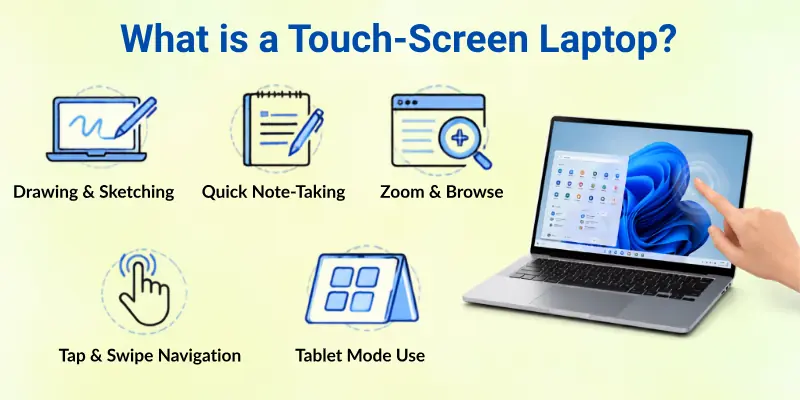
This type of laptop feels more interactive and easier to use. Many users like it for quick browsing, drawing, note-taking, and simple navigation. It gives a more modern and flexible way to use a laptop in daily tasks.
Common uses of a touch-screen laptop:
- Drawing or sketching with a finger or stylus
- Taking quick notes in class or meetings
- Zooming in and out while reading or browsing
- Navigating apps with simple taps and swipes
- Using it in tablet mode for casual work or entertainment
What is a Non Touch Screen Laptop?
A non touch screen laptop is a standard laptop that you control using a keyboard and a touchpad or mouse. The screen does not respond to touch. You cannot tap, swipe, or zoom directly on the display. You must use the cursor to interact with everything on the screen.
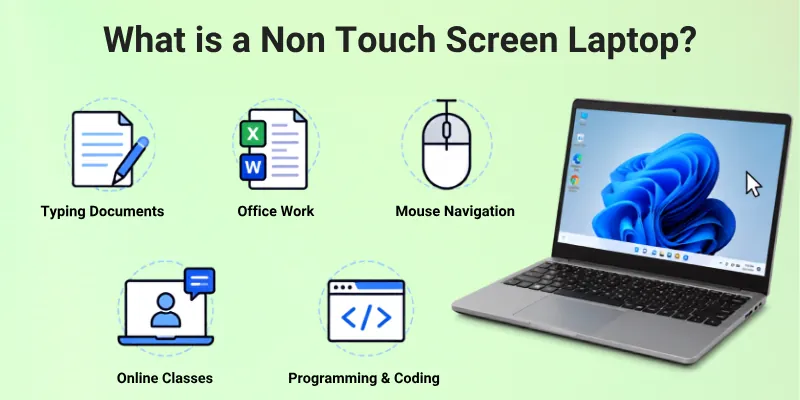
This type of laptop is the most common choice for everyday users. It is simple, stable, and easy to use for long hours. Many people prefer it for work, study, typing tasks, and browsing because it focuses on performance and comfort instead of touch features.
Common uses of a non touch screen laptop:
- Typing documents, assignments, and reports
- Working in office apps like Excel and Word
- Browsing websites using a mouse or touchpad
- Watching videos and attending online classes
- Programming, coding, and business tasks
Comparison Table of Touch Screen vs Non Touch Screen Laptop
Here is a quick comparison of touch screen laptop vs non touch screen laptop to help you understand the main differences in a simple way:
| Feature | Touch Screen Laptop | Non Touch Screen Laptop |
| Screen Control | You can touch, tap, and swipe the screen | You use a keyboard, touchpad, or mouse |
| Ease of Use | More interactive and modern | Simple and traditional |
| Battery Life | Usually drains faster | Usually lasts longer |
| Price | More expensive | More budget-friendly |
| Weight | Can be slightly heavier | Often lighter |
| Best For | Drawing, notes, casual use | Typing, office work, study |
| Performance | Depends on hardware, not screen | Depends on hardware, not screen |
| Durability | The screen is more sensitive | The screen is more durable in most cases |
Differences Between Touch Screen and Non Touch Screen Laptop Features
Here are the main features that clearly show the difference between a touch screen laptop and a non touch screen laptop. These points will help you understand how both types work in daily use and what makes them different from each other.
These features matter when you choose a laptop for study, work, or personal use. Each point below explains an important part of the experience, so you can make a better decision.
- Screen Interaction Style
- Input Control Method
- Display Responsiveness
- Battery Efficiency
- Pricing Difference
- Device Weight and Build
- Screen Durability
- Work Productivity Suitability
- Creative Work Support
- Gaming and Performance Use
- Portability for Travel
- Maintenance and Care Needs
Let’s take a closer look at all these in detail.
1. Screen Interaction Style
Here is how both laptops differ in the way you interact with the screen:
Touch Screen Laptop: A touch screen laptop lets you directly interact with the display using your fingers or a stylus. You can tap, swipe, zoom, and drag items easily. It feels similar to using a smartphone, which makes it very simple for quick actions.
Non Touch Screen Laptop: A non touch screen laptop does not allow direct screen interaction. You must use a keyboard, touchpad, or mouse to control everything. It gives a more traditional working style that many users still prefer for accuracy.
2. Input Control Method
Here is the difference in how you give commands to the laptop:
Touch Screen Laptop: You can control most actions by touching the screen. It reduces the need for extra devices like a mouse. This makes it more flexible for casual and creative use.
Non Touch Screen Laptop: All control depends on the keyboard, touchpad or external mouse. It is more precise for typing-heavy tasks. Many professionals prefer this method for speed and control.
3. Display Responsiveness
Here is how both laptops respond when you interact with the screen:
Touch Screen Laptop: The display responds instantly when you tap or swipe. It supports multi-touch gestures, which makes navigation smooth and fast. This adds a more interactive feel to the device.
Non Touch Screen Laptop: The screen only displays content and does not respond to touch. All actions depend on pointer movement through a mouse or touchpad. This keeps the system simple and stable.
4. Battery Efficiency
Here is how power usage differs between the two laptop types:
Touch Screen Laptop: Touch screen laptops use more battery because the display has extra touch sensors. This can reduce overall battery life during long use. Bright screens and touch activity also increase power usage.
Non Touch Screen Laptop: Non-touch screen laptops usually save more battery. They do not run touch sensors, which reduces power consumption. This makes them better for long study or work sessions.
5. Pricing Difference
Here is how the cost varies between these two laptop types:
Touch Screen Laptop: Touch screen laptops are usually more expensive. The extra hardware and technology increase the overall price. They are often seen in premium or modern models.
Non Touch Screen Laptop: Non touch laptops are more budget-friendly. They offer similar performance without extra touch features. This makes them a popular choice for students and office users.
6. Device Weight and Build
Here is how both laptops differ in size and physical design:
Touch Screen Laptop: These laptops can be slightly heavier due to added display layers. They are often designed with flexible hinges for tablet mode. This adds more features but can increase weight.

Non Touch Screen Laptop: Non touch laptops are usually lighter and simpler in design. They focus on basic structure without extra display hardware. This makes them easier to carry for daily use.
7. Screen Durability
Here is how strong and safe the screen is in daily use:
Touch Screen Laptop: Touch screens are more sensitive to pressure and scratches. They need careful handling to avoid damage. Many users also use screen protectors for safety.
Non Touch Screen Laptop: Non-touch screens are generally more durable. They are less sensitive because there is no direct touch layer. This makes them slightly more reliable for rough use.
8. Work Productivity Suitability
Here is how both laptops perform in daily work tasks:
Touch Screen Laptop: Touch-screen laptops help with fast navigation and quick tasks. They are useful for meetings, presentations, and creative work. However, they may not always be ideal for long typing sessions.
Non Touch Screen Laptop: Non touch laptops are better for long office work and typing tasks. They provide stable control for documents and spreadsheets. Many professionals rely on them for daily productivity.
9. Creative Work Support
Here is how both laptops help with design and creative tasks:
Touch Screen Laptop: Touch screen laptops are great for drawing and designing. You can use a stylus for sketching or editing. This makes them popular among artists and designers.
Non-Touch Screen Laptop: Non touch laptops support creative software but need a mouse or tablet for drawing. They are not as direct for sketching work. Still, they handle editing tools very well.
10. Gaming and Performance Use
Here is how both laptops handle gaming and performance tasks:
Touch Screen Laptop: Touch-screen laptops are not designed mainly for gaming. The touch feature does not improve gaming performance. Performance depends more on hardware than on the screen type.
Non Touch Screen Laptop: Non touch laptops are commonly used for gaming. They often focus on better cooling and performance. This makes them more stable for long gaming sessions.
11. Portability for Travel
Here is how easy both laptops are to carry and use on the go:
Touch Screen Laptop: Touch screen laptops can be used in different modes, like tablet mode. This adds flexibility while travelling. However, they may be slightly heavier.
Non Touch Screen Laptop: Non touch laptops are usually lighter and easier to carry. They focus on a simple design for travel use. Many users prefer them for daily commuting.
12. Maintenance and Care Needs
Here is how much care both laptops need in daily use:
Touch Screen Laptop: These laptops need more careful cleaning and handling. The screen can show fingerprints and smudges easily. Regular cleaning is needed to keep it clear.
Non-touch screen laptop: These laptops are easier to maintain. They do not show fingerprints as much. This makes them simple to keep clean and use daily.

Pros and Cons of Touch Screen and Non Touch Screen Laptop
Here is a simple look at the advantages and disadvantages of both touch screen and non touch screen laptops. This will help you understand which one fits your needs in daily life, study, or work.
Advantages of Touch-Screen Laptop
Touch-screen laptops offer a more modern and interactive way to use a computer:
- Easy Interaction: You can tap, swipe, and zoom directly on the screen like a smartphone.
- Faster Navigation: You can open apps and move around quickly with simple touch gestures.
- Better for Creativity: You can draw, sketch, and design using a finger or a stylus.
- Flexible Use: Many models support tablet mode for reading, watching, or casual use.
- User-Friendly for Beginners: Simple touch controls make it easy for new users to learn.
- Good for Presentations: You can control slides and content directly on the screen.
Disadvantages of Touch-Screen Laptop
Touch-screen laptops also come with some limits that you should consider before buying:
- Higher Price: They usually cost more than normal laptops.
- Battery Drain: Touch features use extra power, which reduces battery life.
- Screen Smudges: Fingerprints and marks appear easily on the display.
- Fragile Display: The screen is more sensitive and needs careful handling.
- Heavier Build: Extra touch layers can make the laptop slightly heavier.
- Not Always Needed: Many users do not fully use the touch feature.
Advantages of Non Touch Screen Laptop
Non touch screen laptops are simple, stable, and widely used for everyday tasks:
- Affordable Price: They are usually cheaper and fit most budgets.
- Longer Battery Life: No touch sensors help save more power.
- Better Durability: The screen is less sensitive to damage.
- Stable Performance: Focuses on keyboard and mouse use for accuracy.
- Ideal for Work: Great for typing, office tasks, and long study sessions.
- Lightweight Design: Often easier to carry and travel with.
Disadvantages of Non Touch Screen Laptop
Non touch screen laptops also have some limitations in modern use:
- No Direct Interaction: You cannot touch or swipe the screen.
- Less Creative Freedom: Not ideal for drawing or design work.
- Slower Navigation for Some Tasks: You must always use a mouse or touchpad.
- Less Modern Feel: Lacks the interactive experience of touch devices.
- Limited Flexibility: Cannot be used like a tablet.
- Not Ideal for Casual Use: Less convenient for quick browsing or entertainment.
Who Should Use a Touch Screen Laptop?
A touch-screen laptop is best for people who want a more interactive and flexible way of using a computer.
It works like a mix of a laptop and a tablet, so it fits users who prefer quick control, creativity, and easy navigation. It is not necessary for everyone, but it is very useful in specific situations.
- Students who take notes or draw: Touch screen laptops help students write notes, highlight text, and sketch ideas easily using a finger or stylus.
- Creative designers and artists: People who do drawing, graphic design, or editing can use touch features for better control and detailed work.
- Casual users for browsing and entertainment: If you mostly watch videos, read, or browse the internet, touch control makes everything faster and easier.
- Business professionals in meetings: It helps in presentations, slide control, and quick changes during meetings.
- Users who like modern technology: People who enjoy using new and flexible devices will find touch laptops more enjoyable.
- People who want tablet-like use: If you want both a laptop and tablet experience in one device, this is a good choice.
Who Should Use a Non Touch Screen Laptop?
A non-touch screen laptop is a better choice for people who want a simple, stable, and budget-friendly device. It focuses on keyboard and mouse use, which makes it very reliable for work, study, and long typing tasks.
It is widely used because it gets the job done without extra features:
- Students who mainly type and study: It is great for writing assignments, doing research, and attending online classes.
- Office workers and professionals: It supports daily office tasks like emails, spreadsheets, and reports with ease.
- People who want long battery life: Since it has no touch features, it saves more power for longer use.
- Budget-conscious buyers: It is more affordable and gives good performance at a lower price.
- Gamers and performance users: It works well for gaming and heavy software because it focuses on hardware performance.
- Users who prefer a simple design: If you like a traditional laptop experience without extra features, this is a good option.
How to Decide Between Touch and Non Touch Laptops
Choosing between a touch screen and a non touch screen laptop becomes easy when you clearly understand how you will use it.
Both options are good, but the right choice depends on your work, budget, and comfort. Think about your daily tasks before you decide.
- Check your daily use: If you mostly type, study, or work in office apps, a non-touch laptop is enough. If you like drawing, browsing fast, or using touch gestures, go for a touch-screen laptop.
- Think about your budget: Touch-screen laptops cost more. If you want to save money, a non-touch laptop is the better choice.
- Consider battery life: If you need long battery backup for study or travel, non-touch laptops are more suitable.
- Look at your work type: Creative users like designers and artists benefit more from touch screens. Office users and writers often prefer non touch laptops.
- Decide your comfort style: If you enjoy using a mouse and keyboard, go simple. If you like tapping and swiping like a phone, choose touch.
- Think long-term use: Choose a laptop that will still fit your needs after a few years, not just today.
Avoid These Errors When Choosing a Laptop
Many people rush their decision and end up buying a laptop that does not fit their real needs. If you understand these common errors, you can save money and choose a better device for long-term use.
- Buying for looks only: Many users pick a laptop just because it looks modern. Always check performance and features first, not design.
- Ignoring your daily needs: Do not buy a touch-screen laptop if you only need typing and basic work. Choose based on real usage.
- Overpaying for unused features: Some people pay extra for touch features but never use them. This wastes money.
- Not checking battery life: A laptop with a poor battery can create problems during study or work sessions.
- Forgetting portability needs: Heavy laptops are hard to carry. Always think about travel and daily movement.
- Skipping keyboard and screen comfort: You will use these every day, so make sure they feel comfortable for long use.
- Not planning for future use: Choose a laptop that will still support your needs after a few years, not just today.
Conclusion
In this article, we’ve covered touch screen vs non touch screen laptops in detail, along with their features, advantages, disadvantages, and best use cases.
Personally, I recommend a non touch screen laptop for students and office users because it gives strong performance, better battery life, and a lower price. A touch-screen laptop is a good choice for creative users who want more control and flexibility.
Don’t skip the next part of the FAQs. I hope you will find something more interesting, so don’t miss it. If you miss it, you may lose something new.
Common FAQs
Here are some frequently asked questions related to touchscreen vs non touch screen laptops:
Non touch screen laptops usually give better battery life. They do not use extra power for touch sensors. Touch screen laptops drain more battery because of the active display layer. So, non touch laptops are better for long use without charging.
A touch-screen laptop is worth it only if you use its features. It is great for drawing, design work, and flexible use. But if you only do typing, browsing, or office work, it may not be necessary. You may end up paying more for features you do not use.
Yes, many touch-screen laptops support tablet mode. You can fold or rotate the screen and use it like a tablet. This makes it useful for reading, watching videos, or casual use. It gives a mix of laptop and tablet experience.
Gaming performance does not depend on the screen type. However, non touch laptops are more common for gaming setups. They often focus on better cooling and strong hardware. Touch screen features do not improve the gaming experience.
Touch screen laptops are more sensitive than normal ones. The display can get damaged more easily if not handled carefully. Scratches and fingerprints also appear quickly. That is why proper care and protection are important.
Yes, non touch screen laptops are still very popular. They are widely used for office work, study, and programming. They are affordable and reliable for daily tasks. Many professionals still prefer them for stable performance.
Non touch screen laptops are usually better for office work. They are simple, fast, and comfortable for typing long documents. They also offer better battery life for full-day use. Touch laptops are less commonly used in office environments.
You should choose based on your daily needs. If you want drawing, notes, or tablet-like use, pick a touchscreen laptop. If you want typing, study, or office work, choose a non-touch laptop.
- Think about your budget before deciding
- Check your daily tasks and usage style
- Consider battery life and portability needs


- Be Respectful
- Stay Relevant
- Stay Positive
- True Feedback
- Encourage Discussion
- Avoid Spamming
- No Fake News
- Don't Copy-Paste
- No Personal Attacks
- Be Respectful
- Stay Relevant
- Stay Positive
- True Feedback
- Encourage Discussion
- Avoid Spamming
- No Fake News
- Don't Copy-Paste
- No Personal Attacks