
Wired vs Wireless Keyboard – Comparison Guide for Beginners
Technology keeps changing the way we work, and keyboards are no exception. The wired vs wireless keyboard debate is something every computer user comes across at some point. One gives you direct and stable performance, while the other offers freedom and a clean setup.
In this article, we will explore their differences, key features, pros and cons, and ideal use cases in a simple way. You will also get practical tips to choose the right one easily.
Let’s dive in and discover the better choice for you!
What Is a Wired Keyboard?
A wired keyboard is a simple typing device that connects directly to a computer using a cable. It sends your key presses through a physical wire, which keeps the connection stable and fast. You just plug it in, and it starts working without extra setup.
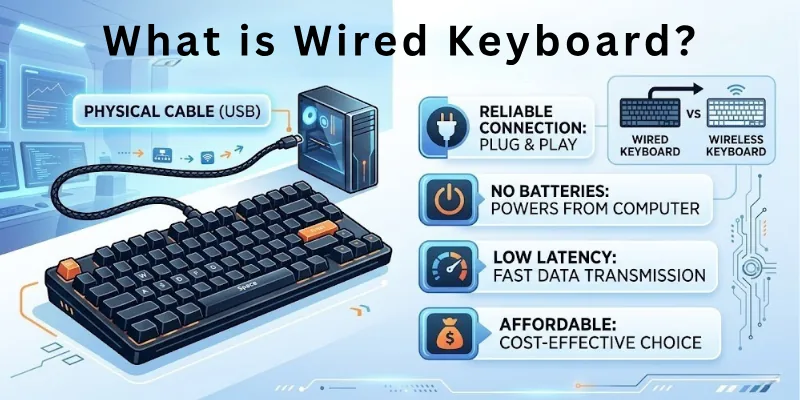
It usually connects through a USB port. The cable carries all the data from the keyboard to the computer in real time. This direct connection helps reduce delay, which makes typing smooth and quick.
Common Uses of Wired Keyboards
- Office work where stable typing is needed all day
- Gaming setups where fast response matters
- Desktop computers in schools and computer labs
- Workstations that need reliable and nonstop use
What Is a Wireless Keyboard?
A wireless keyboard is a typing device that connects to a computer without a cable. It uses signals like Bluetooth or a small USB receiver to send your keystrokes. This makes your desk cleaner and gives you more freedom to move the keyboard.
It runs on batteries or a built-in rechargeable battery. You can use it from a distance without sitting close to the computer. This makes it useful for both personal and professional setups where comfort and flexibility matter.
Common Uses of Wireless Keyboards
- Home use for laptops and smart TVs
- Students who need a clean and flexible setup
- Office workers who prefer a tidy desk
- People who present slides or control devices from a distance

Wired vs Wireless Keyboard: Comparison Table
Here is a quick comparison of wireless vs wired keyboards to help you understand the main differences in a simple way:
| Feature | Wired Keyboard | Wireless Keyboard |
| Connection | Uses a USB cable | Uses Bluetooth or USB receiver |
| Setup | Plug and play | Needs pairing or setup |
| Power Source | No battery needed | Works on battery or rechargeable power |
| Portability | Less portable due to the wire | Easy to carry and use anywhere |
| Performance | Very stable and fast response | Slight delay in some cases |
| Desk Setup | Slightly messy due to the cable | Clean and clutter-free |
| Cost | Usually cheaper | Usually more expensive |
| Best For | Gaming, office, heavy use | Home use, travel, flexible setup |
Key Features Explained: Wired Versus Wireless Keyboard
Before we look at the comparison in detail, it is important to understand the main features that affect how both wired and wireless keyboards work.
These features help you decide which keyboard fits your needs better in daily use:
- Connection Type
- Response Time
- Power Source
- Battery Life
- Portability
- Setup Process
- Durability
- Compatibility with Devices
- Build Quality
- Noise Level
- Keyboard Layout Options
- Cable Management (wired only)
- Wireless Range
- Multi-device Support
- Maintenance Needs
Let’s explore each feature in detail one by one.
1. Connection Type
Here is how both keyboards differ in the way they connect to a computer:
Wired Keyboard: This keyboard connects directly using a USB cable. It sends signals through a physical wire, which makes the connection stable. You do not need pairing or setup. You just plug it in and start typing right away.
Wireless Keyboard: This keyboard connects without cables using Bluetooth or a USB receiver. It sends signals through wireless technology instead of wires. You need to pair it with your device before use. This gives you more freedom to move around while working.
2. Response Time
Here is the difference in how fast both keyboards respond when you press a key:
Wired Keyboard: This keyboard gives an almost instant response. The signal travels through the cable without delay. This makes typing feel fast and smooth. It is often preferred for gaming and fast work.
Wireless Keyboard: This keyboard may have a slight delay in response. The signal travels through Bluetooth or a receiver. This delay is usually small but can be noticed in fast tasks. It still works well for normal daily typing.
3. Power Source
Here is how both keyboards get the power to function:
Wired Keyboard: This keyboard does not need any separate power source. It gets power directly from the computer through the USB cable. This means it never stops working due to battery issues. You can use it continuously without worry.
Wireless Keyboard: This keyboard depends on batteries or rechargeable power. You need to charge it or replace batteries after some time. If the battery runs out, the keyboard stops working. This makes power management important for users.
4. Battery Life
Here is how both keyboards differ in energy usage over time:
Wired Keyboard: This keyboard does not use a battery at all. It runs directly through the computer’s power. This removes the need for charging or replacements. It is simple and low-maintenance.
Wireless Keyboard: This keyboard has a limited battery life. Some last days, while others last weeks or months, depending on use. You need to recharge or change batteries regularly. This adds an extra step in daily usage.
5. Portability
Here is how easy it is to carry and use both keyboards in different places:
Wired Keyboard: This keyboard is less portable because of its cable. You need to manage the wire while carrying it. It is better for fixed setups like desks. Moving it often can feel a bit inconvenient.
Wireless Keyboard: This keyboard is highly portable. You can easily carry it in a bag without worrying about cables. It works well in different locations. This makes it ideal for travel and flexible work setups.
6. Setup Process
Here is how both keyboards differ when you first start using them:
Wired Keyboard: This keyboard has a very simple setup. You just plug the USB cable into the computer. It works instantly without extra steps. No software or pairing is needed.
Wireless Keyboard: This keyboard needs to be set up before use. You may need to pair it with Bluetooth or connect a USB receiver. Some models may need driver installation. It takes a little more time compared to wired keyboards.
7. Durability
Here is how both keyboards perform in terms of long-term use:
Wired Keyboard: This keyboard is generally very durable. It does not depend on batteries or wireless signals. However, the cable can wear out if handled roughly. Overall, it lasts long with proper care.
Wireless Keyboard: A wireless keyboard is also durable, but has more components. Battery and wireless parts may need care over time. If handled properly, it can last many years. But it may need maintenance more often than wired ones.
8. Compatibility with Devices
Here is how both keyboards work with different devices:
Wired Keyboard: This keyboard works with most computers that have a USB port. It is widely compatible with desktops and laptops. No special setup is needed for most systems. It works instantly when plugged in.
Wireless Keyboard: This keyboard works with devices that support Bluetooth or USB receivers. It can connect to laptops, tablets, and even smart TVs. Some models may have limited compatibility. You may need to check device support before buying.
9. Build Quality
Here is how both keyboards differ in physical design and strength:
Wired Keyboard: This keyboard often has a solid and simple build. It is designed for stable desk use. Many models focus on strength and long-term typing comfort. It is usually less complex in design.
Wireless Keyboard: This keyboard is often designed to be slim and modern. It focuses on portability and style. Some models are lightweight but still strong. Build quality can vary based on price and brand.
10. Noise Level
Here is how both keyboards differ in typing sound:
Wired Keyboard: This keyboard may produce more typing noise depending on the model. Mechanical wired keyboards are especially louder. Some users like the clicky sound, while others do not. It depends on the key type.
Wireless Keyboard: This keyboard is often quieter. Many models are designed for soft and silent typing. This makes them good for shared spaces. However, some wireless models can also be noisy.
11. Keyboard Layout Options
Here is how both keyboards differ in layout styles:
Wired Keyboard: This keyboard comes in many layout styles, like full-size and compact. It is widely available in standard QWERTY format. You can easily find different key arrangements. It suits both basic and advanced users.
Wireless Keyboard: This keyboard also comes in many layouts. Some are compact for travel, while others are full-size. Many modern designs focus on minimal space use. This gives users more choice based on need.
12. Cable Management (Wired Only)
Here is how cable handling affects both keyboards differently:
Wired Keyboard: A wired keyboard always has a cable attached. You need to manage the wire on your desk. It can sometimes create clutter. Good cable management helps keep the space clean.
Wireless Keyboard: This keyboard has no cable at all. This keeps your desk clean and organized. You do not need to worry about wire tangling. It creates a simple and neat workspace.
13. Wireless Range
Here is how distance affects usage in wireless vs wired setups:
Wired Keyboard: This does not have a range limit. It works as long as it is connected to the computer. You must stay close to the device because of the cable. Movement is limited.
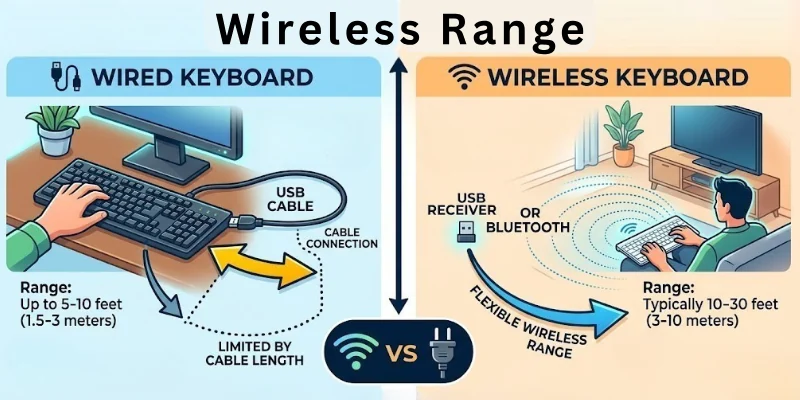
Wireless Keyboard: This keyboard works within a certain range. You can use it from a distance, usually a few meters. This gives you flexibility in movement. It is useful for presentations or TV use.

14. Multi-device Support
Here is how both keyboards handle more than one device:
Wired Keyboard: A wired keyboard usually connects to one device at a time. You need to unplug it to switch devices. It is simple but not flexible. It works best for single-device setups.
Wireless Keyboard: A wireless keyboard can connect to multiple devices in some models. You can switch between a laptop, tablet, or phone easily. This saves time and effort. It is useful for multitasking users.
15. Maintenance Needs
Here is how both keyboards differ in care and upkeep:
Wired Keyboard: A wired keyboard needs very little maintenance. You mainly keep it clean and dust-free. There is no battery to manage. It is easy to maintain overall.
Wireless Keyboard: A wireless keyboard needs more attention. You must charge it or replace batteries regularly. It also needs proper care for the Bluetooth or receiver connection. This adds a bit more maintenance work.
Advantages and Disadvantages of Wired Keyboards
Now let’s understand the real benefits and limits of wired keyboards so you can see where they perform well and where they fall short.
Benefits of Wired Keyboards
Wired keyboards are known for stable performance and simple use in everyday computing:
- Stable connection: They stay connected through a cable, so the signal does not drop during use.
- Fast response: Key presses reach the computer instantly without delay.
- No charging needed: They work directly through the computer’s power, so you never worry about batteries.
- Easy setup: You just plug in the USB cable and start using it right away.
- Affordable option: Most wired keyboards cost less than wireless models.
- Reliable for long use: They work well for office tasks, gaming, and heavy typing sessions without interruption.
Limitations of Wired Keyboards
Even though wired keyboards are reliable, they also come with some practical limits:
- Limited movement: The cable keeps you tied to a fixed position near the computer.
- Cable clutter: Wires can make your desk look messy if not managed properly.
- Less portable: It is not easy to carry and use in different places.
- Restricted flexibility: You cannot use it comfortably from a distance.
- Set up space needed: You need a proper desk arrangement to handle the cable.
Benefits of Wireless Keyboards
Wireless keyboards focus on comfort, flexibility, and modern workspace design:
- Clean setup: No wires means a neat and organized desk.
- High mobility: You can use it from a distance without sitting close to the computer.
- Easy portability: It is light and easy to carry anywhere.
- Flexible use: Works well with laptops, tablets, and smart devices.
- Modern design: Most wireless keyboards come in slim and stylish shapes.
- Comfortable usage: You can adjust your working position freely.
Limitations of Wireless Keyboards
Wireless keyboards are convenient, but they also have some practical challenges:
- Battery dependency: You need to charge or replace batteries regularly.
- Possible delay: Some models may have a slight input lag compared to wired ones.
- Connection issues: Bluetooth or receiver signals can sometimes drop or weaken.
- Higher cost: Wireless keyboards are usually more expensive than wired ones.
- Extra maintenance: You need to manage charging and wireless connections properly.
Who Should Use a Wired Keyboard?
Now, let’s understand who gets the most benefit from using a wired keyboard in daily work and tasks.
- Office workers: You should use it if you need stable typing for long hours without interruptions.
- Gamers: It works best for you if you want a fast response and zero delay during gameplay.
- Students in labs: It is a good choice if you use desktop computers in schools or computer labs.
- Heavy typists: You should prefer it if you type a lot and want a reliable connection.
- Fixed workstation users: It fits well if you always work at the same desk.
Who Should Use a Wireless Keyboard?
Now let’s see who benefits more from a wireless keyboard in everyday life:
- Home users: You should use it if you want a clean and simple desk setup.
- Students: It works well for you if you use laptops, tablets, or move between places.
- Travel users: It is a good option if you carry your keyboard with you often.
- Presenters: You should choose it if you control slides or devices from a distance.
- Multi-device users: It fits you if you switch between a laptop, tablet, or phone regularly.
Tips for Choosing the Right Keyboard (Wireless Keyboard or Wired Keyboard)
So, guys, let’s understand how you can choose the right keyboard based on your daily use, comfort, and work needs. This will help you avoid confusion and pick the best option easily.
- Check your purpose first: You should decide if you need it for gaming, office work, study, or casual use before buying.
- Choose speed or flexibility: Pick a wired keyboard if you want fast and stable typing, or choose wireless if you want freedom of movement.
- Look at your desk setup: You should go for wired if you don’t mind cables, but wireless is better if you want a clean workspace.
- Think about battery needs: Wireless keyboards need charging or batteries, so choose wired if you want zero power worries.
- Check device compatibility: Make sure the keyboard works with your laptop, PC, tablet, or other devices.
- Focus on comfort: You should always choose a keyboard that feels comfortable for long typing sessions.
- Set your budget: Wired keyboards are usually cheaper, while wireless options can cost more depending on features.
Conclusion
Let’s close it out for today. In this article, we’ve covered wired vs wireless keyboards in detail, from how they work to their real-life benefits and drawbacks.
I personally suggest a wired keyboard for users who need fast and reliable typing, while wireless keyboards suit people who prefer mobility and a tidy desk. Always pick based on your usage style, not just looks.
Don’t skip the next part of the FAQs. I hope you will find something more interesting, so don’t miss it. If you miss it, you may lose something new.
Popular FAQs
Below are some FAQs that help clear doubts about wired keyboard vs wireless keyboard:
A wired keyboard is better if you want stable and fast performance. It works well for office work and gaming without delay. A wireless keyboard is better if you want a clean and flexible setup.
Some wireless keyboards may have a small delay in response time. This happens because the keyboard sends signals through Bluetooth or a wireless receiver instead of a direct cable connection. Weak signals or a low battery can also cause slower performance sometimes.
This delay is usually very small and does not affect normal typing or office work. However, gamers or fast typists may notice it more during quick actions. High-quality wireless keyboards reduce this issue and give a smoother experience.
Wired keyboards are often better for gaming because they give an instant response. They do not depend on batteries or signals. This makes gameplay smoother and more reliable.
Before buying a keyboard, always check your usage needs first. You should also check the connection type, comfort, and battery life if it is wireless.
Here are key things to consider:
- Your work type (gaming, office, study)
- Wired or wireless preference
- Device compatibility
- Budget and comfort level
Wireless keyboard battery life depends on usage and model. Some last a few weeks, while others can last months. Rechargeable models can be used again after charging.
Both can be durable if used properly. Wired keyboards last longer because they have fewer electronic parts. Wireless keyboards may need battery care, but can also last many years.
Yes, you can use them with most modern laptops easily if they support the required connection type.
- Most wireless keyboards work with laptops that support Bluetooth
- Some use a USB receiver for connection
- Always check compatibility before buying
Wired keyboards are usually cheaper than wireless ones. They offer a simple design and fewer features. Wireless keyboards cost more because of added technology and convenience.
Wireless keyboards do not need the internet to work. They connect using Bluetooth or a USB receiver. They only need power from batteries or charging.
For office work, both keyboards can be useful. Wired keyboards are good for long typing hours and stability. Wireless keyboards are better if you want a clean and flexible desk setup.


- Be Respectful
- Stay Relevant
- Stay Positive
- True Feedback
- Encourage Discussion
- Avoid Spamming
- No Fake News
- Don't Copy-Paste
- No Personal Attacks
- Be Respectful
- Stay Relevant
- Stay Positive
- True Feedback
- Encourage Discussion
- Avoid Spamming
- No Fake News
- Don't Copy-Paste
- No Personal Attacks