
Optical vs Laser Mouse: Comparison Guide for Beginners
Do you feel confused when people talk about optical and laser mouse? Both look the same, so it’s easy to think they work the same, too. But that’s not true.
They have different parts inside, and they work in different ways. Some people use the wrong mouse and get poor results. That’s why it’s important to understand the optical vs laser mouse before choosing one.
In this blog, you will learn how optical and laser mouse are not the same. We will explain everything step by step in clear and simple words.
Let’s get started!
What Is an Optical Mouse?
An optical mouse is a computer mouse that uses a small LED light to track movement. It reads the surface under it and helps the cursor move on the screen. You move it on a desk or a mouse pad, and it sends signals to the computer. It does not use a ball or laser for tracking.
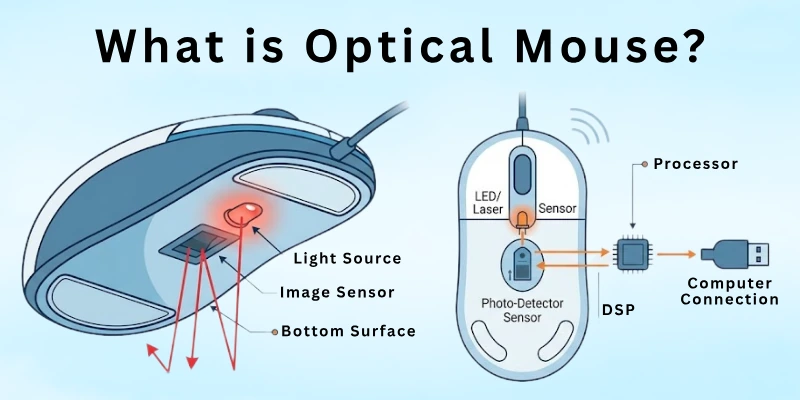
This type of mouse works best on flat and non-shiny surfaces. It is commonly used in homes, schools, and offices because it is simple and easy to handle. Most people prefer it for daily computer tasks like browsing, typing, and basic work.
Common uses of an optical mouse in daily life:
- Using a computer in school computer labs
- Browsing the internet at home
- Doing office work like documents and emails
- Playing simple computer games

What Is a Laser Mouse?
A laser mouse is a computer mouse that uses a laser light to track movement. It reads very small details on the surface and sends accurate signals to the computer. When you move it, the cursor on the screen follows with high precision. It does not need a special mouse pad to work well.
A laser mouse works on many types of surfaces, including glass, wood, and shiny desks. It is often used by people who need more accuracy in their work. You will find it in gaming, graphic design, and professional tasks where small movements matter.
Where you can use a laser mouse (simple examples):
- Playing high-precision computer games
- Working on graphic design or editing tools
- Using a laptop on glass or shiny tables
- Doing detailed office or technical work
Laser vs Optical Mouse Comparison Table
Here is a quick comparison of a laser mouse versus optical mouse to help you understand the main differences in a simple way:
| Feature | Optical Mouse | Laser Mouse |
| Tracking Technology | Uses LED light | Uses laser light |
| Surface Support | Works best on flat, non-shiny surfaces | Works on almost all surfaces |
| Accuracy | Good for daily use | Very high and precise |
| Sensitivity (DPI) | Lower DPI range | Higher DPI range |
| Best For | Office, school, basic tasks | Gaming, design, professional work |
| Price | More affordable | More expensive |
| Power Usage | Uses less battery | May use more battery |
This table helps you quickly see how both mice are different and which one fits your needs better.
Key Features of Laser Mouse vs Optical Mouse
Before we compare both types, it’s important to understand the main features that make them different. These features help you decide which mouse fits your needs better in daily use, gaming, or professional work.
- Tracking Technology
- Surface Compatibility
- Accuracy
- Sensitivity (DPI)
- Speed Response
- Power Consumption
- Gaming Performance
- Everyday Usage Suitability
- Price Range
- Durability
Let’s look at them in detail.
1. Tracking Technology
Here is how both mice differ in the way they read movement on a surface.
An optical mouse uses a small LED light to track movement. It captures images of the surface and helps the cursor move on the screen. It works well on normal flat surfaces like desks and mouse pads. You may notice it performs best in simple daily tasks.
A laser mouse uses laser light instead of an LED. It reads very fine surface details for more accurate tracking. You can use it on many surfaces, including glass or shiny tables. It gives you smoother and more precise control, especially in detailed work.
2. Surface Compatibility
Here is how both mice differ in the type of surfaces they can work on without losing performance.
An optical mouse works best on flat and non-shiny surfaces. You will get smooth movement when you use it on a mouse pad or a wooden desk. It may struggle on glass or very shiny surfaces. So, you usually need a proper surface for better results.
A laser mouse works on almost any surface because it uses advanced laser tracking. You can use it on glass, metal, wood, or even uneven desks. It gives stable performance even when the surface is not perfect. This makes it more flexible for different working environments.
3. Accuracy
Here is how both mice differ when it comes to delivering precise and exact cursor movement on the screen.
Optical mouse gives good accuracy for normal daily tasks. It works well when you are browsing, typing, or doing simple office work. You may notice small limits when you try very detailed movements. Still, it is more than enough for everyday computer use.
Laser mouse offers much higher accuracy because it detects very small surface details. It responds better to tiny hand movements, which helps in precise work. You can rely on it for design, editing, or gaming, where control matters. It gives you smoother and sharper tracking overall.
4. Sensitivity (DPI)
Here is how both mice differ in how sensitive they are to movement and how fast the cursor responds on screen.
Optical mouse usually comes with lower DPI settings. This means the cursor moves at a steady and controlled speed. It feels easy to handle for beginners and normal users. You can use it comfortably for school work, browsing, and office tasks.
Laser mouse comes with higher DPI settings. This allows the cursor to move faster and respond to very small hand movements. It gives you more control options, especially for detailed work. You can adjust it for gaming or professional design needs.
5. Speed Response
Here is how both mice differ in how quickly the cursor reacts when you move your hand.
Optical mouse responds at a steady and simple speed. It gives smooth movement that feels stable for daily tasks. You will notice it works well when you are not doing fast or complex actions. It keeps things easy and controlled for normal use.
Laser mouse reacts faster to small and quick hand movements. It detects even tiny changes in direction very quickly. This makes it useful for fast gaming or detailed work. You get a more responsive feel when you move it on the surface.
6. Power Consumption
Here is how both mice differ in how much power they use during daily computer work.
An optical mouse uses less power because it relies on a simple LED light. This helps it save battery and run for a longer time. You do not need to change batteries often in normal use. It is a good option if you want something energy-efficient.
Laser mouse usually uses more power because its sensor is more advanced. The laser tracking system needs extra energy to work with high precision. This can reduce battery life slightly compared to optical mice. You may need to recharge or replace batteries more often.
7. Gaming Performance
Here is how both mice differ when you use them for gaming and fast-paced actions.
Optical mouse works well for casual gaming. It gives smooth and steady control, which is enough for simple games. You may notice limits in very fast or competitive gaming. Still, it performs fine for beginners and light gamers.
Laser mouse is better for serious and competitive gaming. It reacts faster and gives high precision during quick movements. You can adjust sensitivity for different game styles. This helps you get better control in fast and detailed gameplay.
8. Everyday Usage Suitability
Here is how both mice differ in how comfortable and practical they feel for daily computer use.
An optical mouse is very simple and easy for everyday tasks. You can use it for browsing, studying, typing, and basic office work. It feels smooth and does not need advanced settings. This makes it a good choice for most normal users.
A laser mouse is also good for daily use, but it offers more advanced control. You can use it for both simple tasks and professional work. It may feel more sensitive for basic users at first. Once you adjust, it gives you a more flexible experience.
9. Price Range
Here is how both mice differ in cost and how much you need to spend to buy them.
An optical mouse is usually more affordable and budget-friendly. You can easily find it in a low price range. It is a good choice if you want simple use without spending much. Most students and office users prefer it for this reason.
A laser mouse is generally more expensive than an optical mouse. It costs more because it uses advanced tracking technology. You pay extra for better accuracy and performance. It is often chosen by gamers and professional users.
10. Durability
Here is how both mice differ in how long they last with regular use over time.
Optical mouse is simple in design, which helps it stay reliable for daily use. It has fewer complex parts, so it often handles normal wear and tear well. You can use it for a long time if you keep it clean and safe. It is a solid choice for basic users.
Laser mouse is also durable, but it has more advanced internal components. This makes it powerful, but also slightly more sensitive to damage if not handled properly. With careful use, it can last a long time and maintain high performance. It is best for users who need advanced features and take care of their devices.

Pros and Cons of Optical Mouse and Laser Mouse
Now, let’s quickly understand the good and weak sides of both optical and laser mice. This will help you choose the right one based on your needs. I will keep it simple so you can decide without confusion. You just need to focus on what matters most for your daily use.
Advantages of an Optical Mouse
An optical mouse is widely used because it is simple, affordable, and easy to handle. It works well for most basic computer tasks. Many users prefer it for home, school, and office use.

Let’s look at its main benefits:
- Budget-friendly: It costs less, so it is great for students and basic users
- Easy to use: No complex settings, just plug and start working
- Good for daily tasks: Works smoothly for browsing, typing, and office work
- Low power use: Uses less battery compared to advanced mice
- Reliable performance: Performs well for normal computer activities
Disadvantages of an Optical Mouse
An optical mouse is good for simple work, but it has some limits. It may not perform well in advanced or professional use. You should know these points before choosing it.
Let’s see its drawbacks.
- Limited surface support: Does not work well on glass or shiny surfaces
- Lower precision: Not ideal for high-detail work like design or editing
- Basic performance: Not suitable for professional gaming or advanced tasks
- Less sensitivity control: Limited DPI options compared to a laser mouse
Advantages of a Laser Mouse
A laser mouse is more advanced and offers higher accuracy. It is designed for users who need precision and control. It works well in both simple and professional environments.
Here are its main benefits.
- High accuracy: Detects very small movements for precise control
- Works on many surfaces: Can be used on glass, wood, and uneven desks
- Better for gaming: Ideal for fast and competitive gameplay
- Adjustable sensitivity (DPI): Allows better control for different tasks
- Professional use: Great for designers, editors, and advanced users
Disadvantages of a Laser Mouse
A laser mouse offers great performance, but it also has a few downsides. It may not be perfect for every user, especially beginners.
Let’s understand its limitations clearly.
- Higher price: Costs more than an optical mouse
- Too sensitive for some users: Can feel fast or hard to control at first
- More power usage: Drains battery faster due to the advanced sensor
- Over-precision issues: May pick up unwanted small movements on some surfaces
- Not always needed for basic work: Can be overkill for simple tasks like browsing
Who Should Use an Optical Mouse?
An optical mouse is best for people who do simple and daily computer work. It is easy to use and does not need advanced settings.
If you want smooth basic performance without spending much, this is a good choice. You just plug it in and start using it.
- Students: Good for online classes, assignments, and basic browsing
- Office users: Perfect for emails, documents, and daily office tasks
- Home users: Ideal for internet browsing and simple computer use
- Beginners: Great for people who are new to computers
- Budget users: Best if you want a low-cost and reliable option
Who Should Use a Laser Mouse?
A laser mouse is best for people who need high accuracy and better control. It works well for advanced tasks where small movements matter.
If you use a computer for professional or creative work, this mouse can help you more. It gives you extra speed and precision.
- Gamers: Best for fast and competitive gaming control
- Graphic designers: Useful for detailed design and editing work
- Video editors: Helps in precise timeline and editing control
- Professionals: Good for advanced office and technical tasks
- Power users: Ideal for people who need high performance and flexibility
Best Tips for Selecting an Optical or Laser Mouse
Choosing the right mouse becomes simple when you focus on your daily needs. You do not need to get confused by too many features. Just think about how and where you will use it.
These easy tips will help you make a smart choice:
- Know your usage type: Pick an optical mouse for basic tasks and a laser mouse for advanced work or gaming
- Check surface compatibility: Optical works best on flat surfaces, while laser works on almost all surfaces
- Focus on comfort: Choose a shape that fits your hand well for long use without pain
- Set your budget: Optical mice are cheaper, while laser mice cost more but offer extra features
- Look at DPI settings: Higher DPI helps in fast movement and precise control, especially for gaming or design work
- Check battery performance: Optical mice usually consume less power compared to laser mice
- Think long-term use: Choose a mouse that matches your work style so you do not need to replace it often
Common Mistakes People Make When Choosing an Optical or Laser Mouse
Many people buy a mouse without thinking about their real needs. This can lead to poor comfort, low performance, or wasted money. If you understand common mistakes, you can easily pick the right mouse the first time.
Let’s look at what you should avoid:
- Buying without checking usage needs: Many users pick a mouse without knowing if they need basic or advanced features
- Ignoring surface type: Some people buy a laser or optical mouse without thinking about where they will use it
- Focusing only on price: Choosing the cheapest option can lead to poor comfort and performance
- Overlooking comfort and grip: A bad shape can cause hand pain during long use
- Not checking DPI settings: Low or high sensitivity can affect your control and accuracy
- Ignoring battery life: Some users forget that laser mice may need more frequent charging
- Choosing advanced features unnecessarily: Some people buy high-end mice even for simple tasks, which is not needed
Final Thoughts
So guys, it’s time to wrap up. In this article, we’ve covered optical vs laser mouse in detail, from basic working to features, differences, and best use cases.
I would suggest an optical mouse for beginners and office users because it keeps things simple and smooth. On the other hand, a laser mouse is better for users who need high precision and advanced performance.
Don’t skip the next part of the FAQs. I hope you will find something more interesting, so don’t miss it. If you miss it, you may lose something new.
Common FAQs About Optical and Laser Mouse
Here are some frequently asked questions related to optical versus laser mouse that will help clear your doubts:
The main difference between an optical mouse vs laser mouse is how they track movement. An optical mouse uses LED light to read the surface under it. A laser mouse uses laser technology for deeper and more precise tracking. This difference changes accuracy, surface support, and overall performance.
An optical mouse is better for most daily tasks because it feels simple and easy to control. It works well for browsing, office work, and study tasks. You do not need advanced settings to use it. A laser mouse also works fine, but it may feel too sensitive for basic users.
Yes, a laser mouse can work on many different surfaces, including glass, wood, and shiny tables. It uses advanced sensors that detect very small surface details. However, performance can still vary depending on surface quality.
- Works on glass and reflective surfaces
- Works on rough and smooth tables
- Gives stable tracking in most environments
- May feel too sensitive on some surfaces
This makes it a flexible option for users who work in different places.
An optical mouse is fine for casual gaming and simple games. It gives smooth and stable movement without extra complexity. However, it may not handle fast or competitive gaming very well. For serious gaming, many users prefer a laser mouse for better speed and precision.
A laser mouse is more accurate because it detects very small movements on almost any surface. This helps in tasks like graphic design, photo editing, and gaming. An optical mouse is still reliable, but it is more suitable for general use. So, accuracy depends on how advanced your work is.
An optical mouse works best with a mouse pad, but it can also work on flat surfaces. A mouse pad helps improve smooth movement and tracking stability. Without it, performance may drop on shiny or uneven desks.
An optical mouse is still widely used because:
- It works on most basic desks
- It is easy to set up anywhere
- It performs well with simple surfaces
A laser mouse usually uses more batteries because it has a stronger sensor. It needs more power to deliver high-precision tracking. An optical mouse uses less energy, so its battery lasts longer. This makes optical mice more efficient for long daily use.
A laser mouse can feel advanced for beginners because of its high sensitivity. It is more useful for professional tasks like gaming or design work. Beginners may not need all its features at the start. So, it depends on how advanced your computer use is.
An optical mouse is usually better for students and office users. It is simple, affordable, and easy to handle for daily tasks. You can use it for typing, browsing, and presentations without any difficulty. A laser mouse is more suited for advanced work.
Yes, you can switch easily because both work in a similar way. They connect through USB or wireless options without special setup. The main difference is sensitivity and accuracy, so you may need a short adjustment period. After that, both feel comfortable using.

- Be Respectful
- Stay Relevant
- Stay Positive
- True Feedback
- Encourage Discussion
- Avoid Spamming
- No Fake News
- Don't Copy-Paste
- No Personal Attacks
- Be Respectful
- Stay Relevant
- Stay Positive
- True Feedback
- Encourage Discussion
- Avoid Spamming
- No Fake News
- Don't Copy-Paste
- No Personal Attacks