Mechanical vs Membrane Keyboard: Complete Comparison Guide for Beginners
Choosing the right keyboard can change how you type every day. Mechanical vs membrane keyboard is a popular topic because both offer very different experiences. One gives a solid and clicky feel, while the other feels smooth and silent.
In this guide, we will explore how both keyboards work, their main features, key differences, and real-world uses. You will also see a clear comparison and helpful tips to make a better decision. This article is simple, clear, and made for beginners.
Let’s jump in and explore the details step by step.
What Is a Mechanical Keyboard?
A mechanical keyboard is a type of keyboard that uses separate physical switches under each key. These switches work on their own, so every key press feels clear and precise. This design helps users type faster and with better control.
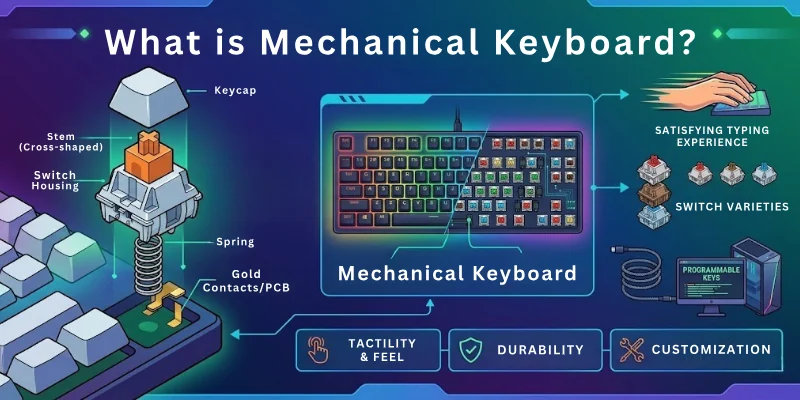
Each key gives a strong response when pressed, which makes typing more accurate. People often choose mechanical keyboards for long typing sessions because they feel more stable and comfortable during use.
Example of Mechanical Keyboard Use
- Gaming keyboards with fast key response
- Coding keyboards used by programmers
- Writing keyboards used by bloggers and authors
- Office setups where heavy typing is needed
What Is a Membrane Keyboard?
A membrane keyboard is a type of keyboard that works with a soft pressure system under the keys. It uses thin layers instead of separate switches, so the keys feel smooth when you press them. This design makes it simple and easy to use.
When you press a key, it connects through a rubber layer and sends the signal to the computer. It does not give a strong click feel, so typing feels quieter and softer. Many people use it for basic daily tasks.
Example of Membrane Keyboard Use
- School and college computers
- Office work, like typing emails and documents
- Home use for browsing and simple tasks
- Budget laptops and standard desktop setups

Comparison Table: Mechanical Keyboard vs Membrane Keyboard
Here is a quick comparison of a membrane keyboard vs mechanical keyboard to help you understand the main differences in a simple way:
| Feature | Mechanical Keyboard | Membrane Keyboard |
| Key Type | Uses individual mechanical switches | Uses rubber dome layers |
| Typing Feel | Strong, clear, and responsive | Soft and smooth press |
| Sound | Loud clicking sound | Quiet typing |
| Speed | Faster key response | Normal response speed |
| Durability | Long-lasting and strong build | Shorter lifespan |
| Maintenance | Easy to clean and repair | Hard to repair |
| Price | More expensive | Budget-friendly |
| Best Use | Gaming, coding, heavy typing | Office work, study, basic use |
Membrane vs Mechanical Keyboard: Features Compared
Here are the key features of mechanical and membrane keyboards. These points show how both keyboards differ in real use and help you understand their main strengths and limits.
Here is the list of main features of both keyboards:
- Typing Feel
- Key Switch Type
- Sound Level
- Speed and Response
- Durability
- Price
- Gaming Performance
- Comfort Level
- Maintenance and Cleaning
- Weight and Build Quality
- Customization Options
- Best Use Cases
Let’s break down every feature step by step.
1. Typing Feel
Here is how both keyboards differ in the way they feel while typing and how your fingers experience each press:
A mechanical keyboard gives a sharp and defined press for each key. Every key feels stable and controlled under your fingers. This helps users type with better accuracy and confidence during long typing sessions.
A membrane keyboard feels soft and smooth when you press the keys. The keys need a bit more pressure and feel less “clicky.” This makes typing quiet and simple for basic daily use.
2. Key Switch Type
Here is the difference in how both keyboards register each key press inside the system:
A mechanical keyboard uses individual switches under every key. Each switch works separately, which improves precision and control. This design also allows faster and more reliable input.
A membrane keyboard uses layered rubber sheets to detect key presses. All keys share the same pressure system, which makes the structure simpler. It works well for normal tasks but gives less precision.
3. Sound Level
Here is how both keyboards differ in the noise they create while typing:
A mechanical keyboard produces a noticeable clicking sound when typing. The sound depends on the switch type used. Some users enjoy this feedback, especially for gaming and writing.
A membrane keyboard stays very quiet during use. The soft rubber layer reduces noise while typing. This makes it a good choice for shared spaces like offices or classrooms.
4. Speed and Response
Here is the difference in how fast each keyboard reacts when you press a key:
A mechanical keyboard responds quickly because each switch activates instantly. This improves typing speed and reaction time. It is often preferred for gaming and fast typing work.
A membrane keyboard responds slightly slower due to its layered structure. The key press needs full pressure to register. It works fine for everyday tasks, but it is not built for high-speed use.
5. Durability
Here is how both keyboards differ in how long they last under regular use:
A mechanical keyboard is built with strong switches that can handle millions of key presses. It stays reliable even after heavy daily use. This makes it a long-term investment.
A membrane keyboard has a softer structure that wears out faster over time. The rubber layer can lose its responsiveness with heavy use. It is suitable for light to moderate usage.
6. Price
Here is the difference in cost between the two keyboard types in the market:
A mechanical keyboard usually costs more because of its switch technology and build quality. The higher price reflects better performance and durability. It is often seen as a premium option.
A membrane keyboard is much more affordable for most users. It is designed for budget-friendly setups. This makes it popular among students and general users.
7. Gaming Performance
Here is how both keyboards perform when used for gaming and fast reactions:
A mechanical keyboard gives faster response and better control during gameplay. The clear feedback helps players react quickly. This is why most gamers prefer it.
A membrane keyboard works for casual gaming but lacks fast feedback. The softer press can slow down reaction time in competitive games. It is better for simple or light gaming use.
8. Comfort Level
Here is the difference in how comfortable each keyboard feels during long use:
A mechanical keyboard offers strong feedback that some users find more controlled. It reduces typing mistakes during long sessions. However, it may feel tiring for users who prefer soft keys.
A membrane keyboard feels soft and gentle on the fingers. It reduces finger pressure during typing. This makes it comfortable for light and everyday use.
9. Maintenance and Cleaning
Here is how both keyboards differ in cleaning and maintenance needs:
A mechanical keyboard is easier to clean because keys can often be removed. Dust and dirt can be cleared more effectively. This helps keep it in good condition for a long time.
A membrane keyboard is harder to clean because of its sealed design. Dirt can get trapped under the surface. It needs careful handling during cleaning.
10. Weight and Build Quality
Here is the difference in physical design and how solid each keyboard feels:
A mechanical keyboard is heavier and more solid in build. It stays stable on the desk during typing or gaming. This gives a premium and strong feel.
A membrane keyboard is lighter and easier to move. It is made with simple materials for daily use. This makes it more portable but less sturdy.
11. Customization Options
Here is how both keyboards differ in customization and personal setup options:
A mechanical keyboard offers many customization features like switch types, keycaps, and RGB lighting. Users can modify it based on their preference. This makes it popular among enthusiasts.
A membrane keyboard has limited customization options. Most models come in fixed designs. It focuses more on basic functionality than personalization.
12. Best Use Cases
Here is how both keyboards differ in where and how they are best used:
A mechanical keyboard is ideal for gaming, programming, and heavy typing work. It supports users who need speed and accuracy. It works well for professional and intensive use.

A membrane keyboard is best for simple tasks like browsing, studying, and office work. It suits users who want a quiet and budget-friendly option. It is good for everyday basic use.

Pros and Cons of Mechanical and Membrane Keyboards
Here is a clear look at the pros and cons of mechanical and membrane keyboards to help you understand which one fits your needs better.
Advantages of a Mechanical Keyboard
Here are the main benefits of using a mechanical keyboard for typing, gaming, and long-term use:
- Fast and accurate typing: Mechanical switches respond quickly, which helps you type faster with fewer mistakes.
- Strong durability: These keyboards last for years because each key has its own switch built for heavy use.
- Better typing feedback: You feel each key press clearly, which improves control and confidence while typing.
- Great for gaming: Fast response time helps gamers react quickly during intense gameplay.
- Easy repair and cleaning: Individual keys can often be removed, making cleaning simple and effective.
Disadvantages of a Mechanical Keyboard
Here are some common drawbacks you should know before choosing a mechanical keyboard:
- High price: Mechanical keyboards cost more than basic keyboards, which may not suit every budget.
- Loud sound: The clicking noise can be distracting in quiet places like offices or libraries.
- Heavier design: These keyboards are heavier, so they are not very easy to carry around.
- Not ideal for beginners on a budget: New users may not need advanced features for simple tasks.
Advantages of the Membrane Keyboard
Here are the key benefits of using a membrane keyboard for daily and basic computer use:
- Low cost: Membrane keyboards are affordable, making them perfect for budget users.
- Quiet typing: Soft key presses create very little noise, which is good for shared spaces.
- Lightweight design: Easy to carry and move, suitable for simple setups.
- Simple to use: No learning curve, just plug in and start typing.
- Good for basic tasks: Works well for browsing, writing emails, and school work.
Disadvantages of the Membrane Keyboard
Here are the limitations of membrane keyboards that may affect performance and long-term use:
- Shorter lifespan: The rubber layers wear out faster with heavy usage.
- Slower response: Key presses are less sharp, which can slow down typing speed.
- Less durability: Not designed for heavy gaming or professional typing work.
- Hard to repair: Most membrane keyboards cannot be repaired once damaged.
- Weak feedback: You may not clearly feel each key press, which can reduce typing accuracy.
Who Should Use Mechanical Keyboards?
Mechanical keyboards are best for users who spend a lot of time typing or need fast and accurate input for their daily work or hobbies:
- Gamers who need speed and quick response: Mechanical keyboards help players react faster in competitive games because each key press registers instantly.
- Writers and bloggers who type a lot: The clear key feedback helps reduce typing mistakes and supports long writing sessions.
- Programmers and developers: Accurate key response makes coding easier and more efficient during long work hours.
- Heavy computer users: People who work on computers for many hours get better comfort and control with mechanical keyboards.
- Users who want long-term durability: If someone wants a keyboard that lasts for years without losing performance, a mechanical keyboard is a strong choice.
Who Should Use Membrane Keyboards?
Membrane keyboards are a good choice for users who want a simple, quiet, and budget-friendly keyboard for everyday computer tasks:
- Students for daily study work: Membrane keyboards work well for assignments, notes, and online classes without needing advanced features.
- Office users for basic tasks: They are ideal for typing emails, creating documents, and handling routine office work.
- Home users for simple use: Great for browsing, watching videos, and light computer use at home.
- Users who prefer quiet typing: The soft key press keeps noise low, which is useful in shared or silent environments.
- Budget-focused buyers: Perfect for people who want a reliable keyboard at a low cost without extra features.
Tips for Choosing the Right Keyboard
Choosing the right keyboard depends on how you use your computer every day and what level of comfort and performance you need:
- Think about your main use: Choose mechanical if you game or type a lot, and choose membrane for simple daily tasks.
- Set your budget first: Mechanical keyboards cost more, while membrane keyboards fit smaller budgets.
- Check typing comfort: Try different keyboards if possible to see which one feels better for your fingers.
- Look at noise level: Pick a quiet keyboard if you work in shared or silent spaces.
- Consider size and layout: Choose full-size or compact keyboards based on your desk space and needs.
- Focus on durability: If you want long-term use, a mechanical keyboard is usually stronger.
Common Mistakes to Avoid When Choosing a Keyboard
Many users make simple mistakes when buying a keyboard, which can lead to poor comfort or wasted money:
- Choosing only by price: Picking the cheapest option can reduce comfort and long-term use quality.
- Ignoring typing feel: Not testing the keyboard can lead to discomfort during daily use.
- Overlooking usage needs: Buying a gaming keyboard for basic work or a basic keyboard for gaming can cause problems.
- Not checking build quality: A weak build can reduce lifespan and performance.
- Ignoring noise level: Loud keyboards can disturb others in offices or shared rooms.
- Skipping research: Not comparing features often leads to the wrong choice for your needs.
Conclusion
So guys, it’s time to conclude. In this article, we’ve covered mechanical vs membrane keyboards in detail. We looked at their working style, main features, and real-life differences in performance and comfort.
Mechanical keyboards stand out for heavy users who want accuracy and durability, while membrane keyboards are simple and cost-friendly for everyday tasks.
From my point of view, mechanical keyboards are worth it if you work long hours on a computer.
Don’t skip the next part of the FAQs. I hope you will find something more interesting, so don’t miss it. If you miss it, you may lose something new.
Common Reader Questions
Here are some quick answers to the most asked questions about membrane versus mechanical keyboard:
The main difference between mechanical and membrane keyboard is the way keys work. Mechanical keyboards use individual switches for each key, while membrane keyboards use soft rubber layers. This changes the typing feel, speed, and durability.
Mechanical keyboards feel faster and more responsive during typing or gaming. Membrane keyboards feel softer and quieter, which makes them better for basic use.
Mechanical keyboards are better for gaming because they respond faster. Gamers need quick actions, and mechanical switches help with that.
- Faster key response
- Better accuracy during gameplay
- Strong feedback for better control
Membrane keyboards can work for casual gaming, but they are not ideal for competitive players.
Yes, a mechanical keyboard is worth it if you type a lot every day. It improves typing speed and reduces mistakes over time.
Mechanical keyboards also give strong feedback, which helps long writing sessions. This makes them popular among writers, programmers, and professionals.
Membrane keyboards use a simple rubber layer system instead of complex switches. This reduces manufacturing cost.
They are designed for basic tasks like browsing and office work. That is why they are more affordable for most users.
Membrane keyboards are much quieter than mechanical keyboards. They use soft rubber layers that reduce typing noise.
Mechanical keyboards can be loud depending on the switch type. This is why membrane keyboards are better for shared spaces like offices or libraries.
Mechanical keyboards last much longer than membrane keyboards. They are built with strong switches designed for heavy use.
Membrane keyboards wear out faster because their rubber layer weakens over time. This reduces the key response after long usage.
Yes, beginners can easily use a mechanical keyboard. It works like a normal keyboard but gives stronger feedback.
However, it may take a short time to get used to the key feel. After that, most users prefer it for comfort and speed.
Membrane keyboards are best for students and basic users. They are simple, quiet, and budget-friendly.
They work well for typing notes, assignments, and browsing. This makes them a practical choice for everyday school or home use.
Mechanical keyboards can improve typing speed over time. The clear key feedback helps users press keys more accurately.
- Faster response time
- Better key control
- Reduced typing errors
With practice, many users notice better speed and comfort.
The value depends on your needs and usage style. Mechanical keyboards give long-term value due to durability and performance. Membrane keyboards give short-term value because they are cheaper. They are good for users who only need basic functions.

- Be Respectful
- Stay Relevant
- Stay Positive
- True Feedback
- Encourage Discussion
- Avoid Spamming
- No Fake News
- Don't Copy-Paste
- No Personal Attacks
- Be Respectful
- Stay Relevant
- Stay Positive
- True Feedback
- Encourage Discussion
- Avoid Spamming
- No Fake News
- Don't Copy-Paste
- No Personal Attacks