
Wired vs Wireless Mouse: Which One Should You Buy?
Did you know that over 70% of people now prefer using a wireless mouse at home or work? Still, a wired mouse is often the top pick for gamers and office workers who need speed and stability.
When choosing between a wired vs wireless mouse, there are many things to think about, like speed, comfort, battery life, and price.
In this blog, we’ll explain the differences between wired and wireless mouse options in simple words, so you can decide which one is right for you.
So, guys, let’s get started
What Is a Wired Mouse?
A wired mouse is a computer mouse that connects to a laptop or desktop with a cable. We usually plug it into a USB port to start using it. The mouse sends signals directly through the wire, so it works quickly and smoothly. Many people use wired mice for office work, gaming, and daily computer tasks.
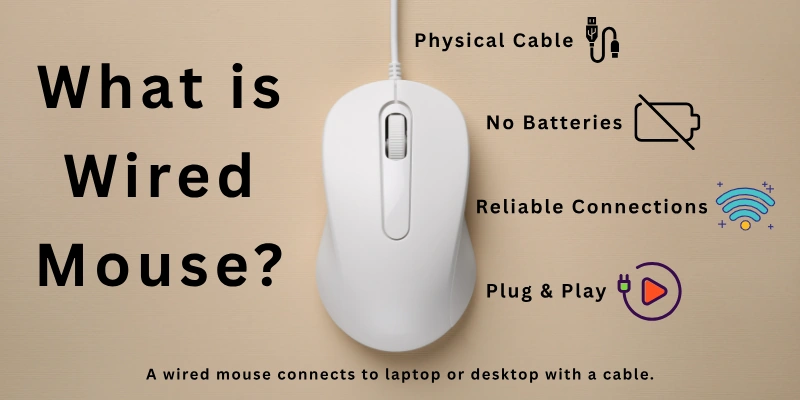
You do not need batteries or charging for a wired mouse. Once you connect it, it starts working right away. Many users like it because it gives a stable connection and steady performance. If you want a simple mouse with no charging problems, a wired mouse can be a good choice.
Where people commonly use a wired mouse:
- Playing fast computer games
- Working in offices and schools
- Editing photos or videos
- Using desktop computers at home
- Doing long study or work sessions without worrying about charging worries

What Is a Wireless Mouse?
A wireless mouse is a computer mouse that works without a cable. It connects to a computer using Bluetooth or a small USB receiver. You can move it freely without worrying about wires. This makes it easy to use with laptops, desktops, and even smart devices.
A wireless mouse runs on batteries or a built-in rechargeable system. You need to charge it or replace batteries after some time. Many people like it because it keeps the desk clean and gives more freedom to move the mouse. It is a popular choice for students, travellers, and office users.
Where people commonly use a wireless mouse:
- Working on laptops in cafés or offices
- Giving presentations in meetings or classes
- Travelling with a lightweight setup
- Using computers with limited desk space
- Doing daily browsing and casual work
Comparison Table: Wireless vs Wired Mouse
Here is a simple comparison to help you understand both options clearly. I’ve kept it easy so you can quickly see the real differences:
| Feature | Wired Mouse | Wireless Mouse |
| Connection | Uses a USB cable | Uses Bluetooth or USB receiver |
| Power | No battery needed | Needs a battery or charging |
| Movement | Limited by wire length | Full freedom to move |
| Setup | Plug and use instantly | Needs pairing or receiver setup |
| Speed | Very fast and stable | Slight delay in some models |
| Portability | Less easy to carry | Easy to carry anywhere |
| Desk Look | Cables may look messy | Clean and neat setup |
| Gaming Use | Preferred for fast gaming | Good, but depends on the model |
| Maintenance | Very low | Needs battery care |
| Cost | Usually cheaper | Usually more expensive |
Major Differences in Wired and Wireless Mouse Features
Here are the key features that clearly show the difference between wired and wireless mouse.
Each point helps you understand how both options work in daily use, so you can easily compare them before choosing the right one.
- Connectivity Type
- Power Source
- Response Time
- Movement Freedom
- Setup Process
- Battery Life & Charging
- Portability
- Gaming Performance
- Desk Cleanliness & Cable Management
- Cost & Affordability
- Device Compatibility
- Durability & Build Quality
Let’s explore each feature one by one in a clear way.
1. Connectivity Type
Here is how both mouse types differ in the way they connect to a computer.
A wired mouse connects directly through a USB cable. It sends signals through the wire, which makes the connection stable and instant. You just plug it in, and it starts working right away without extra steps.
A wireless mouse connects through Bluetooth or a USB receiver. It does not use any cables, so it gives more freedom to move. However, it needs proper pairing before use to work smoothly.
2. Power Source
Here is the difference in how both mice get power to function.
A wired mouse takes power directly from the computer through the USB port. It does not need batteries or charging, so it keeps working as long as the device is on.
A wireless mouse runs on batteries or a rechargeable system. You must replace or charge it after some time, depending on usage, to keep it working.
3. Response Time
Here is how both mice differ in speed and reaction time.
A wired mouse gives instant response because it is directly connected to the system. This makes it very smooth for tasks that need fast clicking or movement.
A wireless mouse may have a slight delay in some low-end models. Good quality ones perform well, but still depend on signal strength and battery level.
4. Movement Freedom
Here is the difference in how freely you can move each mouse.
A wired mouse has limited movement because the cable restricts how far you can go. It works best in a fixed setup like a desk.
A wireless mouse gives full freedom of movement. You can use it from a distance, which makes it more flexible and comfortable in different situations.
5. Setup Process
Here is how both mice differ in the starting and setup steps.
A wired mouse is very simple to use. You just plug it into the USB port, and it starts working instantly without any setup.
A wireless mouse needs a small setup process. You either connect it through Bluetooth or plug in a USB receiver, and sometimes pair it first.
6. Battery Life & Charging
Here is the difference in power usage and battery needs.
A wired mouse does not need batteries or charging at all. It gets continuous power from the computer, so there is no interruption.
A wireless mouse depends on batteries or charging. You must keep it powered, or it will stop working when the battery drains.
7. Portability
Here is how both mice differ when it comes to carrying and travel use.
A wired mouse is less portable because the cable can get tangled. It is better for home or office setups.
A wireless mouse is easy to carry and store. It fits well in laptop bags and is ideal for travel or mobile work.
8. Gaming Performance
Here is how both mice perform in gaming situations.
A wired mouse is often preferred by gamers because it offers fast and stable response. It reduces delay during quick actions.
A wireless mouse can also work well for gaming, but performance depends on the model. High-end versions perform smoothly, while basic ones may feel slower.
9. Desk Cleanliness & Cable Management
Here is the difference in keeping your workspace clean and organized.
A wired mouse creates cable clutter on the desk. The wire can sometimes make the space look messy.
A wireless mouse keeps the desk clean and simple. Without wires, the setup looks more organized and modern.
10. Cost & Affordability
Here is how both options differ in price and value.
A wired mouse is usually cheaper. It is a budget-friendly option for most users.
A wireless mouse is generally more expensive. The higher cost comes from added technology and convenience features.

11. Device Compatibility
Here is the difference in how both mice work with different devices.
A wired mouse works with almost every computer that has a USB port. It does not need extra software in most cases.
A wireless mouse also works with many devices, but may need Bluetooth support or a USB receiver for proper connection.
12. Durability & Build Quality
Here is how both mice differ in strength and long-term use.
A wired mouse is often more durable because it has fewer electronic parts. However, the cable can wear out over time.
A wireless mouse has more internal components, like batteries and sensors. It is strong, but battery life and charging cycles affect long-term use.
Advantages and Disadvantages of Wired and Wireless Mouse
Now, let’s understand the real benefits and limits of both wired and wireless mice in a simple and practical way. This will help you choose the right option for your daily use.
Advantages of a Wired Mouse
A wired mouse is widely used because it offers stable performance and reliable control for everyday tasks.

- Fast and stable connection with no signal loss or interruptions
- No batteries or charging needed, so it is always ready to use
- Quick response time, ideal for gaming, editing, and fast work
- Budget-friendly option for students, offices, and home users
- Simple plug-and-play setup, no extra software required
- Wide compatibility with most desktops and laptops using USB
Disadvantages of a Wired Mouse
A wired mouse works well, but it also has some practical limitations in daily use.
- Cables can create clutter, making the desk look less clean
- Limited movement range because of the fixed wire length
- Less convenient for travel, especially with laptops
- Cables can get tangled, especially in tight spaces
- Less flexible setup, not ideal for modern minimal desks
Advantages of a Wireless Mouse
A wireless mouse is popular today because it offers freedom, comfort, and a clean workspace experience.
- No wires, which keeps the desk clean and organized
- Easy to carry anywhere, great for travel and remote work
- Full movement freedom, no cable restrictions at all
- Perfect for laptops and mobile setups, especially on the go
- Modern and neat design improves the overall workspace look
- Improved battery life in new models, supports longer usage
Disadvantages of a Wireless Mouse
A wireless mouse is convenient, but it also comes with a few drawbacks you should consider before buying.
- Needs regular charging or battery replacement
- Possible minor delay in low-quality or older models
- Occasional connection issues, especially with weak signals
- Higher price compared to wired mice
- Can stop working suddenly if the battery runs out during use
Who Should Use a Wired Mouse?
A wired mouse is a great choice for people who want stable performance and simple use without extra care. It works best for users who sit at a fixed desk for long hours.
- Gamers who need fast response and zero delay for smooth gameplay
- Office workers who use desktop computers daily for long working hours
- Students who want a low-cost and reliable option for study tasks
- Designers and editors who need accurate control for detailed work
- Home users who prefer plug-and-play simplicity without charging worries
Who Should Use a Wireless Mouse?
A wireless mouse is best for people who value freedom, portability, and a clean workspace. It fits well with modern mobile and flexible work styles.
- Laptop users who work on the go in cafes, libraries, or offices
- Travellers who need a lightweight and easy-to-carry setup
- Students who prefer a clutter-free desk for study
- Remote workers who move between different locations
- Casual users who want comfort and easy daily browsing
Tips for Choosing a Wireless Mouse or Wired Mouse
Now let’s look at some simple and practical tips that will help you choose the right mouse based on your needs, comfort, and daily usage style.
- Check your main usage before buying: A wired mouse works best for gaming and office work, while a wireless mouse is better for travel and flexible use
- Think about comfort and hand feel: Choose a mouse that fits your hand size so you can use it for long hours without pain
- Look at response speed needs: If you need fast and accurate clicks, a wired mouse is usually more reliable
- Consider battery life and charging: A wireless mouse needs charging, so pick one with long battery backup if you travel often
- Check your desk setup: If you want a clean and cable-free desk, a wireless mouse is a better option
- Think about portability: A wireless mouse is easier to carry in a laptop bag for school, office, or travel
- Set your budget first: A wired mouse is usually cheaper, while a wireless mouse costs more but offers extra freedom
- Check device compatibility: Make sure your laptop or PC supports USB or Bluetooth, depending on the mouse type
- Don’t ignore build quality: A strong and durable mouse lasts longer and gives better value for money
Mistakes to Avoid When Buying a Wired or Wireless Mouse
When you buy a mouse, small mistakes can affect your comfort, speed, and daily work. Here are some common errors people make and how you can avoid them.
- Ignoring your usage needs: Many people buy a wired mouse or wireless mouse without thinking about their actual work. Always match the mouse with gaming, office, or casual use
- Choosing style over comfort: A good look is not enough. If the mouse does not fit your hand, it can cause pain during long use
- Not checking connectivity type: Some users forget to check USB or Bluetooth support, which leads to connection issues later
- Overlooking battery life in a wireless mouse: A wireless mouse with weak battery backup can interrupt your work often
- Buying only based on price: A very cheap mouse may lack durability, smooth tracking, or good performance
- Ignoring response speed: Slow response can affect gaming, editing, and fast work tasks
- Not checking compatibility: Some mice do not work properly with all laptops or systems
- Forgetting hand size and grip style: Wrong size mouse can reduce comfort and control
- Ignoring build quality: Weak material can reduce lifespan and cause early damage
- Skipping reviews and feedback: Real user reviews help you understand performance before buying
Conclusion
So guys, it’s time to sum up. In this article, we’ve covered wired vs wireless mouse in detail. If you ask me, I’d say go for a wireless mouse if you care about having a clean desk and easy movement.
But if you want speed and no charging hassle, a wired mouse is still a great pick. Now it’s your turn, think about how you use your computer and choose the one that fits your lifestyle.
Still unsure? Scroll back up and check the table again!
Common Doubts Answered
Here are some simple answers to common questions about wired mouse vs wireless mouse:
There is no single “best” option because both work differently. A wired mouse is better for speed, stability, and gaming. A wireless mouse is better for comfort, travel, and a clean setup.
- Choose a wired mouse for fast response and gaming
- Choose a wireless mouse for flexibility and portability
- Both are good, depending on your daily use
Most modern wireless mice do not have noticeable lag for normal use. Good quality models work smoothly for office tasks, browsing, and even gaming.
However, low-quality or older models can show a slight delay. This usually happens due to weak signals or a low battery.
For gaming, performance and speed matter the most. A wired mouse is usually preferred because it gives instant response without delay. Many pro gamers still use wired options for stable performance. But high-end wireless mice also work well if they have strong sensors and low latency.
Battery life depends on the model and usage. Some last a few weeks, while others can last several months on a single charge.
- Heavy use: 2–4 weeks on average
- Normal use: 1–3 months
- Energy-saving models last even longer
It also depends on whether you use rechargeable or replaceable batteries.
Yes, a wireless mouse is very good for office work. It keeps your desk clean and gives you more movement freedom.
It also works well for long hours of browsing, typing, and multitasking. Many offices now prefer wireless setups for a modern workspace.
A wired mouse is usually more affordable than a wireless one. It is simple, easy to produce, and does not need batteries or extra technology. A wireless mouse costs more because it includes Bluetooth or receiver technology and battery support.
Yes, a wireless mouse can work without Bluetooth. Many models use a small USB receiver (also called a dongle) that you plug into your computer.
- Works with the USB receiver even without Bluetooth
- Some models support both Bluetooth and a USB dongle
- Always check the connection type before buying
A wired mouse is often more durable in terms of internal components because it has a simpler design. It does not depend on batteries or charging parts.
However, the cable can wear out over time if handled roughly. A wireless mouse avoids cable damage but depends on battery life and electronic parts.



- Be Respectful
- Stay Relevant
- Stay Positive
- True Feedback
- Encourage Discussion
- Avoid Spamming
- No Fake News
- Don't Copy-Paste
- No Personal Attacks
- Be Respectful
- Stay Relevant
- Stay Positive
- True Feedback
- Encourage Discussion
- Avoid Spamming
- No Fake News
- Don't Copy-Paste
- No Personal Attacks