
Types of Touch Sensor – Easy & Clear Guide for Beginners in 2026
Have you ever wondered how your phone instantly knows where you touched the screen? It feels simple on the surface, but behind that smooth response, a smart system of touch sensors is working in real time.
These sensors detect your finger movement and convert it into signals that your device understands and responds to immediately.
What makes it more interesting is that not all touch sensors work the same way. Some respond to pressure, some detect electrical signals from your body, while others use light or sound-based technology. Each type is designed for a specific purpose depending on speed, accuracy, and usage environment.
In this article, you will learn the main types of touch sensors in a simple and practical way. You will also understand how each one works, where it is used, and why different devices rely on different technologies.
Main Types of Touch Sensors
These are the most commonly used touch sensors in everyday devices like phones, kiosks, laptops, and public screens. They focus on speed, accuracy, and user experience.
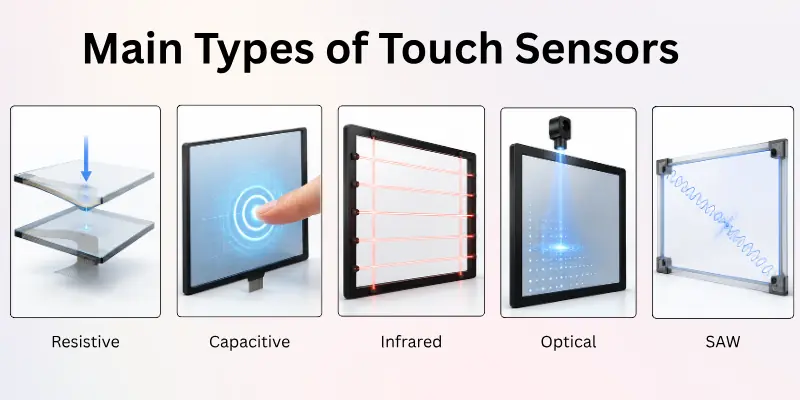
Here is the list of touch sensor types:
- Resistive Touch Sensor
- Capacitive Touch Sensor
- Infrared Touch Sensor
- Optical Touch Sensor
- Surface Acoustic Wave (SAW) Touch Sensor
Let’s explore each type and understand how it helps devices detect touch.
1. Resistive Touch Sensor
A resistive touch sensor works through physical pressure. It has two thin conductive layers separated by a small gap. When you press the screen, these layers connect and create an electrical signal that identifies the exact touch point. It does not depend on finger conductivity, so any object can be used.
This type is commonly found in older devices, ATMs, and industrial control systems. It is still useful in environments where users wear gloves or need stylus-based input. However, the extra layers slightly reduce screen brightness and clarity compared to modern technologies.
- Works on pressure-based input
- Supports any object (finger, stylus, etc.)
- Low cost and durable
- Slightly reduced display clarity
- Used in ATMs and industrial machines
Tip: Best suited for low-cost and industrial systems where durability matters more than display quality.

2. Capacitive Touch Sensor
A capacitive touch sensor works by detecting the electrical charge of the human body. When your finger touches the screen, it changes the electrostatic field, and the system immediately detects the location of touch. No pressure is required.
This is the most widely used technology in smartphones, tablets, and laptops. It provides smooth response, high accuracy, and better display clarity because of its single glass layer structure. However, it may not work properly with gloves or non-conductive materials.
- Uses electrical conductivity of skin
- Very fast and responsive
- High display clarity
- Does not work well with gloves
- Common in smartphones and tablets
Tip: Ideal for fast and smooth interaction in modern smart devices.
3. Infrared Touch Sensor
An infrared touch sensor uses invisible light beams arranged across the screen. When your finger or any object interrupts these beams, the system detects the exact touch position instantly.
It is commonly used in kiosks, digital boards, and large interactive displays. It supports multiple input types and does not require direct contact pressure. However, dust or dirt can interrupt the light path and affect accuracy.
- Uses infrared light grid
- Works with any object
- Ideal for large screens
- Sensitive to dust and blockage
- Used in kiosks and smart boards
Tip: Works best in clean and large interactive environments.
4. Optical Touch Sensor
An optical touch sensor uses cameras and light reflection to detect touch points. When an object touches the screen, it changes the light pattern, and the system calculates the exact position.
This technology is widely used in smart boards and large display systems. It provides excellent screen clarity because there is no physical touch layer. However, response time can be slightly slower compared to capacitive sensors.
- Uses camera-based detection
- Supports multi-touch input
- High display clarity
- Slightly slower response
- Used in smart boards and large displays
Tip: Best for education and presentation environments.
5. Surface Acoustic Wave (SAW) Touch Sensor
A SAW touch sensor uses ultrasonic sound waves that travel across the screen. When you touch the surface, it absorbs part of the wave, and the system identifies the exact touch location.
It is known for high accuracy and clear display quality. However, dust, oil, or water can interfere with the sound waves and reduce performance.
- Uses sound wave technology
- High accuracy detection
- Excellent display clarity
- Sensitive to dirt and moisture
- Used in kiosks and info systems
Tip: Requires a clean surface for stable and accurate results.

Advanced Types of Touch Sensors
These sensors are used in specialized environments like industrial systems, healthcare devices, smart tools, and security applications. They are not common in everyday smartphones.
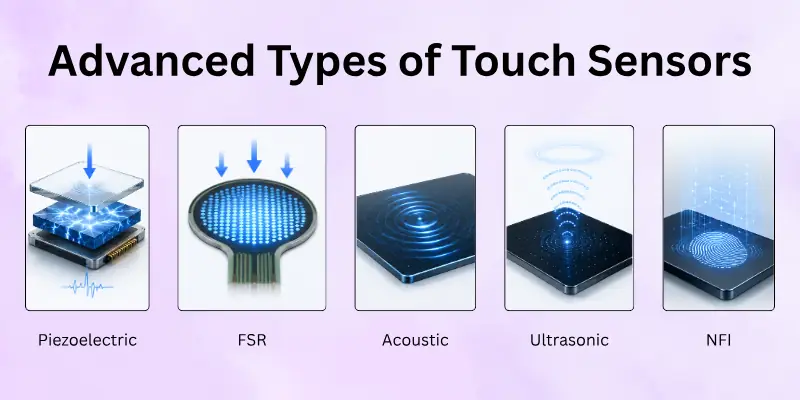
Here is the list of advanced kinds of touch sensors:
- Piezoelectric Touch Sensor
- Force-Sensitive Resistor (FSR)
- Acoustic Touch Sensor
- Ultrasonic Touch Sensor
- Near-Field Imaging (NFI) Sensor
Let’s cover them in detail.
6. Piezoelectric Touch Sensor
A piezoelectric touch sensor generates an electrical signal when pressure is applied using special materials. It can detect taps, vibration, and strong pressure input.
This type is commonly used in industrial machines and tools where durability and force detection are important. It is not typically used in consumer smartphones due to its specialized nature.
- Pressure-based signal generation
- Detects vibration and taps
- Durable structure
- Higher cost
- Industrial applications
Tip: Best for heavy-duty systems requiring pressure detection.
7. Force-Sensitive Resistor (FSR)
A Force-Sensitive Resistor changes its resistance when pressure is applied. The stronger the pressure, the stronger the signal becomes, but it does not detect exact touch location.
It is used in simple devices, toys, and basic electronic systems where only force measurement is needed rather than precise touch input.
- Measures force intensity
- Low-cost solution
- Simple structure
- No exact touch location
- Used in basic electronics
Tip: Suitable for basic pressure-sensing applications.
8. Acoustic Touch Sensor
An acoustic touch sensor detects vibrations created when a surface is touched. These vibrations travel through the material and are converted into touch signals.
It is used in smart surfaces and industrial environments. However, external noise or interference can affect accuracy.
- Uses vibration detection
- Works on multiple surfaces
- Fast response system
- Sensitive to noise
- Used in smart tools
Tip: Works best in controlled environments with minimal vibration noise.
9. Ultrasonic Touch Sensor
An ultrasonic touch sensor uses high-frequency sound waves that humans cannot hear. When you touch the surface, it changes the wave pattern, allowing detection without direct electrical contact.
It is often used in touchless systems where hygiene and safety are important, such as medical tools or smart taps.
- Uses ultrasonic waves
- Supports touchless interaction
- Safe and hygienic
- Slight delay in response
- Used in medical and smart systems
Tip: Ideal for touchless and hygiene-sensitive environments.
10. Near-Field Imaging (NFI) Sensor
A Near-Field Imaging sensor detects touch using advanced analysis of skin patterns, heat, and electrical signals. It can also support identity recognition in some systems.
This is a highly advanced technology used in security devices, smart locks, and authentication systems where both touch and identity verification are needed.
- Advanced imaging technology
- Detects touch and identity
- High security level
- Expensive technology
- Used in secure devices
Tip: Best for high-security applications and biometric systems.
Comparison Table of Touch Sensors
There are many types of touch sensors, and each works in a different way. This table shows a quick comparison to help you understand their main features:
| Type | Needs Pressure | Works with Gloves | Fast Response | Cost |
| Resistive | Yes | Yes | Medium | Low |
| Capacitive | No | No | Very Fast | Medium |
| Infrared | No | Yes | Fast | High |
| SAW | No | Yes | Fast | Medium |
| Optical | No | Yes | Fast | High |
| Piezoelectric | Yes | Yes | Medium | Medium |
| Acoustic | No | Yes | Slow | Medium |
| FSR | Yes | Yes | Medium | Low |
| Ultrasonic | No | Yes | Fast | High |
| Near-Field Imaging | No | Yes | Medium | High |
How to Choose the Right Touch Sensor
Selecting the right touch sensor depends on how and where you plan to use it. You should consider a few important points before making a choice.
Here are the main factors you should look at before choosing:
- Environment: Will the sensor be used indoors or outdoors? Some sensors perform better in clean, dry spaces. Others work well in dusty, wet, or bright conditions.
- Touch Method: Will the screen be touched by a finger, glove, stylus, or object? Capacitive sensors respond best to uncovered fingers. Resistive and other types can work with gloves or tools.
- Response Speed: Some applications need very fast responses. Choose a sensor that matches the speed your device requires.
- Screen Size: Small devices work well with capacitive or resistive sensors. Large displays may need infrared or optical sensors.
- Budget: Cost matters. Basic sensors, like resistive ones, are affordable. High-end sensors, such as ultrasonic or optical types, cost more but offer better performance.
Here are a few examples to help you decide:
- Use a capacitive sensor for smartphones and tablets.
- Choose a resistive sensor for ATMs, ticket machines, or public kiosks.
- Pick an infrared or optical sensor for large touchscreens or display boards.
- Select a near-field or ultrasonic sensor for outdoor use or areas with dust and moisture.
Always match the sensor type to your device’s needs and the environment. This will ensure better performance, ease of use, and longer device life.
Applications of Touch Sensors
Touch sensors are used in many devices we use every day. They help machines respond quickly and make them easier to use.
Below are some common places where touch sensors are used:
- Smartphones and Tablets: Touch sensors help you open apps, type messages, and swipe screens.
- ATMs and Kiosks: They allow users to press buttons on the screen to get money, print tickets, or select items.
- Smart TVs and Remotes: Users can control the screen with simple finger touches instead of buttons.
- Elevators: Touch panels allow users to press floor numbers without mechanical buttons.
- Home Appliances: Microwaves, ovens, and washing machines use touch controls for settings and timers.
- Cars: Touchscreens help control music, maps, and other car functions easily.
- Laptops and Monitors: Touchscreen displays make it easy to draw, scroll, and select options.
- Gaming Devices: Some game consoles use touch controls for faster and smoother actions.
- Medical Equipment: Touchscreens allow doctors and nurses to enter data quickly and cleanly.
- Industrial Machines: Workers use touch panels to run machines and check system settings.
Touch sensors make devices smarter, faster, and more user-friendly. That is why they are used in so many different fields.
Future of Touch Sensors
Touch sensors will continue to grow and improve. New technology will make them even smarter, faster, and more useful.
Here are some ways touch sensors will change in the future:
- Better Sensitivity: Future sensors will respond to lighter touches and work on more surfaces.
- Touchless Controls: Some new systems will let you control screens by waving your hand near them, no contact needed.
- More Durable Materials: Sensors will become stronger and last longer, even in rough or outdoor conditions.
- Flexible Screens: Some sensors will work on bendable or foldable screens for new types of devices.
- Lower Power Use: New sensors will save more energy, helping batteries last longer.
- Smarter Functions: Sensors may work with AI to understand gestures, pressure levels, or movement.
- Expanded Use: We will see more touch sensors in schools, hospitals, smart homes, and transportation.
Touch sensors will play a bigger role in our daily lives. As they improve, they will make technology easier and more exciting to use.
Conclusion
So, we’ve come to the end of our article. We’ve learned a lot about the various types of touch sensors in detail.
Based on what we’ve explored, I personally recommend capacitive touch sensors for everyday devices like smartphones and tablets, as they offer great speed and ease of use.
If you’re planning to choose a sensor for your own project or product, take time to review the features. Don’t forget to share this article with others who might find it useful
Common FAQs
Below are some common questions about the touch sensors types:
Most smartphones mainly use capacitive touch sensors because they are fast, accurate, and smooth. They detect the electrical signal from your finger and respond instantly. This makes daily use, like scrolling and typing, very easy and responsive.
Resistive touch sensors work with pressure, while capacitive sensors work with electrical touch from your finger. When comparing capacitive vs resistive touchscreens, the main difference comes down to how they detect input.
Resistive screens can work with any object, but capacitive screens need skin contact. Capacitive technology is more modern and commonly used in smartphones because it offers faster response, better accuracy, and a smoother user experience.
Capacitive touch sensors are the best for mobile phones because they offer fast response and high accuracy. They also provide better display clarity compared to older technologies. That is why almost all modern smartphones use capacitive touch technology.
Infrared touch sensors are mainly used in kiosks, ATMs, and large interactive screens. They use invisible light beams to detect touch without physical pressure. These are ideal for public systems where multiple users interact with the screen.
A capacitive touch sensor works by detecting changes in the electrical field when your finger touches the screen. The device senses this change and identifies the exact touch location. It does not require pressure; only a light touch is enough.
Optical touch sensors use cameras and light to detect touch points on a screen. They are highly useful for large displays and smart boards.
Key advantages include:
- High display clarity
- Supports multi-touch usage
- Works well for group interaction
- No physical touch layer needed
SAW touch sensors are commonly used in kiosks, public information systems, and industrial displays. They use sound waves to detect touch points on the screen. However, they need a clean surface to work properly.
A force-sensitive resistor detects how much pressure you apply instead of exact touch location. It changes resistance based on force level. It is used in basic electronics, toys, and simple control systems.
Advanced touch sensors are used in specialized industries like healthcare, security, and industrial automation. These include ultrasonic, acoustic, and near-field imaging sensors.
Common uses include:
- Smart medical devices
- Secure access systems
- Industrial machines
- Touchless interfaces
The right touch sensor depends on your device and usage needs. Smartphones need capacitive sensors, while kiosks often use infrared or SAW sensors. Industrial systems may use piezoelectric or FSR sensors for durability and pressure detection.


- Be Respectful
- Stay Relevant
- Stay Positive
- True Feedback
- Encourage Discussion
- Avoid Spamming
- No Fake News
- Don't Copy-Paste
- No Personal Attacks
- Be Respectful
- Stay Relevant
- Stay Positive
- True Feedback
- Encourage Discussion
- Avoid Spamming
- No Fake News
- Don't Copy-Paste
- No Personal Attacks