What is a Mechanical Keyboard – Complete Beginner’s Guide
Have you ever typed on a keyboard that feels soft, then tried one that clicks loudly? You may wonder why they feel so different.
The answer is simple: one is a regular keyboard, and the other is a mechanical keyboard. But what makes a mechanical keyboard special?
In this guide, we will explain what is mechanical keyboard in a very easy way. You will learn how it works, why people love it, and if it’s the right choice for you.
Let’s get started and make it easy to understand.
What Is a Mechanical Keyboard? (Definition of Mechanical Keyboard)
A computer mechanical keyboard is a type of keyboard that uses separate mechanical switches under each key. These switches help the keys respond more accurately when you type.
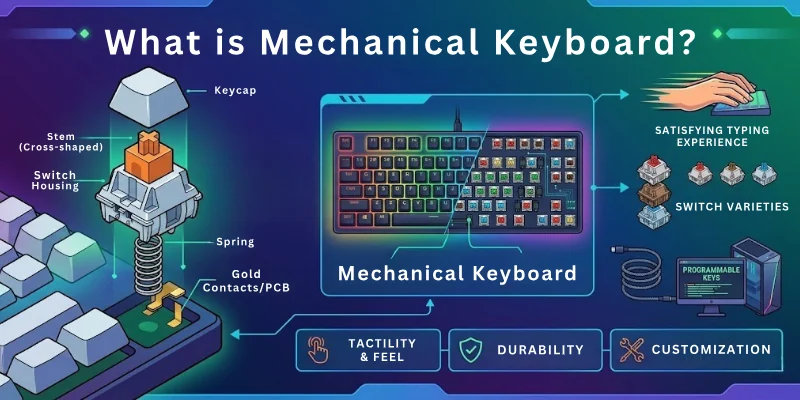
Unlike regular keyboards, mechanical keyboards give clearer feedback when a key is pressed. You may feel a small bump or hear a clicking sound, depending on the switch type.
Each key works separately, which makes typing feel more responsive and controlled.
How Does a Mechanical Keyboard Work?
A mechanical keyboard works by using a special switch under each key. When you press a key, the switch goes down and touches a part that sends a signal to the computer.
This tells the computer which key you pressed. Each key has its own switch, and that’s what makes it different from a regular keyboard.
Here’s how it works in simple steps:
- Press: You press a key with your finger.
- Move: The key pushes down a small spring and switches inside.
- Click: The switch touches a metal part and makes a click sound.
- Signal: The keyboard sends a signal to the computer.
- Show: The computer shows the letter or action on the screen.
Because of these switches, mechanical keyboards are faster, stronger, and easier to use.

Parts of a Mechanical Keyboard
A mechanical keyboard is made of several important parts that work together to create a smooth and responsive typing experience. Each part has a different role, and together they help the keyboard feel stronger, faster, and more comfortable to use.
Let’s understand the main parts of a mechanical keyboard in simple words.
- Keycaps are the top parts of the keyboard that you press with your fingers. They display letters, numbers, and symbols on each key. Most mechanical keyboards allow you to remove and replace keycaps easily. Many people change them to improve the look or feel of their keyboard.
- Switches are placed under every keycap. They are the most important part of a mechanical keyboard because they control how each key feels and responds. When you press a key, the switch registers the input and sends a signal to the computer. Different switches can feel smooth, clicky, or slightly bumpy.
- PCB (Printed Circuit Board): The PCB is the main electronic board inside the keyboard. It connects all the switches together and helps transfer signals to the computer. Without the PCB, the keyboard would not be able to detect key presses properly.
- Plate: The plate sits above the PCB and holds the switches firmly in place. It gives the keyboard extra strength and stability, which helps create a more solid typing feel.
- Case: The case is the outer body of the keyboard. It protects all the internal parts and gives the keyboard its overall shape and design. Cases can be made from plastic, aluminium, or other materials, depending on the keyboard model.
- Stabilizers are used under larger keys like the spacebar, Shift key, and Enter key. They help keep these bigger keys balanced and prevent them from shaking or wobbling while typing.
- Cable or Wireless Connection: Mechanical keyboards connect to computers either through a cable or wirelessly. Wired keyboards usually use a USB cable, while wireless models connect through Bluetooth or a wireless receiver.
Types of Mechanical Keyboard Switches
Mechanical keyboard switches come in different types. Each type changes how the keyboard feels, sounds, and responds when you type:
- Linear switches feel smooth and quiet. They move straight down without any bump. Gamers often prefer them because they respond quickly.
- Tactile switches give a small bump when pressed. This helps you feel the key activation without making a loud noise. They work well for typing and daily use.
- Clicky switches make a clear clicking sound with each press. They also give a bump for feedback. Many typing users enjoy this strong feedback, but it can be loud.
Switch Colours and What They Mean
Mechanical keyboard switches come in different colours. Each colour gives a different feel and sound when you press the key. Some are smooth, some click, and others feel bumpy.
- Red: Linear and quiet. Great for gaming.
- Brown: Tactile but not loud. Good for typing and gaming.
- Blue: Clicky and loud. Best for people who love the sound of typing.
Benefits of Using a Mechanical Keyboard
Mechanical keyboards improve your typing and gaming experience in many practical ways. They feel better when using and also perform better during long hours of work.
- Better Comfort During Long Use: Mechanical keyboards reduce finger strain. The keys respond easily, so you do not need to press hard. This helps during long typing or gaming sessions.
- Strong Build and Long Lifespan: These keyboards are built to last. Each key switch can handle millions of presses, which makes them more durable than normal keyboards.
- Faster and More Responsive Typing: Every key press registers quickly. This improves speed and makes typing and gaming feel smooth and accurate.
- Easy Customization Options: You can change keycaps, switches, and lighting. This lets you adjust the keyboard based on your style and comfort.
- Simple Cleaning and Maintenance: You can remove keycaps to clean dust and dirt easily. This keeps the keyboard in good condition for a long time.
- Better Typing Accuracy: The clear feedback from each key helps you avoid mistakes. You always know when a key is pressed correctly.
- More Enjoyable Typing Experience: The feel and sound of mechanical keys make typing more satisfying. Many users enjoy this feedback during daily use.
- Custom Lighting and Aesthetic Control: Many mechanical keyboards come with RGB lighting. You can adjust colours and effects to match your setup or mood.
Drawbacks of Mechanical Keyboards
Mechanical keyboards are powerful and durable, but they are not perfect for everyone. Before buying one, it is important to understand a few limitations.
- Higher Price Compared to Normal Keyboards: Mechanical keyboards usually cost more than membrane keyboards. The better build quality and switches increase the price.
- Noticeable Typing Noise: Some switch types, especially clicky ones, can be loud. This may not suit quiet places like offices, libraries, or shared workspaces.
- Heavier and Less Portable: Most mechanical keyboards are heavier and bulkier. This makes them less convenient to carry in a bag or use while travelling.
- Adjustment Time for Beginners: If you are using a mechanical keyboard for the first time, it may feel different. It can take a few days to get fully comfortable.
- Not Always Suitable for Silent Environments: Even quieter switches still produce more sound than normal keyboards. This can be distracting in very quiet settings.
Who Should Use a Mechanical Keyboard?
A mechanical keyboard is not for everyone, but it is very useful for people who type often or need better speed and control.
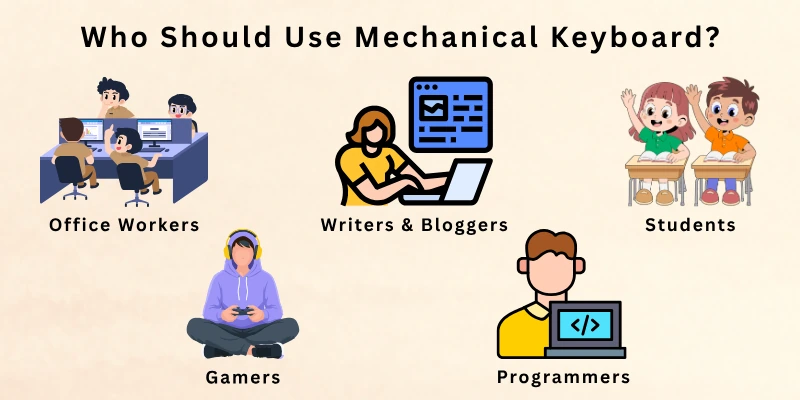
If you spend a lot of time on a computer, this keyboard can improve your daily experience.
- Gamers: They need fast response and accurate key presses during gameplay, which helps improve performance in competitive games.
- Writers and Bloggers: They type for long hours, and mechanical keyboards give better comfort and reduce typing fatigue.
- Students: They use keyboards for notes, assignments, and online learning, where smooth and reliable typing helps a lot.
- Office Workers: They handle emails, reports, and daily documents, so a durable and comfortable keyboard improves productivity.
- Programmers: They write long lines of code, and clear key feedback helps reduce mistakes and improve typing flow.
Mechanical Keyboard Sizes
Mechanical keyboards come in different sizes, and each size is designed for different needs. Some users prefer a full layout with all keys, while others choose smaller designs to save desk space and improve comfort.
- Full-Size (100%): A full-size keyboard includes all keys, including function keys, arrow keys, and a number pad. It is best for users who work with numbers, data entry, or need a complete keyboard layout.
- Tenkeyless (TKL): A TKL keyboard removes the number pad. It saves desk space and gives more room for mouse movement. Many gamers and office users prefer this size.
- 75% Layout: A 75% keyboard is more compact than TKL but still keeps important keys like arrows and function keys. It offers a good balance between size and usability.
- 65% Layout: This keyboard removes some function keys but keeps arrow keys. It is compact, clean, and suitable for users who want a small setup without losing basic navigation control.
- 60% Layout: This keyboard is very compact and removes function keys and arrow keys. It uses shortcuts (key combinations) for extra actions. It is popular among minimal desk setups and gamers.
- 40% Layout: This is the smallest standard layout. It mainly includes letters and a few extra keys. Most actions require key combinations, so it is suitable only for advanced users who prefer extreme minimalism.

Custom Mechanical Keyboards
Some users like to build their own keyboards instead of buying a ready-made one. This is called a custom mechanical keyboard. It takes more time and effort, but it gives a fully personalized experience.
In custom keyboards, you can choose every part based on your preference:
- Choose your size: You can pick a small compact layout or a full-size keyboard, depending on your needs and desk space.
- Select your switches: You can use smooth, clicky, tactile, quiet, or fast switches based on your typing style.
- Design your look: You can customise colours, keycaps, and overall style to match your setup.
- Add lighting effects: Many users add RGB lighting to make the keyboard more attractive and modern.
- Personal hobby option: Building custom keyboards has become a popular hobby among tech enthusiasts because it combines creativity and performance.
How to Choose the Right Mechanical Keyboard
Choosing the right mechanical keyboard depends on your needs, comfort, and budget. A good keyboard should match how you type, work, or play every day.
- Think About Your Purpose: First, decide why you need it. Gaming needs fast response, while typing needs comfort. Some users need both.
- Pick the Right Size: Choose a size that fits your desk. Full-size has all keys, while TKL or compact saves space and gives more room for mouse use.
- Select the Switch Type: Switches decide how the keyboard feels. Pick smooth, tactile, or clicky based on what feels comfortable for you.
- Set Your Budget: Prices vary a lot. Choose a keyboard that fits your budget without losing important features.
- Check Extra Features: Look for things like RGB lights, wireless option, or silent keys. Only choose features you really need.
Caring for Your Mechanical Keyboard
Taking care of your mechanical keyboard helps it last longer and work better. Simple habits can keep it clean, smooth, and in good condition.
- Keep It Clean: Dust and dirt can build up between the keys. Clean your keyboard regularly with a soft brush or cloth to keep it fresh.
- Avoid Food and Drinks: Try not to eat or drink near your keyboard. Small spills or crumbs can damage the switches over time.
- Clean Keycaps Sometimes: You can remove keycaps for deep cleaning. Wash them gently and let them dry completely before placing them back.
- Use Gentle Typing: Do not press the keys too hard. Light and normal typing pressure helps reduce wear and keeps switches strong.
- Cover When Not in Use: If possible, use a cover to protect your keyboard from dust when you are not using it.
Conclusion
So, friends, we’ve come to the end. In this guide, we have learned all about what is a mechanical keyboard.
Mechanical keyboards are great for many reasons. They feel better, last longer, and make typing or gaming more fun. You can pick your favourite switch, size, and even design your own.
Whether you’re a gamer, writer, student, or someone who types every day, a mechanical keyboard can make your work easier and more fun. Once you try it, you’ll see why so many people love it.
FAQs About Mechanical Keyboard
Let’s look at some common questions people ask about what is mechanical keyboard:
A mechanical keyboard is a type of keyboard that uses individual mechanical switches under each key. Each switch registers a key press separately, which makes typing more accurate and responsive.
When you press a key, you feel clear feedback, like a bump or click, depending on the switch type. This helps users type faster and with fewer mistakes compared to regular keyboards.
Yes, a mechanical keyboard is often better for typing comfort, speed, and durability. It gives a more precise feel compared to a normal membrane keyboard. However, it may cost more and produce more sound, so it depends on your personal needs.
Some benefits are:
- Faster and more responsive typing
- Long-lasting build quality
- Better typing accuracy and control
These benefits make it a popular choice for gamers, writers, and office users. It improves the overall typing experience in daily use.
Yes, mechanical keyboards are widely used for gaming because they respond quickly to key presses. This helps players react faster in fast-paced games. Many gamers also prefer them because they support multiple key presses at the same time without errors, which improves gameplay performance.
Mechanical keyboards use high-quality individual switches under each key. These switches are designed to last for millions of presses. They also offer better performance, customization options, and build quality. That is why they cost more than standard keyboards.
Yes, mechanical keyboards are often better for long typing work because they provide clearer key feedback and better comfort. This helps reduce typing errors during extended use.
Many writers, students, and office workers prefer them because the keys feel more stable and responsive. It makes long hours of typing easier and less tiring compared to basic keyboards.
Tactile switches are often best for typing because they give a small bump when a key is pressed. This helps users feel when the key is activated. It improves typing accuracy and reduces mistakes, especially during long writing sessions.
Mechanical keyboards can be both loud and quiet, depending on the switch type. Clicky switches are loud, while linear switches are much quieter. You can choose a switch based on your working environment and personal comfort.
Mechanical keyboards are built for long-term use and can last for many years. Most switches are rated for millions of key presses. With proper cleaning and care, they stay reliable and perform well for a long time.
Cleaning a mechanical keyboard is simple and important for its long life. You can remove keycaps and clean dust using a soft brush or cloth.
Regular cleaning keeps the keyboard smooth, improves performance, and prevents dirt buildup under the keys.


- Be Respectful
- Stay Relevant
- Stay Positive
- True Feedback
- Encourage Discussion
- Avoid Spamming
- No Fake News
- Don't Copy-Paste
- No Personal Attacks
- Be Respectful
- Stay Relevant
- Stay Positive
- True Feedback
- Encourage Discussion
- Avoid Spamming
- No Fake News
- Don't Copy-Paste
- No Personal Attacks