Webcam vs Laptop Camera: Difference between Laptop Camera and Webcam
Most laptops come with a built-in camera, but these are usually basic and offer average quality. On the other hand, webcams come in many types and can give better video and sound.
The webcam vs laptop camera debate matters when you want clear calls, better lighting, or extra features.
Knowing the facts about each can help you choose the best option for work, school, or content creation.
Let’s get started!
What is a Webcam?
A webcam is a small digital camera that captures video and sends it to a computer or laptop. People use webcams for video calls, online classes, meetings, and live streaming. Some webcams connect through a USB cable, while others work wirelessly. Most modern webcams also include a built-in microphone for audio.
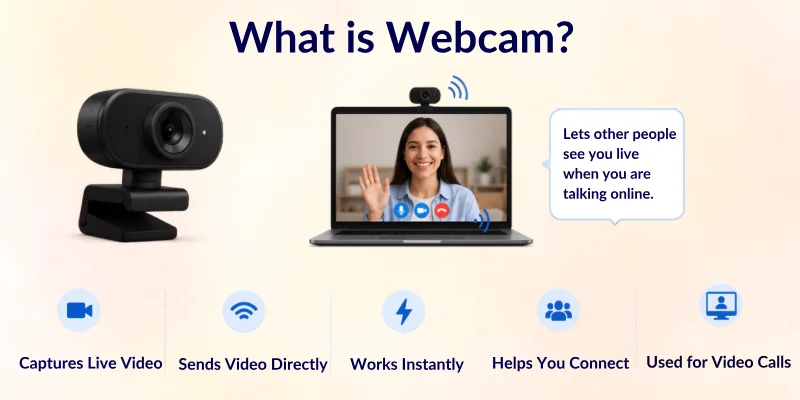
Webcams help people share clear video during online communication. Many external webcams give better video quality than built-in laptop cameras. You can place them on a monitor or desk and adjust the angle easily. This makes them useful for work, gaming, teaching, and content creation.
Common Uses of a Webcam
- Video calls on Zoom, Skype, and Google Meet
- Online classes and virtual learning
- Live streaming on YouTube or Twitch
- Recording videos for social media
- Online job interviews and meetings
- Talking with friends and family online
Example: A YouTuber may use a webcam to record face videos clearly while streaming games or teaching online.
What is a Laptop Camera?
A laptop camera is a small built-in camera placed at the top of a laptop screen. It helps users make video calls, attend online classes, and join meetings without any extra device. Most laptop cameras start working automatically when you open apps like Zoom or Google Meet.
Laptop cameras are designed for simple and basic use. They are easy to access because they are already part of the laptop. However, their video quality is usually average compared to external webcams. They work best in good lighting and close-up use.
Common Uses of a Laptop Camera
- Online classes and virtual learning
- Video meetings on Zoom, Teams, or Google Meet
- Quick video calls with friends and family
- Online interviews and remote work meetings
- Scanning or face verification in apps
Example: A student uses a laptop camera to attend daily online classes without buying or connecting any extra device.

Comparison Table of Laptop Camera vs Webcam
Here is a quick comparison of the difference between webcam and laptop camera. This table helps you understand both options in a simple way so you can choose the right one easily:
| Feature | Webcam | Laptop Camera |
| Video Quality | High and clear | Basic and average |
| Sound Quality | Better (in many models) | Basic built-in mic |
| Installation | Needs USB or setup | Already built-in |
| Flexibility | Can adjust the angle easily | Fixed position |
| Portability | Easy to move and use anywhere | Only works with a laptop |
| Low Light Performance | Good in many models | Weak in low light |
| Price | Extra cost | No extra cost |
| Best For | Streaming, meetings, and content creation | Simple video calls and classes |
| Control Settings | More options available | Limited settings |
| Upgrade Option | Can be replaced or upgraded | Not upgradeable |
Key Features of Webcam vs Laptop Camera
To understand the real difference between a webcam and a laptop camera, it is important to look at their main features. These features show how both devices perform in daily use like video calls, online classes, and streaming.
Each point below will help you compare them in a simple and clear way:
- Video Quality
- Audio Quality
- Setup and Installation
- Portability
- Camera Angles and Flexibility
- Low Light Performance
- Privacy and Security
- Streaming and Recording Performance
- Price and Value for Money
- Compatibility and Usage
Let’s look at them in detail.
1. Video Quality
Here is the difference in video clarity between a webcam and a laptop camera during daily use:
A webcam usually delivers sharper and clearer video. It captures more detail and works better in different lighting conditions. Many webcams also support higher resolutions like 1080p or 4K. This makes them a strong choice for professional meetings and streaming.
A laptop camera gives basic video quality for simple use. It often looks softer and less detailed, especially in low light. Most built-in cameras focus on convenience rather than high performance. They work fine for quick video calls and casual use.
2. Audio Quality
Here is the difference in sound clarity when comparing webcams and laptop cameras:
A webcam often comes with a better built-in microphone. It captures clearer voice input and reduces background noise in many models. Some webcams also offer noise-cancelling features for better communication. This improves overall audio during calls and recordings.
A laptop camera usually relies on the laptop’s built-in mic system. The sound quality is basic and may pick up background noise easily. It works for simple conversations but is not ideal for professional audio needs. The voice may sound less clear in noisy places.
3. Setup and Installation
Here is the difference in how easily both devices can be set up for use:
A webcam needs a simple setup using a USB port or wireless connection. Most webcams work with plug-and-play support, so users can start quickly. Some advanced models may need software installation for extra features. Overall, the setup is still easy and fast.
A laptop camera does not need any setup because it is already built in. It starts working automatically when you open a video app. This makes it very convenient for beginners and daily users. There is no extra hardware or connection required.
4. Portability
Here is the difference in how easily you can carry and use both cameras anywhere:
A webcam is small and lightweight, so you can carry it easily in a bag. You can use it with different devices, like laptops or desktops. This makes it flexible for travel and remote work. It is not fixed to one device.
A laptop camera is fixed inside the laptop and cannot be moved separately. You can only use it when your laptop is with you. It is convenient but not independent. This limits its use to one device only.
5. Camera Angles and Flexibility
Here is the difference in how much control you get over camera positioning:
A webcam allows full control over angle and position. You can place it on a monitor, desk, or tripod. This helps you adjust framing for better video quality. It is useful for streaming and content creation.
A laptop camera has a fixed position on the screen. You cannot change its angle easily, which limits flexibility. The camera often captures a lower or straight-on view. This can affect how you appear on video calls.
6. Low Light Performance
Here is the difference in how both cameras perform in dark or low-light environments:
A webcam usually performs better in low-light conditions. Many models include features that improve brightness and reduce noise. This helps keep the video clear even in dim rooms. It is good for professional use.
A laptop camera struggles in low-light situations. The video may look dark, grainy, or unclear. It depends heavily on room lighting to perform well. This makes it less reliable in poor lighting conditions.
7. Privacy and Security
Here is the difference in how both devices handle privacy control.
A webcam often includes privacy features like lens covers or shutters. Users can physically block the camera when it is not in use. This adds extra safety and peace of mind. It is useful for security-focused users.
A laptop camera does not always include physical privacy protection. Some users cover it manually for safety. It can feel less secure if not managed properly. However, software controls can still disable it when needed.
8. Streaming and Recording Performance
Here is the difference in how both cameras perform during live streaming and recording:
A webcam is designed for smooth streaming and high-quality recording. It handles movement better and reduces lag in most cases. Many streamers prefer webcams for stable output. It works well for YouTube and online content.
A laptop camera is not built for professional streaming. It may lag or show lower quality during long recordings. It works fine for short meetings or calls. However, it is not ideal for content creation.
9. Price and Value for Money
Here is the difference in cost and overall value between the two camera types:
A webcam requires an extra purchase, which adds to your setup cost. However, it offers better quality and more features. This makes it a good investment for professionals. You get more value if you use it regularly.
A laptop camera comes built-in, so there is no extra cost. It is budget-friendly and simple to use. However, it offers limited performance compared to webcams. It is best for basic users.
10. Compatibility and Usage
Here is the difference in how both cameras work with different devices and apps:
A webcam works with many devices and operating systems. You can use it on laptops, desktops, and sometimes even smart devices. It supports most video calling and streaming apps. This makes it highly flexible.
A laptop camera only works with the laptop it is built into. It cannot be used separately on other devices. It still supports common apps like Zoom and Meet. But its usage is limited to one system.

Pros and Cons of Webcam and Laptop Camera
Let’s now look at the advantages and disadvantages of both devices. This will help you clearly understand which option works better for your needs.
Advantages of a Webcam
A webcam offers better performance and more control, which makes it a strong choice for professional and daily online use:
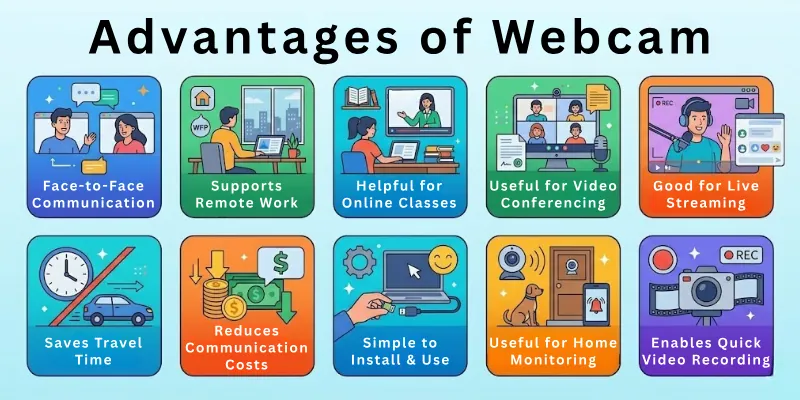
- Better video quality: It delivers clear and sharp video, which improves the overall call or recording experience.
- Improved lighting performance: It works better in low light and keeps the video more visible and balanced.
- Flexible positioning: You can place it anywhere and adjust the angle for better framing.
- Good for streaming and content creation: It supports smooth video for YouTube, gaming, and live streaming.
- Better control options: Many webcams allow you to adjust settings like focus, brightness, and zoom.
Disadvantages of a Webcam
A webcam also has some limitations that you should consider before buying it:
- Extra cost: You need to buy it separately, which increases your setup cost.
- Needs setup space: It requires proper placement on a desk or monitor.
- Requires connection: Most webcams need a USB or wireless connection to work.
- May need software setup: Some advanced models need drivers or apps for full features.
Advantages of a Laptop Camera
A laptop camera is simple and convenient, making it a good option for basic users:
- Already built-in: You do not need to buy or install anything extra.
- Easy to use: It works automatically when you start a video app.
- Good for basic calls: It handles online classes and meetings without any problem.
- No extra wires or setup: Everything is already inside the laptop, so it is hassle-free.
- Portable solution: You can use it anywhere as long as you have your laptop.
Disadvantages of a Laptop Camera
A laptop camera has some clear limitations compared to an external webcam:
- Lower video quality: The video often looks soft and less detailed.
- Poor low-light performance: It struggles in dark rooms and needs good lighting.
- Fixed angle: You cannot adjust the camera position for better framing.
- Basic microphone quality: The built-in mic may pick up background noise.
- Limited upgrade options: You cannot improve or replace the built-in camera separately.
Who Should Use a Webcam?
A webcam is best for people who need clear video quality and more control during online communication. It is a great choice for users who want a professional setup for work or content creation.
- Online teachers and tutors: They can deliver clear video lessons and improve student engagement.
- YouTubers and content creators: They get better video quality for recordings and live streaming.
- Remote workers and professionals: They can attend meetings with clear and stable video quality.
- Gamers and streamers: They can stream gameplay with smooth and high-quality video.
- Business users: They can improve presentation quality during online meetings.
Who Should Use a Laptop Camera?
A laptop camera is best for users who need simple and quick video access without extra setup. It works well for daily and basic communication needs:
- Students attending online classes: They can join lectures easily without buying extra devices.
- Casual users: They can make quick video calls with friends and family.
- Travellers: They can use it anywhere without carrying extra equipment.
- Office users with basic needs: They can attend simple meetings without needing high video quality.
- Beginners: They can start video calls easily without any setup or learning curve.
Tips for Choosing the Right Camera
Here are some simple tips to help you choose the right camera for your needs. These points will help you make a smart and practical decision.
- Check your main use: Decide if you need the camera for meetings, classes, streaming, or casual calls.
- Look at video quality: Choose a camera that offers clear and sharp video for better communication.
- Consider the lighting in your room: Pick a camera that performs well even in low light conditions.
- Think about your budget: Balance price with features so you get good value for money.
- Check compatibility: Make sure the camera works with your laptop and apps like Zoom or Teams.
- Look for easy setup: Choose a camera that is simple to install and use without extra effort.
Common Mistakes to Avoid When Choosing a Camera
Many people make simple mistakes when buying a camera. Avoiding these can help you choose a better option.
- Ignoring video quality: Some users focus only on price and forget about clarity and performance.
- Not checking lighting performance: A camera may look good, but it can fail in low-light rooms.
- Choosing without knowing your purpose: Buying the wrong type for streaming, meetings, or casual use can cause problems.
- Overlooking compatibility: Some cameras do not work well with all devices or software.
- Skipping reviews and comparisons: Not checking user feedback can lead to a poor buying decision.
Conclusion
So, we’ve reached the end. Today, we learned all about webcam vs laptop camera and how they are different.
I think you should use a webcam if you want better video and sound. It works well for online classes, meetings, or making videos.
A webcam allows you to control the light, angle, and how clear you look. It may cost more, but it gives better results. Now it’s your turn, think about what you need and choose the camera that is best for you.
Common FAQs
Here are some simple answers to questions on the difference between laptop camera and webcam:
A webcam is usually better than a laptop camera because it gives clearer video and more control. It works well for meetings, streaming, and online classes where quality matters. A laptop camera is fine for basic use, but it often looks less sharp. So, the best choice depends on your needs and budget.
Yes, a webcam can improve video call quality in most cases. It gives sharper video, better brightness, and smoother performance. Many webcams also handle low light better than built-in laptop cameras. This makes your face look clearer during calls.
A webcam is usually better for Zoom meetings because it gives clearer video and better stability. It helps you look more professional during online communication. Laptop cameras work fine for basic meetings, but the quality is lower. So, webcams are a better choice for regular users.
A laptop camera is still good for quick or casual Zoom calls. It is easy to use and does not need any setup. However, it may not give the best video quality in professional meetings. Lighting also affects its performance more.
Yes, a webcam is very good for online classes. It helps students and teachers see each other clearly during lessons. The better video quality improves communication and the learning experience. It also works well in different lighting conditions.
- Better video clarity for teachers and students
- Improves interaction during live classes
- Works well even in low-light rooms
- Easy to connect with most learning platforms
Yes, many webcams come with built-in microphones. These mics capture voice clearly during calls and recordings. Some models even reduce background noise for better sound quality. However, external microphones still give the best audio results.
A laptop camera’s quality can be improved with a few simple steps. Good lighting and camera positioning make a big difference. Cleaning the camera lens also helps improve clarity. Software updates can also improve performance slightly.
- Use good lighting in front of you
- Clean the camera lens regularly
- Adjust your sitting position and angle
- Keep your background simple and bright
- Update camera drivers for better performance
A laptop camera can handle basic streaming, but it is not ideal for professional use. The video quality may look low and less stable during long sessions. It works only for simple or beginner-level streaming. For better results, a webcam is recommended.
A webcam gives smoother and clearer video for streaming. It supports higher resolution and better lighting performance. This makes it a better choice for content creators and gamers. It improves the overall viewing experience for the audience.
Yes, you can use a webcam with most laptops easily. Most webcams connect through a USB port and work with plug-and-play support. They also work with popular apps like Zoom, Teams, and Google Meet. Just make sure your laptop has a working USB port.


- Be Respectful
- Stay Relevant
- Stay Positive
- True Feedback
- Encourage Discussion
- Avoid Spamming
- No Fake News
- Don't Copy-Paste
- No Personal Attacks
- Be Respectful
- Stay Relevant
- Stay Positive
- True Feedback
- Encourage Discussion
- Avoid Spamming
- No Fake News
- Don't Copy-Paste
- No Personal Attacks