
How to Clean a Camera Lens Without Scratches in 2026
Your camera lens helps you capture clear, sharp, and high-quality photos. Over time, dust, dirt, fingerprints, and smudges can build up on the lens surface. When this happens, your images may look blurry, dull, or less detailed than expected.
That is why regular lens cleaning is important. A clean lens helps you get better photo quality and protects your camera equipment from unnecessary wear.
In this guide, we will show you how to clean a camera lens safely and correctly. You will learn the tools you need, the steps to follow, common mistakes to avoid, and simple tips to keep your lens clean and ready for every shot.
Tools You Need to Clean a Camera Lens
Before you start, gather the right tools. Using proper cleaning tools helps remove dust and smudges safely without scratching or damaging your camera lens.
- Lens Cleaning Solution: Use a cleaning solution made specifically for camera lenses. It helps remove fingerprints, smudges, and dirt safely without harming the lens coating.
- Microfiber Lens Cloth: A soft microfiber cloth is ideal for wiping the lens surface. It cleans effectively and does not leave scratches or lint behind.
- Lens Tissue: Lens tissues are designed for delicate optical surfaces. They can help remove marks and fingerprints when used gently.
- Lens Blower: A lens blower removes loose dust and debris without touching the lens. This should be your first step before wiping the glass.
- Lens Brush: A soft lens brush helps remove tiny dust particles that remain after using a blower.
- Lens Cleaning Pen: A lens cleaning pen usually includes a brush on one end and a cleaning tip on the other. It is useful for removing stubborn smudges and fingerprints.
- Cotton Swabs (Optional): Cotton swabs can help clean around lens edges and other hard-to-reach areas. Use them carefully to avoid touching the glass unnecessarily.
How to Clean Camera Lens Step by Step
Cleaning a camera lens is simple when you follow the correct steps. Always start with the gentlest cleaning method first. This helps protect the lens coating and prevents scratches.
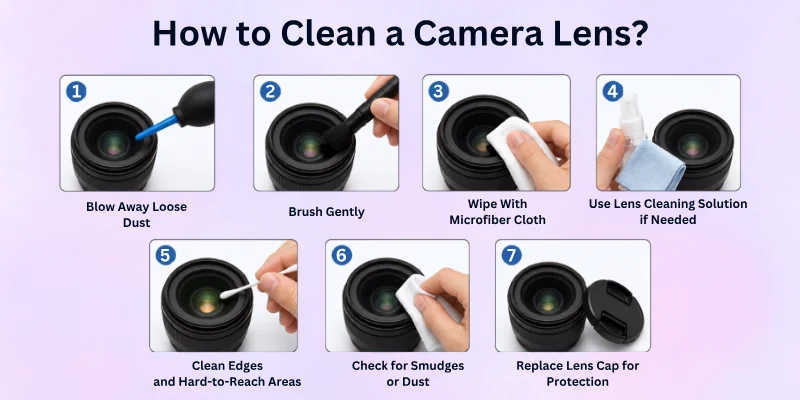
Below are the best ways to clean a camera lens:
Step 1: Inspect the Lens for Dust and Smudges
Before cleaning, carefully check the lens under good lighting. Look for dust, fingerprints, smudges, or other marks on the glass surface.
This step helps you identify the areas that need attention and prevents unnecessary cleaning. If the lens only has a small amount of dust, you may not need to use a cleaning solution.
Step 2: Use an Air Blower to Remove Loose Dust
Use a lens blower to remove loose dust and debris from the lens surface. Hold the camera with the lens facing downward so dust falls away instead of settling back onto the glass.
Never blow on the lens with your mouth. Moisture from your breath can leave marks and attract more dust.
Step 3: Brush Away Remaining Particles
If some dust remains after using the blower, gently remove it with a soft lens brush. Use light strokes and avoid pressing the brush against the glass.
Make sure the brush is clean before use. A dirty brush can spread dirt across the lens and create scratches.
Step 4: Apply Lens Cleaning Solution Properly
If fingerprints or smudges are still visible, apply a small amount of lens cleaning solution to a microfiber cloth or lens tissue.
Never spray the solution directly onto the lens. Excess liquid can seep into the edges of the lens and potentially damage internal components.
Step 5: Wipe the Lens with a Microfiber Cloth
Using the microfiber cloth, gently wipe the lens in small circular motions. Start from the center of the lens and work your way toward the outer edges.
Do not apply too much pressure. Let the cloth and cleaning solution do the work. This method helps remove smudges while protecting the lens coating.
Step 6: Clean Lens Edges and Hard-to-Reach Areas
Dust and dirt often collect around the edges of the lens. Use a lens brush, cotton swab, or lens tissue to clean these areas carefully.
Take your time and avoid touching the glass with your fingers while cleaning around the edges.
Step 7: Check the Lens and Repeat if Needed
After cleaning, inspect the lens again under bright light. Check for any remaining dust, fingerprints, or streaks.
If needed, repeat the cleaning process using gentle movements. Once the lens looks clean and clear, replace the lens cap to help protect it from dust and dirt.

How to Remove Common Lens Problems
Even if you take good care of your camera, your lens can still collect dust, fingerprints, smudges, and other marks. Knowing how to deal with these common problems helps keep your photos clear and sharp.
How to Remove Fingerprints from a Camera Lens
Fingerprints are one of the most common lens issues. The natural oils from your fingers can leave smudges that affect image quality.
- Use a lens blower to remove loose dust first
- Apply a small amount of lens cleaning solution to a microfiber cloth
- Wipe the lens gently in circular motions
- Check the lens for any remaining marks
Avoid touching the lens directly to prevent new fingerprints.
How to Remove Dust from a Camera Lens
Dust can settle on the lens surface during storage or outdoor photography.
- Hold the lens facing downward
- Use a lens blower to remove loose dust
- Use a soft lens brush for any remaining particles
- Avoid wiping dust directly with a cloth
Removing dust first helps prevent scratches during cleaning.
How to Remove Smudges from a Camera Lens
Smudges often come from fingerprints, moisture, or accidental contact with the lens.
- Blow away loose dust first
- Use a microfiber cloth with lens cleaning solution
- Wipe gently from the center outward
- Repeat if necessary until the lens is clear
Never use excessive force while cleaning.
How to Remove Water Spots from a Camera Lens
Water spots can appear after shooting in rain, humidity, or near water.
- Dry the lens surface with a clean microfiber cloth
- Apply a small amount of lens cleaning solution if spots remain
- Wipe gently in circular motions
- Inspect the lens for streaks after cleaning
Cleaning water spots quickly helps prevent stains from becoming harder to remove.

Common Camera Lens Cleaning Mistakes to Avoid
Cleaning a camera lens is simple, but using the wrong methods can damage the lens or affect image quality. Avoid these common mistakes to keep your lens safe and in excellent condition.
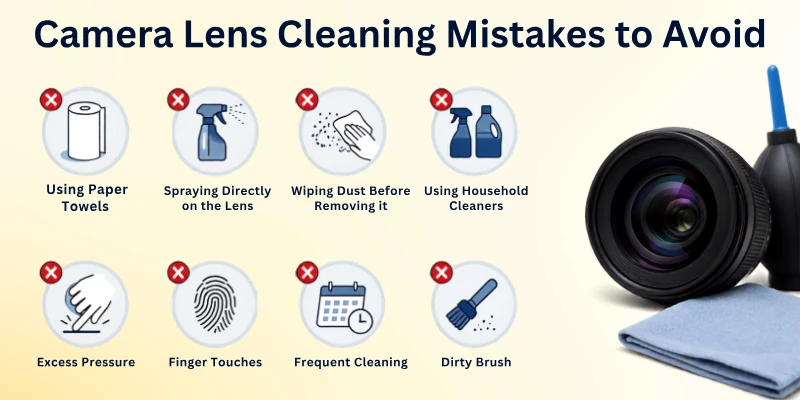
- Using paper towels or regular tissues: These materials can scratch the lens surface and leave tiny fibres behind. Always use a microfiber lens cloth or lens tissue.
- Spraying cleaning solution directly on the lens: Excess liquid can seep into the edges of the lens and damage internal parts. Apply the solution to a cloth first, then clean the lens.
- Wiping dust before removing it: Rubbing dust across the lens can cause scratches. Always use a lens blower or soft brush before wiping the glass.
- Using household cleaners: Glass cleaners, window cleaners, and other household products can damage the lens coating. Only use products designed for camera lenses.
- Applying too much pressure: Pressing hard while cleaning can damage the lens coating. Use gentle circular motions and let the cleaning tools do the work.
- Touching the lens with your fingers: Fingerprints leave oils and smudges on the glass. Hold the camera by the body or lens edges whenever possible.
- Cleaning the lens too often: Unnecessary cleaning increases the risk of scratches. Only clean the lens when you notice dust, fingerprints, or smudges affecting image quality.
- Using a dirty cloth or brush: Dirty cleaning tools can spread dust and debris across the lens. Make sure all cleaning accessories are clean before use.
Conclusion
In this article, we’ve covered how to improve a camera lens in detail. We explored the right way to clean your lens, how to handle it safely, where to store it, and which small upgrades can sharpen your image quality.
From my own experience, regular care makes the biggest difference. Keep dust away, don’t touch the glass surface, and always cover your lens with a cap when you’re not using it.
These simple habits may look minor, but they keep your lens safe and help you capture clearer, sharper photos every time. Start using these tips today and see the improvement in your next shoot.
Important FAQs
Before you go, check out these frequently asked questions to understand how to clean a dirty camera lens even better:
The safest way to clean a camera lens is to use a microfiber cloth and a lens cleaning solution. First, remove dust with a blower to avoid scratches. Always clean gently in a circular motion to protect the lens coating.
No, you should not use water, glass cleaner, or household cleaning products. These liquids can damage the lens coating and reduce image quality. Always use a proper camera lens cleaner made for DSLR or mirrorless cameras.
You only need a few simple tools to clean a camera lens safely:
- Air blower to remove dust
- Microfiber lens cleaning cloth
- Lens cleaning solution
- Soft lens brush
Using the right camera cleaning kit helps prevent scratches and keeps your photos sharp.
You should clean your DSLR or mirrorless camera lens only when you see dust, fingerprints, or smudges. Cleaning too often can wear down the protective coating over time. Regularly checking your lens helps maintain clear and sharp images.
To remove fingerprints from a camera lens, apply a small drop of lens cleaning solution to a microfiber cloth. Gently wipe the lens in a circular motion from the centre outward. This method safely removes smudges without harming the glass surface.
Avoid using rough cloth, tissues, or your shirt to wipe the lens. Never spray cleaning solution directly onto the lens surface. These mistakes can scratch the lens and reduce overall camera image quality.
Yes, a dirty camera lens can affect photo quality. Dust, fingerprints, and smudges may reduce sharpness, create blurry spots, and lower image contrast.
Keeping your lens clean helps you capture clearer and more detailed photos.
Yes, a lens cleaning pen is safe when used correctly. The soft brush removes loose dust, while the cleaning tip helps remove fingerprints and smudges. Always remove dust first to avoid scratching the lens surface.
A small amount of dust inside a lens usually does not affect image quality. However, excessive dust can sometimes reduce contrast or become noticeable in certain lighting conditions.
If you notice image problems, consider professional lens servicing.
No, you do not need to clean your camera lens after every photoshoot. Only clean it when you see visible dust, fingerprints, or smudges. Unnecessary cleaning can increase the risk of scratches and wear on the lens coating.



- Be Respectful
- Stay Relevant
- Stay Positive
- True Feedback
- Encourage Discussion
- Avoid Spamming
- No Fake News
- Don't Copy-Paste
- No Personal Attacks
- Be Respectful
- Stay Relevant
- Stay Positive
- True Feedback
- Encourage Discussion
- Avoid Spamming
- No Fake News
- Don't Copy-Paste
- No Personal Attacks