Screen vs Monitor: Easy Comparison for Better Choice
People often use the words “screen” and “monitor” in the same way, but they are not exactly the same. A monitor is a separate device that shows visuals from a computer. A screen is the display area where images and videos appear on devices like laptops, phones, and tablets.
In this guide on screen vs monitor, we will explain the real difference in simple words. We will also cover how each one works, where they are used, and which option fits your needs best.
Let’s make this topic clear so you can choose with confidence and avoid confusion.
What is a Screen?
A screen is a flat display surface that shows images, text, and videos. You see screens in many devices like mobile phones, laptops, tablets, and TVs. It helps you view digital content in a simple visual form.
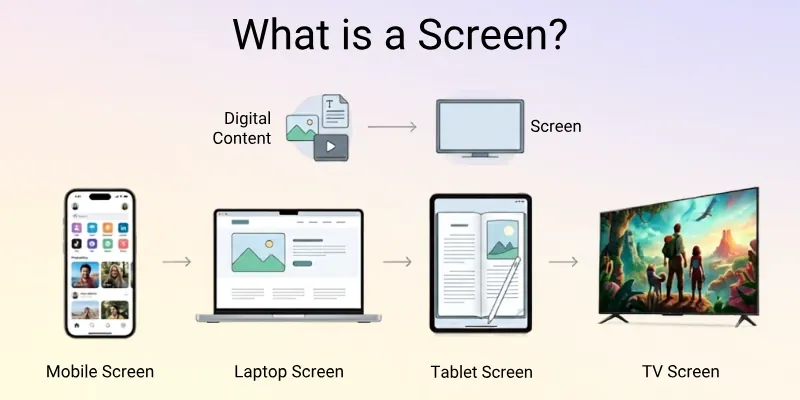
A screen is usually built inside a device. It does not work alone. It only shows output when the device sends data to it. Without a screen, you cannot see what your device is doing.
Simple Examples of Screens:
- Mobile phone display used for calls, apps, and videos
- Laptop screen used for study, work, and browsing
- Tablet screen used for reading and drawing
- TV screen used for watching movies and shows
What is a Monitor?
A monitor is a display device that shows visual output from a computer. It connects to a CPU or laptop and helps you see work, games, videos, and other digital content clearly. It works as an external screen, not a built-in part of the system.
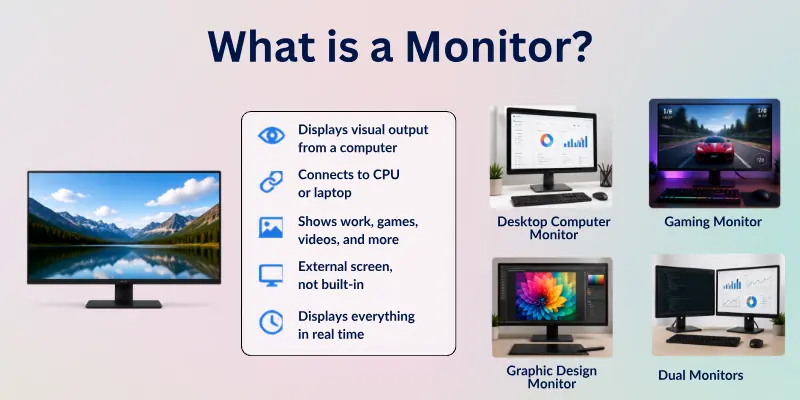
A monitor does not work on its own. It needs a device like a computer or a laptop to send signals. Once connected, it displays everything in real time. People use monitors for better viewing, larger display size, and improved clarity.
Simple Examples of Monitors:
- Desktop computer monitor used in offices and homes
- A gaming monitor is used for smooth and fast gameplay
- A graphic design monitor used for editing photos and videos
- Dual monitors are used for multitasking in work setups
Comparison Table of Monitor vs Screen
Here is the quick comparison of the difference between screen and monitor:
| Feature | Screen | Monitor |
| Definition | A built-in display inside devices | An external display connected to a computer |
| Usage | Used in mobiles, laptops, tablets, TVs | Used with desktop computers or laptops |
| Connection | Already part of the device | Needs cable or connection (HDMI, VGA, USB-C) |
| Portability | Very easy to carry with the device | Not portable, stays on a desk |
| Size Options | Fixed size based on device | Comes in many sizes (small to large) |
| Performance | Depends on the device | Often offers better display quality options |
| Power Source | Uses device battery or power | Needs a separate power supply |
| Common Use | Daily personal use | Work, gaming, and professional tasks |
Differences Between Screen and Monitor Features
Here are the main features that help us understand the difference between a screen and a monitor. Each point focuses on a separate aspect so you can compare them easily without confusion.
Below is the quick list of features:
- Display Quality
- Screen Size Options
- Portability
- Usage Purpose
- Connectivity Options
- Power Source
- Performance (Refresh Rate & Speed)
- Installation and Setup
- Upgrade Options
- Durability and Lifespan
- Cost and Budget Impact
Let’s dive into all the points in detail.
1. Display Quality
Here is the difference in how both devices handle image clarity and visual detail:
A screen is built inside a device like a laptop or mobile. It shows clear visuals based on the device’s built-in hardware. The quality depends on the device model and cannot be changed easily.
A monitor often gives better display control and higher resolution options. It can show sharper images, especially for work and gaming. Many monitors also support better color accuracy.
2. Screen Size Options
Here is the difference in how size flexibility works for screens and monitors:
A screen comes in a fixed size because it is part of the device. You cannot change it without changing the whole device. Phones, tablets, and laptops all come with preset screen sizes.
A monitor comes in many size options like 22-inch, 24-inch, or 32-inch. You can choose the size based on your needs. This makes it more flexible for different setups.
3. Portability
Here is the difference in how easy it is to carry screens and monitors:
A screen is very portable because it is built into devices like laptops or phones. You can easily carry the device anywhere. It is made for mobile use.

A monitor is not portable for daily use. It stays on a desk and needs careful handling. It is better for fixed places like offices or gaming setups.
4. Usage Purpose
Here is the difference in how people use screens and monitors in daily life:
A screen is used for personal tasks like calling, browsing, watching videos, and studying. It supports everyday use in simple ways. Most people use screens all the time without thinking about them.
A monitor is used for focused work like office tasks, gaming, designing, and editing. It gives a larger view and better control. It is common in professional setups.
5. Connectivity Options
Here is the difference in how both devices connect to other systems:
A screen does not need an external connection because it is already part of the device. It works directly with the internal hardware. No extra setup is needed.
A monitor needs cables like HDMI, VGA, or USB-C to connect with a computer. It depends on an external system to display content. This makes it more flexible but requires setup.
6. Power Source
Here is the difference in how screens and monitors get power:
A screen uses the device’s battery or built-in power system. For example, phones and laptops power their own screens. This makes them easy to use anywhere.
A monitor needs a separate power connection. It plugs into a wall socket to work. It cannot run on battery in normal cases.
7. Performance (Refresh Rate & Speed)
Here is the difference in how smooth visuals appear on both devices:
A screen usually has standard performance based on the device type. Basic screens are fine for normal use, like browsing and videos. High-end devices may offer better refresh rates.
A monitor often provides higher refresh rates and faster response times. This is useful for gaming and fast-moving visuals. It gives a smoother and more stable experience.
8. Installation and Setup
Here is the difference in how easy it is to start using both devices:
A screen does not need installation because it is already built into the device. You just turn on the device and start using it. It is ready from the start.
A monitor needs setup with cables and placement. You must connect it to a computer and adjust settings. It takes a little more time to start using.
9. Upgrade Options
Here is the difference in how both devices can be improved.
A screen cannot be upgraded separately. If you want a better screen, you need to buy a new device. It is fixed inside the system.
A monitor can be upgraded anytime. You can replace it with a better model without changing your computer. This gives more flexibility.
10. Durability and Lifespan
Here is the difference in how long screens and monitors usually last.
A screen lasts as long as the device works. If the device gets damaged, the screen is also affected. It is not separate.
A monitor is built as an independent device. It can last many years if handled carefully. You can also replace parts like cables if needed.
11. Cost and Budget Impact
Here is the difference in cost and overall budget planning.
A screen is included in the price of the device. You do not buy it separately. The cost depends on the whole device.
A monitor has a separate cost. Prices vary based on size, quality, and features. You can choose according to your budget.
Pros and Cons of Screen and Monitor
Here, we look at the main benefits and drawbacks of both screens and monitors in simple words.
Advantages of Screen
So, here are the main benefits of a screen in daily use:
- Easy to carry: A screen is built into devices like laptops and phones, so you can use it anywhere.
- No setup needed: It works instantly because it is already part of the device.
- Simple use: You only turn on the device and start working or watching.
- All-in-one design: It combines the display and system in one device.
- Good for daily tasks: It works well for browsing, studying, calling, and watching videos.
Disadvantages of the Screen
Here are the main limits of a screen that you should know:
- Not upgradeable: You cannot improve or replace the screen separately.
- Fixed size: You must use the size that comes with the device.
- Lower control: You cannot adjust display settings like a monitor.
- Can be costly to repair: If the screen breaks, repair can be expensive.
- Less powerful display: It may not match monitor-level sharpness or refresh rate.
Advantages of a Monitor
Here are the main benefits of a monitor for work and performance:
- Better display quality: A monitor often shows sharper and clearer visuals.
- Larger screen options: You can choose the size that fits your workspace.
- High performance: Many monitors support high refresh rates for smooth viewing.
- Easy upgrade: You can replace or upgrade it without changing your computer.
- Good for professionals: It works well for gaming, editing, and office work.
Disadvantages of a Monitor
Here are the main drawbacks of a monitor in simple terms:
- Not portable: It stays in one place and is hard to carry.
- Needs setup: You must connect cables and adjust settings before use.
- Extra cost: You need to buy it separately from your computer.
- Takes space: It requires a desk or table area.
- Depends on power: It needs a constant electricity connection to work.

Who Should Use a Screen?
Here is a simple guide on who should choose a screen for daily use:
- Students on the go: A screen is best for students who need a laptop or tablet for classes and notes.
- Casual users: People who use devices for browsing, videos, and social media can easily use a screen.
- Travel users: If you move a lot, a screen-based device is easy to carry and use anywhere.
- Basic office workers: Users who do simple tasks like emails and documents can rely on a screen.
- Mobile users: People who prefer phones or tablets for everyday tasks should choose a screen device.
Who Should Use a Monitor?
Here is a simple guide on who should choose a monitor for better performance:
- Gamers: A monitor is great for smooth gameplay and fast response time.
- Graphic designers: Designers need better colour and sharper visuals, which monitors provide.
- Office professionals: People working long hours on computers get better comfort with a large monitor.
- Video editors: Editors need clear detail and a bigger display space for editing work.
- Multitasking users: People who open many apps at once can work more easily on a monitor.
How to Choose Between Screen and Monitor Easily
Choosing between a screen and a monitor becomes simple when you focus on your real needs and daily use:
- Understand your daily tasks: Pick a screen if you mostly use it for browsing, studying, or watching videos. Choose a monitor if you do gaming, editing, or office work.
- Look at your space: A screen fits well in mobile or small setups. A monitor needs a proper desk area.
- Think about movement: A screen works best if you travel or move often. A monitor works best in a fixed place.
- Check your budget: A screen comes with the device, so it saves extra cost. A monitor needs a separate investment.
- Focus on performance needs: A monitor gives better speed, clarity, and multitasking support.
Common Mistakes People Make When Choosing a Screen or Monitor
Many people make simple mistakes when they decide between a screen and a monitor, which later affects their experience:
- Not checking the purpose first: Users often buy without knowing what they actually need it for.
- Choosing only by price: Some people focus only on cheap options and ignore quality.
- Picking the wrong size: Many users choose a size that does not match their desk or comfort level.
- Ignoring compatibility: Some forget to check if the monitor works with their system or ports.
- Thinking only short-term: People often ignore future needs like work upgrades or gaming use.
Conclusion
Let’s end our discussion here. In this article, we’ve covered screen vs monitor in detail, along with their features, pros, cons, and best use cases.
I suggest choosing a screen if you want simple, portable use for daily tasks like studying and entertainment. Go for a monitor if you need better performance for work, gaming, or design tasks. A monitor gives more control and comfort for long use.
Don’t skip the next part of the FAQs. I hope you will find something more interesting, so don’t miss it. If you miss it, you may lose something new.
Important FAQs
Here are a few FAQs to clear up any confusion about differences between monitor and screen:
A screen vs monitor difference is based on how they are used in devices. A screen is built inside devices like laptops and phones. A monitor is an external display used with a computer. Both show visuals but work in different setups.
Yes, a monitor is often better for gaming because it gives a higher refresh rate and smoother visuals. It also reduces lag during fast gameplay. A screen in a laptop can work, but it may not give the same performance.
Yes, you can easily connect a monitor to a laptop using HDMI or USB-C. This setup gives a larger display and better multitasking. Many people use a monitor for office and study work.
A screen is more portable because it is built into devices like laptops and mobiles. You can carry it anywhere without extra setup. A monitor is fixed and needs a desk space.
A monitor can improve productivity by giving a bigger and clearer display. It helps you open multiple windows at the same time. This makes office work, editing, and studying easier.
A monitor also reduces eye strain during long working hours. Many professionals prefer dual-monitor setups for better workflow.
A screen is usually cheaper because it comes with the device. You do not pay extra for it separately. A monitor needs a separate purchase, which increases the total cost.
Choose size based on your desk space and daily needs:
- 22 to 24 inches: Good for study and office work
- 27 inches: Best for gaming and multitasking
- 32 inches or more: Ideal for design and professional editing
Yes, many monitors offer better resolution and colour accuracy. They are designed for clearer and sharper visuals. Laptop or mobile screens depend on device quality and cannot always match monitors.
Yes, you can use a screen without a monitor because screens are built into devices. Phones, laptops, and tablets work perfectly on their own. A monitor is only needed when you want a bigger display.
Choosing between a screen and a monitor depends on your daily work. If you travel or use basic tasks, a screen is enough. If you need power, speed, and multitasking, a monitor is better.
- Think about your work type first
- Check your space and budget
- Decide based on comfort and usage needs


- Be Respectful
- Stay Relevant
- Stay Positive
- True Feedback
- Encourage Discussion
- Avoid Spamming
- No Fake News
- Don't Copy-Paste
- No Personal Attacks
- Be Respectful
- Stay Relevant
- Stay Positive
- True Feedback
- Encourage Discussion
- Avoid Spamming
- No Fake News
- Don't Copy-Paste
- No Personal Attacks